PowerProtect: VM SQL Server App Aware-sikkerhetskopi mislykkes ABV0007 kunne ikke godkjenne
Summary: Den første konfigurasjonen av Microsoft SQL Server programtilpasset sikkerhetskopi genererer ABV0007 "kan ikke godkjenne".
This article applies to
This article does not apply to
This article is not tied to any specific product.
Not all product versions are identified in this article.
Symptoms
PowerProtect Data Manager beskytter de virtuelle maskinene (VM) med applikasjonstilpasset løsning for Microsoft SQL Server. Den første konfigurasjonen av Microsoft SQL Server programtilpasset sikkerhetskopi genererer ABV0007 "Kan ikke godkjenne."
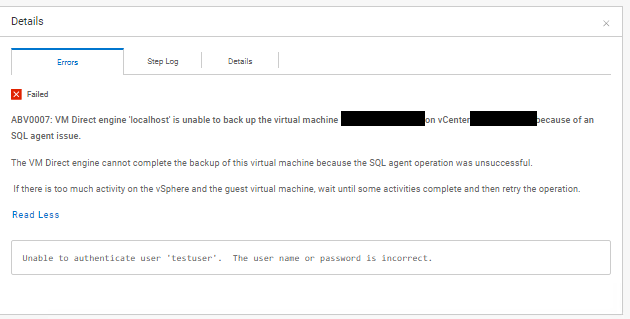
ABV0007: VM Direct engine 'localhost' is unable to back up the virtual machine 'my-vm-name' on vCenter 'my-vcenter.my-domain.com' because of an SQL agent issue.

The VM Direct engine cannot complete the backup of this virtual machine because the SQL agent operation was unsuccessful.

 If there is too much activity on the vSphere and the guest virtual machine, wait until some activities complete and then retry the operation.

Read Less
Unable to authenticate user 'testuser'.  The user name or password is incorrect.
Informasjonen i "PowerProtect Data Manager_*.log" Eksportloggen viser:
vmdm.log: YYYY-MM-DD HH:MM:SS INFO [] [vproxyMonitor] [00000000-0000-4000-a000-000000000000][][][TRACE_ID:82ad56e103a61a50;JOB_ID:bce8e2cddeabcbcf][] [c.e.b.v.v.a.VPEProtectOp.statusChanged(226)] -  MONITOR BackupJob:  state changed BackupJobSession(state=Failure, id=f6f3c7e0-6b62-4f9b-87f6-0c01f0f6780c, error: code=500, text=Backup has FAILED.  Backup of the application "MSSQLDM" on the virtual machine "my-vm-name" is unsuccessful.  Unable to authenticate user 'testuser'.  The user name or password is incorrect., target=my-vm-name): Queued -> Failure, progress=100
vmdm.log: YYYY-MM-DD HH:MM:SS INFO [] [vpe-completion-0] [00000000-0000-4000-a000-000000000000][][][TRACE_ID:82ad56e103a61a50;JOB_ID:bce8e2cddeabcbcf][] [c.e.b.v.v.a.VPEProtectOp.resume(326)] -  Resuming session for asset=my-vm-name -- BackupJobSession(state=Failure, id=f6f3c7e0-6b62-4f9b-87f6-0c01f0f6780c, clean, error: code=500, text=Backup has FAILED.  Backup of the application "MSSQLDM" on the virtual machine "my-vm-name" is unsuccessful.  Unable to authenticate user 'testuser'.  The user name or password is incorrect., target=my-vm-name), isNew=true, taskId=346ca4b0-ae26-4937-864b-9a576685e4a5
vmdm.log: YYYY-MM-DD HH:MM:SS INFO [] [vpe-completion-0] [00000000-0000-4000-a000-000000000000][][][TRACE_ID:82ad56e103a61a50;JOB_ID:bce8e2cddeabcbcf][] [c.e.b.v.v.a.VPEProtectOp.completeSessionFailure(921)] -  Session complete with failure BackupJobSession(state=Failure, id=f6f3c7e0-6b62-4f9b-87f6-0c01f0f6780c, clean, error: code=500, text=Backup has FAILED.  Backup of the application "MSSQLDM" on the virtual machine "my-vm-name" is unsuccessful.  Unable to authenticate user 'testuser'.  The user name or password is incorrect., target=my-vm-name)
vmdm.log: YYYY-MM-DD HH:MM:SS INFO [] [vpe-completion-0] [00000000-0000-4000-a000-000000000000][][][TRACE_ID:82ad56e103a61a50;JOB_ID:bce8e2cddeabcbcf][] [c.e.b.v.v.a.VPEProtectOp.shouldIndexBackup(1584)] -  Backup type SYNTHETIC_FULL
vmdm.log: YYYY-MM-DD HH:MM:SS INFO [] [vpe-completion-0] [00000000-0000-4000-a000-000000000000][][][TRACE_ID:82ad56e103a61a50;JOB_ID:bce8e2cddeabcbcf][] [c.e.b.v.v.u.VMDMErrorHelper.getEEMI(269)] -  Matched messageID=ABV0007, classificationKey=AGENT, keys=[vproxy, vmName, vCenterName]
Informasjonen i "Vmdirect_*.log" Eksportloggen viser:
YYYY-MM-DD HH:MM:SS ERROR:  [82ad56e103a61a50;bce8e2cddeabcbcf] MSSQLDM: MSSQLDM: connect: network: Unable to authenticate user 'testuser'.  The user name or password is incorrect.
YYYY-MM-DD HH:MM:SS ERROR:  [82ad56e103a61a50;bce8e2cddeabcbcf] MSSQLDM: MSSQLDM: connect: network: Unable to receive message:  io: read/write on closed pipe
YYYY-MM-DD HH:MM:SS INFO:   [82ad56e103a61a50;bce8e2cddeabcbcf] MSSQLDM: MSSQLDM: connect: Host agent lock released.
YYYY-MM-DD HH:MM:SS ERROR:  [82ad56e103a61a50;bce8e2cddeabcbcf] MSSQLDM: Backup of the application "MSSQLDM" on the virtual machine "my-vm-name" is unsuccessful.
...
YYYY-MM-DD HH:MM:SS NOTICE: [82ad56e103a61a50;bce8e2cddeabcbcf]     "Status": {
YYYY-MM-DD HH:MM:SS NOTICE: [82ad56e103a61a50;bce8e2cddeabcbcf]         "State": "Failure",
YYYY-MM-DD HH:MM:SS NOTICE: [82ad56e103a61a50;bce8e2cddeabcbcf]         "Description": "Backup of the application \"MSSQLDM\" on the virtual machine \"my-vm-name\" is unsuccessful.  Unable to authenticate user 'testuser'.  The user name or password is incorrect.",
YYYY-MM-DD HH:MM:SS NOTICE: [82ad56e103a61a50;bce8e2cddeabcbcf]         "Progress": 0,
YYYY-MM-DD HH:MM:SS NOTICE: [82ad56e103a61a50;bce8e2cddeabcbcf]         "Error": {
YYYY-MM-DD HH:MM:SS NOTICE: [82ad56e103a61a50;bce8e2cddeabcbcf]             "Text": "Backup has FAILED.  Backup of the application \"MSSQLDM\" on the virtual machine \"my-vm-name\" is unsuccessful.  Unable to authenticate user 'testuser'.  The user name or password is incorrect.",
YYYY-MM-DD HH:MM:SS NOTICE: [82ad56e103a61a50;bce8e2cddeabcbcf]             "Code": 1007,
YYYY-MM-DD HH:MM:SS NOTICE: [82ad56e103a61a50;bce8e2cddeabcbcf]             "Classifications": [
YYYY-MM-DD HH:MM:SS NOTICE: [82ad56e103a61a50;bce8e2cddeabcbcf]                 "Authentication",
YYYY-MM-DD HH:MM:SS NOTICE: [82ad56e103a61a50;bce8e2cddeabcbcf]                 "Agent",
YYYY-MM-DD HH:MM:SS NOTICE: [82ad56e103a61a50;bce8e2cddeabcbcf]                 "Connection"
YYYY-MM-DD HH:MM:SS NOTICE: [82ad56e103a61a50;bce8e2cddeabcbcf]             ],
YYYY-MM-DD HH:MM:SS NOTICE: [82ad56e103a61a50;bce8e2cddeabcbcf]             "Retryable": false,
YYYY-MM-DD HH:MM:SS NOTICE: [82ad56e103a61a50;bce8e2cddeabcbcf]             "Remedy": null
YYYY-MM-DD HH:MM:SS NOTICE: [82ad56e103a61a50;bce8e2cddeabcbcf]         },
...
Cause
Lockbox-legitimasjonen som er konfigurert for beskyttelsespolicyen, bruker en Active Directory-domenekonto. Legitimasjonskonfigurasjonen inkluderer ikke domenenavnet for brukerkontoen. Formatet "User@Domain" må brukes for legitimasjonskontoen for beskyttelsespolicyen.
Resolution
Rediger de lagrede godkjenningsdetaljene for legitimasjonen for beskyttelsesreglene.
- I navigasjonsruten til venstre velger du "Administration > Credentials" for å vise vinduet Legitimasjonsdetaljer .
- Finn legitimasjonen i listen over lagrede legitimasjonsbeskrivelser. Bruk filtrene og kolonnesorteringsalternativene til å organisere listen over legitimasjon.
- Velg legitimasjonen fra listen, og klikk deretter Rediger. Dialogboksen Rediger legitimasjon åpnes.
- Endre feltet «brukernavn» fra «testuser» til «testuser@my-domain».
- Klikk Lagre for å oppdatere den lagrede legitimasjonen.
- Test beskyttelsespolicyen med den oppdaterte legitimasjonen.
Article Properties
Article Number: 000221779
Article Type: Solution
Last Modified: 18 Nov 2025
Version: 2
Find answers to your questions from other Dell users
Support Services
Check if your device is covered by Support Services.