PowerProtect: VM SQL Server 애플리케이션 인식 백업이 "인증할 수 없음"ABV0007 실패함
Summary: Microsoft SQL Server 애플리케이션별 백업의 초기 구성에서는 "인증할 수 없음"ABV0007 생성됩니다.
This article applies to
This article does not apply to
This article is not tied to any specific product.
Not all product versions are identified in this article.
Symptoms
PowerProtect Data Manager는 Microsoft SQL Server 애플리케이션별 솔루션으로 VM(Virtual Machine)을 보호합니다. Microsoft SQL Server 애플리케이션별 백업의 초기 구성에서는 "인증할 수 없음"ABV0007 생성됩니다.
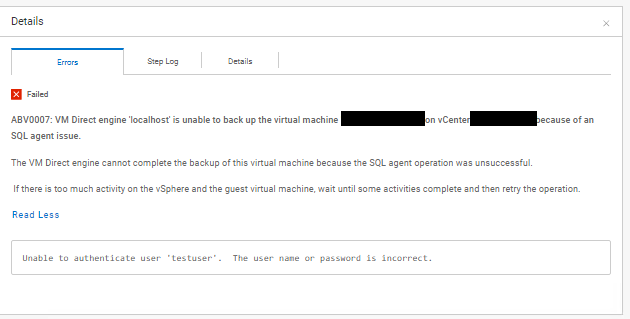
ABV0007: VM Direct engine 'localhost' is unable to back up the virtual machine 'my-vm-name' on vCenter 'my-vcenter.my-domain.com' because of an SQL agent issue.

The VM Direct engine cannot complete the backup of this virtual machine because the SQL agent operation was unsuccessful.

 If there is too much activity on the vSphere and the guest virtual machine, wait until some activities complete and then retry the operation.

Read Less
Unable to authenticate user 'testuser'.  The user name or password is incorrect.
이 "PowerProtect Data Manager_*.log" 로그 내보내기에는 다음이 표시됩니다.
vmdm.log: YYYY-MM-DD HH:MM:SS INFO [] [vproxyMonitor] [00000000-0000-4000-a000-000000000000][][][TRACE_ID:82ad56e103a61a50;JOB_ID:bce8e2cddeabcbcf][] [c.e.b.v.v.a.VPEProtectOp.statusChanged(226)] -  MONITOR BackupJob:  state changed BackupJobSession(state=Failure, id=f6f3c7e0-6b62-4f9b-87f6-0c01f0f6780c, error: code=500, text=Backup has FAILED.  Backup of the application "MSSQLDM" on the virtual machine "my-vm-name" is unsuccessful.  Unable to authenticate user 'testuser'.  The user name or password is incorrect., target=my-vm-name): Queued -> Failure, progress=100
vmdm.log: YYYY-MM-DD HH:MM:SS INFO [] [vpe-completion-0] [00000000-0000-4000-a000-000000000000][][][TRACE_ID:82ad56e103a61a50;JOB_ID:bce8e2cddeabcbcf][] [c.e.b.v.v.a.VPEProtectOp.resume(326)] -  Resuming session for asset=my-vm-name -- BackupJobSession(state=Failure, id=f6f3c7e0-6b62-4f9b-87f6-0c01f0f6780c, clean, error: code=500, text=Backup has FAILED.  Backup of the application "MSSQLDM" on the virtual machine "my-vm-name" is unsuccessful.  Unable to authenticate user 'testuser'.  The user name or password is incorrect., target=my-vm-name), isNew=true, taskId=346ca4b0-ae26-4937-864b-9a576685e4a5
vmdm.log: YYYY-MM-DD HH:MM:SS INFO [] [vpe-completion-0] [00000000-0000-4000-a000-000000000000][][][TRACE_ID:82ad56e103a61a50;JOB_ID:bce8e2cddeabcbcf][] [c.e.b.v.v.a.VPEProtectOp.completeSessionFailure(921)] -  Session complete with failure BackupJobSession(state=Failure, id=f6f3c7e0-6b62-4f9b-87f6-0c01f0f6780c, clean, error: code=500, text=Backup has FAILED.  Backup of the application "MSSQLDM" on the virtual machine "my-vm-name" is unsuccessful.  Unable to authenticate user 'testuser'.  The user name or password is incorrect., target=my-vm-name)
vmdm.log: YYYY-MM-DD HH:MM:SS INFO [] [vpe-completion-0] [00000000-0000-4000-a000-000000000000][][][TRACE_ID:82ad56e103a61a50;JOB_ID:bce8e2cddeabcbcf][] [c.e.b.v.v.a.VPEProtectOp.shouldIndexBackup(1584)] -  Backup type SYNTHETIC_FULL
vmdm.log: YYYY-MM-DD HH:MM:SS INFO [] [vpe-completion-0] [00000000-0000-4000-a000-000000000000][][][TRACE_ID:82ad56e103a61a50;JOB_ID:bce8e2cddeabcbcf][] [c.e.b.v.v.u.VMDMErrorHelper.getEEMI(269)] -  Matched messageID=ABV0007, classificationKey=AGENT, keys=[vproxy, vmName, vCenterName]
이 "Vmdirect_*.log" 로그 내보내기에는 다음이 표시됩니다.
YYYY-MM-DD HH:MM:SS ERROR:  [82ad56e103a61a50;bce8e2cddeabcbcf] MSSQLDM: MSSQLDM: connect: network: Unable to authenticate user 'testuser'.  The user name or password is incorrect.
YYYY-MM-DD HH:MM:SS ERROR:  [82ad56e103a61a50;bce8e2cddeabcbcf] MSSQLDM: MSSQLDM: connect: network: Unable to receive message:  io: read/write on closed pipe
YYYY-MM-DD HH:MM:SS INFO:   [82ad56e103a61a50;bce8e2cddeabcbcf] MSSQLDM: MSSQLDM: connect: Host agent lock released.
YYYY-MM-DD HH:MM:SS ERROR:  [82ad56e103a61a50;bce8e2cddeabcbcf] MSSQLDM: Backup of the application "MSSQLDM" on the virtual machine "my-vm-name" is unsuccessful.
...
YYYY-MM-DD HH:MM:SS NOTICE: [82ad56e103a61a50;bce8e2cddeabcbcf]     "Status": {
YYYY-MM-DD HH:MM:SS NOTICE: [82ad56e103a61a50;bce8e2cddeabcbcf]         "State": "Failure",
YYYY-MM-DD HH:MM:SS NOTICE: [82ad56e103a61a50;bce8e2cddeabcbcf]         "Description": "Backup of the application \"MSSQLDM\" on the virtual machine \"my-vm-name\" is unsuccessful.  Unable to authenticate user 'testuser'.  The user name or password is incorrect.",
YYYY-MM-DD HH:MM:SS NOTICE: [82ad56e103a61a50;bce8e2cddeabcbcf]         "Progress": 0,
YYYY-MM-DD HH:MM:SS NOTICE: [82ad56e103a61a50;bce8e2cddeabcbcf]         "Error": {
YYYY-MM-DD HH:MM:SS NOTICE: [82ad56e103a61a50;bce8e2cddeabcbcf]             "Text": "Backup has FAILED.  Backup of the application \"MSSQLDM\" on the virtual machine \"my-vm-name\" is unsuccessful.  Unable to authenticate user 'testuser'.  The user name or password is incorrect.",
YYYY-MM-DD HH:MM:SS NOTICE: [82ad56e103a61a50;bce8e2cddeabcbcf]             "Code": 1007,
YYYY-MM-DD HH:MM:SS NOTICE: [82ad56e103a61a50;bce8e2cddeabcbcf]             "Classifications": [
YYYY-MM-DD HH:MM:SS NOTICE: [82ad56e103a61a50;bce8e2cddeabcbcf]                 "Authentication",
YYYY-MM-DD HH:MM:SS NOTICE: [82ad56e103a61a50;bce8e2cddeabcbcf]                 "Agent",
YYYY-MM-DD HH:MM:SS NOTICE: [82ad56e103a61a50;bce8e2cddeabcbcf]                 "Connection"
YYYY-MM-DD HH:MM:SS NOTICE: [82ad56e103a61a50;bce8e2cddeabcbcf]             ],
YYYY-MM-DD HH:MM:SS NOTICE: [82ad56e103a61a50;bce8e2cddeabcbcf]             "Retryable": false,
YYYY-MM-DD HH:MM:SS NOTICE: [82ad56e103a61a50;bce8e2cddeabcbcf]             "Remedy": null
YYYY-MM-DD HH:MM:SS NOTICE: [82ad56e103a61a50;bce8e2cddeabcbcf]         },
...
Cause
보호 정책에 대해 구성된 Lockbox 자격 증명은 Active Directory 도메인 계정을 사용합니다. 자격 증명 구성에는 사용자 계정의 도메인 이름이 포함되지 않습니다. 보호 정책 자격 증명 계정에 "User@Domain" 형식을 사용해야 합니다.
Resolution
보호 정책 자격 증명에 대해 저장된 인증 세부 정보를 편집합니다.
- 왼쪽 탐색 창에서 "Administration > Credentials"를 선택하여 자격 증명 세부 정보 창을 표시합니다.
- 저장된 자격 증명 목록에서 자격 증명을 찾습니다. 필터 및 열 정렬 옵션을 사용하여 자격 증명 목록을 구성합니다.
- 목록에서 자격 증명을 선택한 후 Edit를 클릭합니다. Edit Credential 대화 상자가 열립니다.
- 'username' 필드를 "testuser"에서 "testuser@my-domain"으로 수정합니다.
- Save를 클릭하여 저장된 자격 증명을 업데이트합니다.
- 업데이트된 자격 증명으로 보호 정책을 테스트합니다.
Article Properties
Article Number: 000221779
Article Type: Solution
Last Modified: 18 Nov 2025
Version: 2
Find answers to your questions from other Dell users
Support Services
Check if your device is covered by Support Services.