PowerProtect: O backup com reconhecimento de aplicativos do SQL Server da VM falha ABV0007 "não é possível autenticar"
Summary: A configuração inicial do backup com reconhecimento de aplicativos do Microsoft SQL Server gera ABV0007 "não é possível autenticar".
This article applies to
This article does not apply to
This article is not tied to any specific product.
Not all product versions are identified in this article.
Symptoms
O PowerProtect Data Manager protege as máquinas virtuais (VM) com a solução com reconhecimento de aplicativos do Microsoft SQL Server. A configuração inicial do backup com reconhecimento de aplicativos do Microsoft SQL Server gera ABV0007 "Unable to authenticate".
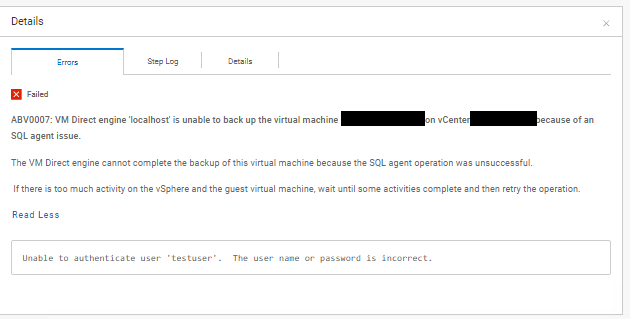
ABV0007: VM Direct engine 'localhost' is unable to back up the virtual machine 'my-vm-name' on vCenter 'my-vcenter.my-domain.com' because of an SQL agent issue.

The VM Direct engine cannot complete the backup of this virtual machine because the SQL agent operation was unsuccessful.

 If there is too much activity on the vSphere and the guest virtual machine, wait until some activities complete and then retry the operation.

Read Less
Unable to authenticate user 'testuser'.  The user name or password is incorrect.
A coluna "PowerProtect Data Manager_*.log" O log de exportação mostra:
vmdm.log: YYYY-MM-DD HH:MM:SS INFO [] [vproxyMonitor] [00000000-0000-4000-a000-000000000000][][][TRACE_ID:82ad56e103a61a50;JOB_ID:bce8e2cddeabcbcf][] [c.e.b.v.v.a.VPEProtectOp.statusChanged(226)] -  MONITOR BackupJob:  state changed BackupJobSession(state=Failure, id=f6f3c7e0-6b62-4f9b-87f6-0c01f0f6780c, error: code=500, text=Backup has FAILED.  Backup of the application "MSSQLDM" on the virtual machine "my-vm-name" is unsuccessful.  Unable to authenticate user 'testuser'.  The user name or password is incorrect., target=my-vm-name): Queued -> Failure, progress=100
vmdm.log: YYYY-MM-DD HH:MM:SS INFO [] [vpe-completion-0] [00000000-0000-4000-a000-000000000000][][][TRACE_ID:82ad56e103a61a50;JOB_ID:bce8e2cddeabcbcf][] [c.e.b.v.v.a.VPEProtectOp.resume(326)] -  Resuming session for asset=my-vm-name -- BackupJobSession(state=Failure, id=f6f3c7e0-6b62-4f9b-87f6-0c01f0f6780c, clean, error: code=500, text=Backup has FAILED.  Backup of the application "MSSQLDM" on the virtual machine "my-vm-name" is unsuccessful.  Unable to authenticate user 'testuser'.  The user name or password is incorrect., target=my-vm-name), isNew=true, taskId=346ca4b0-ae26-4937-864b-9a576685e4a5
vmdm.log: YYYY-MM-DD HH:MM:SS INFO [] [vpe-completion-0] [00000000-0000-4000-a000-000000000000][][][TRACE_ID:82ad56e103a61a50;JOB_ID:bce8e2cddeabcbcf][] [c.e.b.v.v.a.VPEProtectOp.completeSessionFailure(921)] -  Session complete with failure BackupJobSession(state=Failure, id=f6f3c7e0-6b62-4f9b-87f6-0c01f0f6780c, clean, error: code=500, text=Backup has FAILED.  Backup of the application "MSSQLDM" on the virtual machine "my-vm-name" is unsuccessful.  Unable to authenticate user 'testuser'.  The user name or password is incorrect., target=my-vm-name)
vmdm.log: YYYY-MM-DD HH:MM:SS INFO [] [vpe-completion-0] [00000000-0000-4000-a000-000000000000][][][TRACE_ID:82ad56e103a61a50;JOB_ID:bce8e2cddeabcbcf][] [c.e.b.v.v.a.VPEProtectOp.shouldIndexBackup(1584)] -  Backup type SYNTHETIC_FULL
vmdm.log: YYYY-MM-DD HH:MM:SS INFO [] [vpe-completion-0] [00000000-0000-4000-a000-000000000000][][][TRACE_ID:82ad56e103a61a50;JOB_ID:bce8e2cddeabcbcf][] [c.e.b.v.v.u.VMDMErrorHelper.getEEMI(269)] -  Matched messageID=ABV0007, classificationKey=AGENT, keys=[vproxy, vmName, vCenterName]
A coluna "Vmdirect_*.log" O log de exportação mostra:
YYYY-MM-DD HH:MM:SS ERROR:  [82ad56e103a61a50;bce8e2cddeabcbcf] MSSQLDM: MSSQLDM: connect: network: Unable to authenticate user 'testuser'.  The user name or password is incorrect.
YYYY-MM-DD HH:MM:SS ERROR:  [82ad56e103a61a50;bce8e2cddeabcbcf] MSSQLDM: MSSQLDM: connect: network: Unable to receive message:  io: read/write on closed pipe
YYYY-MM-DD HH:MM:SS INFO:   [82ad56e103a61a50;bce8e2cddeabcbcf] MSSQLDM: MSSQLDM: connect: Host agent lock released.
YYYY-MM-DD HH:MM:SS ERROR:  [82ad56e103a61a50;bce8e2cddeabcbcf] MSSQLDM: Backup of the application "MSSQLDM" on the virtual machine "my-vm-name" is unsuccessful.
...
YYYY-MM-DD HH:MM:SS NOTICE: [82ad56e103a61a50;bce8e2cddeabcbcf]     "Status": {
YYYY-MM-DD HH:MM:SS NOTICE: [82ad56e103a61a50;bce8e2cddeabcbcf]         "State": "Failure",
YYYY-MM-DD HH:MM:SS NOTICE: [82ad56e103a61a50;bce8e2cddeabcbcf]         "Description": "Backup of the application \"MSSQLDM\" on the virtual machine \"my-vm-name\" is unsuccessful.  Unable to authenticate user 'testuser'.  The user name or password is incorrect.",
YYYY-MM-DD HH:MM:SS NOTICE: [82ad56e103a61a50;bce8e2cddeabcbcf]         "Progress": 0,
YYYY-MM-DD HH:MM:SS NOTICE: [82ad56e103a61a50;bce8e2cddeabcbcf]         "Error": {
YYYY-MM-DD HH:MM:SS NOTICE: [82ad56e103a61a50;bce8e2cddeabcbcf]             "Text": "Backup has FAILED.  Backup of the application \"MSSQLDM\" on the virtual machine \"my-vm-name\" is unsuccessful.  Unable to authenticate user 'testuser'.  The user name or password is incorrect.",
YYYY-MM-DD HH:MM:SS NOTICE: [82ad56e103a61a50;bce8e2cddeabcbcf]             "Code": 1007,
YYYY-MM-DD HH:MM:SS NOTICE: [82ad56e103a61a50;bce8e2cddeabcbcf]             "Classifications": [
YYYY-MM-DD HH:MM:SS NOTICE: [82ad56e103a61a50;bce8e2cddeabcbcf]                 "Authentication",
YYYY-MM-DD HH:MM:SS NOTICE: [82ad56e103a61a50;bce8e2cddeabcbcf]                 "Agent",
YYYY-MM-DD HH:MM:SS NOTICE: [82ad56e103a61a50;bce8e2cddeabcbcf]                 "Connection"
YYYY-MM-DD HH:MM:SS NOTICE: [82ad56e103a61a50;bce8e2cddeabcbcf]             ],
YYYY-MM-DD HH:MM:SS NOTICE: [82ad56e103a61a50;bce8e2cddeabcbcf]             "Retryable": false,
YYYY-MM-DD HH:MM:SS NOTICE: [82ad56e103a61a50;bce8e2cddeabcbcf]             "Remedy": null
YYYY-MM-DD HH:MM:SS NOTICE: [82ad56e103a61a50;bce8e2cddeabcbcf]         },
...
Cause
As credenciais da lockbox configuradas para a política de proteção usam uma conta de domínio do Active Directory. A configuração de credenciais não inclui o Nome de domínio da conta de usuário. O formato "User@Domain" deve ser usado para a conta de credenciais da política de proteção.
Resolution
Edite os detalhes de autenticação armazenados para as credenciais da Política de proteção.
- No painel de navegação esquerdo, selecione "Administration > Credentials" para visualizar a janela de detalhes Credentials .
- Localize a credencial na lista de credenciais armazenadas. Use as opções de classificação de colunas e filtros para organizar a lista de credenciais.
- Selecione a credencial na lista e clique em Editar. A caixa de diálogo Edit Credential será aberta.
- Modifique o campo "username" de "testuser" para "testuser@my-domain".
- Clique em Save para atualizar as credenciais armazenadas.
- Teste a política de proteção com as credenciais atualizadas.
Article Properties
Article Number: 000221779
Article Type: Solution
Last Modified: 18 Nov 2025
Version: 2
Find answers to your questions from other Dell users
Support Services
Check if your device is covered by Support Services.