PowerProtect: SQL Server App Aware-säkerhetskopiering av virtuell dator misslyckas ABV0007 "det går inte att autentisera"
Summary: Den första konfigurationen av Microsoft SQL Server programmedveten säkerhetskopia genererar ABV0007 "kan inte autentiseras".
This article applies to
This article does not apply to
This article is not tied to any specific product.
Not all product versions are identified in this article.
Symptoms
PowerProtect Data Manager skyddar virtuella maskiner (VM) med Microsoft SQL Server-programmedveten lösning. Den första konfigurationen av den programmedvetna Microsoft SQL Server-säkerhetskopian genererar ABV0007 "Det går inte att autentisera".
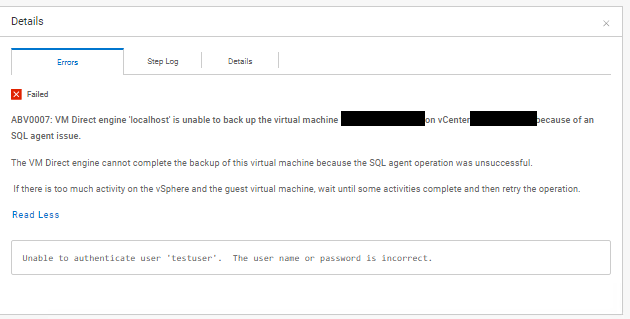
ABV0007: VM Direct engine 'localhost' is unable to back up the virtual machine 'my-vm-name' on vCenter 'my-vcenter.my-domain.com' because of an SQL agent issue.

The VM Direct engine cannot complete the backup of this virtual machine because the SQL agent operation was unsuccessful.

 If there is too much activity on the vSphere and the guest virtual machine, wait until some activities complete and then retry the operation.

Read Less
Unable to authenticate user 'testuser'.  The user name or password is incorrect.
Informationen "PowerProtect Data Manager_*.log" Exportloggen visar:
vmdm.log: YYYY-MM-DD HH:MM:SS INFO [] [vproxyMonitor] [00000000-0000-4000-a000-000000000000][][][TRACE_ID:82ad56e103a61a50;JOB_ID:bce8e2cddeabcbcf][] [c.e.b.v.v.a.VPEProtectOp.statusChanged(226)] -  MONITOR BackupJob:  state changed BackupJobSession(state=Failure, id=f6f3c7e0-6b62-4f9b-87f6-0c01f0f6780c, error: code=500, text=Backup has FAILED.  Backup of the application "MSSQLDM" on the virtual machine "my-vm-name" is unsuccessful.  Unable to authenticate user 'testuser'.  The user name or password is incorrect., target=my-vm-name): Queued -> Failure, progress=100
vmdm.log: YYYY-MM-DD HH:MM:SS INFO [] [vpe-completion-0] [00000000-0000-4000-a000-000000000000][][][TRACE_ID:82ad56e103a61a50;JOB_ID:bce8e2cddeabcbcf][] [c.e.b.v.v.a.VPEProtectOp.resume(326)] -  Resuming session for asset=my-vm-name -- BackupJobSession(state=Failure, id=f6f3c7e0-6b62-4f9b-87f6-0c01f0f6780c, clean, error: code=500, text=Backup has FAILED.  Backup of the application "MSSQLDM" on the virtual machine "my-vm-name" is unsuccessful.  Unable to authenticate user 'testuser'.  The user name or password is incorrect., target=my-vm-name), isNew=true, taskId=346ca4b0-ae26-4937-864b-9a576685e4a5
vmdm.log: YYYY-MM-DD HH:MM:SS INFO [] [vpe-completion-0] [00000000-0000-4000-a000-000000000000][][][TRACE_ID:82ad56e103a61a50;JOB_ID:bce8e2cddeabcbcf][] [c.e.b.v.v.a.VPEProtectOp.completeSessionFailure(921)] -  Session complete with failure BackupJobSession(state=Failure, id=f6f3c7e0-6b62-4f9b-87f6-0c01f0f6780c, clean, error: code=500, text=Backup has FAILED.  Backup of the application "MSSQLDM" on the virtual machine "my-vm-name" is unsuccessful.  Unable to authenticate user 'testuser'.  The user name or password is incorrect., target=my-vm-name)
vmdm.log: YYYY-MM-DD HH:MM:SS INFO [] [vpe-completion-0] [00000000-0000-4000-a000-000000000000][][][TRACE_ID:82ad56e103a61a50;JOB_ID:bce8e2cddeabcbcf][] [c.e.b.v.v.a.VPEProtectOp.shouldIndexBackup(1584)] -  Backup type SYNTHETIC_FULL
vmdm.log: YYYY-MM-DD HH:MM:SS INFO [] [vpe-completion-0] [00000000-0000-4000-a000-000000000000][][][TRACE_ID:82ad56e103a61a50;JOB_ID:bce8e2cddeabcbcf][] [c.e.b.v.v.u.VMDMErrorHelper.getEEMI(269)] -  Matched messageID=ABV0007, classificationKey=AGENT, keys=[vproxy, vmName, vCenterName]
Informationen "Vmdirect_*.log" Exportloggen visar:
YYYY-MM-DD HH:MM:SS ERROR:  [82ad56e103a61a50;bce8e2cddeabcbcf] MSSQLDM: MSSQLDM: connect: network: Unable to authenticate user 'testuser'.  The user name or password is incorrect.
YYYY-MM-DD HH:MM:SS ERROR:  [82ad56e103a61a50;bce8e2cddeabcbcf] MSSQLDM: MSSQLDM: connect: network: Unable to receive message:  io: read/write on closed pipe
YYYY-MM-DD HH:MM:SS INFO:   [82ad56e103a61a50;bce8e2cddeabcbcf] MSSQLDM: MSSQLDM: connect: Host agent lock released.
YYYY-MM-DD HH:MM:SS ERROR:  [82ad56e103a61a50;bce8e2cddeabcbcf] MSSQLDM: Backup of the application "MSSQLDM" on the virtual machine "my-vm-name" is unsuccessful.
...
YYYY-MM-DD HH:MM:SS NOTICE: [82ad56e103a61a50;bce8e2cddeabcbcf]     "Status": {
YYYY-MM-DD HH:MM:SS NOTICE: [82ad56e103a61a50;bce8e2cddeabcbcf]         "State": "Failure",
YYYY-MM-DD HH:MM:SS NOTICE: [82ad56e103a61a50;bce8e2cddeabcbcf]         "Description": "Backup of the application \"MSSQLDM\" on the virtual machine \"my-vm-name\" is unsuccessful.  Unable to authenticate user 'testuser'.  The user name or password is incorrect.",
YYYY-MM-DD HH:MM:SS NOTICE: [82ad56e103a61a50;bce8e2cddeabcbcf]         "Progress": 0,
YYYY-MM-DD HH:MM:SS NOTICE: [82ad56e103a61a50;bce8e2cddeabcbcf]         "Error": {
YYYY-MM-DD HH:MM:SS NOTICE: [82ad56e103a61a50;bce8e2cddeabcbcf]             "Text": "Backup has FAILED.  Backup of the application \"MSSQLDM\" on the virtual machine \"my-vm-name\" is unsuccessful.  Unable to authenticate user 'testuser'.  The user name or password is incorrect.",
YYYY-MM-DD HH:MM:SS NOTICE: [82ad56e103a61a50;bce8e2cddeabcbcf]             "Code": 1007,
YYYY-MM-DD HH:MM:SS NOTICE: [82ad56e103a61a50;bce8e2cddeabcbcf]             "Classifications": [
YYYY-MM-DD HH:MM:SS NOTICE: [82ad56e103a61a50;bce8e2cddeabcbcf]                 "Authentication",
YYYY-MM-DD HH:MM:SS NOTICE: [82ad56e103a61a50;bce8e2cddeabcbcf]                 "Agent",
YYYY-MM-DD HH:MM:SS NOTICE: [82ad56e103a61a50;bce8e2cddeabcbcf]                 "Connection"
YYYY-MM-DD HH:MM:SS NOTICE: [82ad56e103a61a50;bce8e2cddeabcbcf]             ],
YYYY-MM-DD HH:MM:SS NOTICE: [82ad56e103a61a50;bce8e2cddeabcbcf]             "Retryable": false,
YYYY-MM-DD HH:MM:SS NOTICE: [82ad56e103a61a50;bce8e2cddeabcbcf]             "Remedy": null
YYYY-MM-DD HH:MM:SS NOTICE: [82ad56e103a61a50;bce8e2cddeabcbcf]         },
...
Cause
De autentiseringsuppgifter för säkra databaser som konfigurerats för skyddspolicyn använder ett Active Directory-domänkonto. Konfigurationen av autentiseringsuppgifter innehåller inte domännamnet för användarkontot. Formatet "User@Domain" måste användas för kontot för skyddspolicyns inloggningsuppgifter.
Resolution
Redigera den lagrade autentiseringsinformationen för autentiseringsuppgifterna för skyddspolicyn.
- I den vänstra navigeringsrutan väljer du Administration > Credentials för att visa informationsfönstret för inloggningsuppgifter .
- Leta upp autentiseringsuppgifterna i listan över lagrade autentiseringsuppgifter. Använd alternativen filter och kolumnsortering för att organisera listan över autentiseringsuppgifter.
- Välj autentiseringsuppgifterna i listan och klicka sedan på Redigera. Dialogrutan Redigera autentiseringsuppgifter öppnas.
- Ändra fältet "användarnamn" från "testuser" till "testuser@my-domän".
- Klicka på Spara för att uppdatera de lagrade inloggningsuppgifterna.
- Testa skyddspolicyn med de uppdaterade inloggningsuppgifterna.
Article Properties
Article Number: 000221779
Article Type: Solution
Last Modified: 18 Nov 2025
Version: 2
Find answers to your questions from other Dell users
Support Services
Check if your device is covered by Support Services.