启用安全启动的 Latitude 9440 二合一笔记本上的第三方全磁盘加密失败
Summary: 了解第三方应用程序全磁盘加密在 Latitude 9440 二合一笔记本上失败的原因。
This article applies to
This article does not apply to
This article is not tied to any specific product.
Not all product versions are identified in this article.
Symptoms
用于全磁盘加密的第三方应用程序可能无法完成驱动器加密。在 BIOS 中启用安全启动时会出现此问题。
受影响的平台:
- Latitude 9440 二合一
Cause
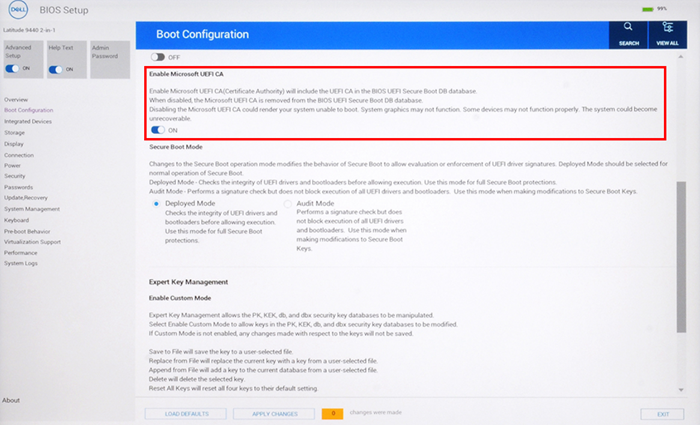
未启用 BIOS 中启动配置下的 Microsoft UEFI CA 设置。默认情况下,此设置处于禁用状态。
Resolution
在 BIOS 中启用第三方应用程序的 Microsoft UEFI CA 设置,以成功完成磁盘加密。
Affected Products
Latitude 9440 2-in-1Article Properties
Article Number: 000221841
Article Type: Solution
Last Modified: 06 Aug 2025
Version: 4
Find answers to your questions from other Dell users
Support Services
Check if your device is covered by Support Services.