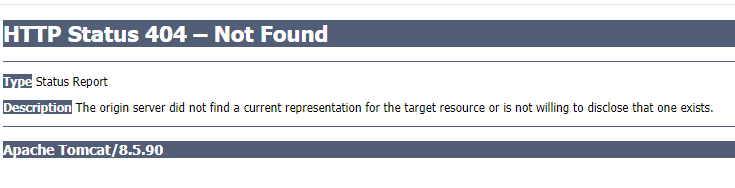
PowerFlex 閘道顯示 404 錯誤
Summary: 在 RCM 升級期間,登入 PowerFlex Gateway UI 會顯示 404 錯誤。
This article applies to
This article does not apply to
This article is not tied to any specific product.
Not all product versions are identified in this article.
Symptoms
- 閘道已使用 RCM 3.6.5 升級
- 登入 PowerFlex Gateway UI,會看到以下內容:
- 閘道scaleio.log顯示此輸出:
2024-02-08 09:13:09,094 [localhost-startStop-1] ERROR c.e.s.s.services.RequestMapUtils - vasa.provider.monitor.interval.seconds (60,60) must be a number between -2147
483648, 2147483647.
影響
在閘道可用之前,升級無法繼續。
Cause
原因
「/opt/emc/scaleio/gateway/webapps/ROOT/WEB-INF/classes/gatewayUser.properties」檔案中有許多參數不當附加逗號,且該行的值已在該行中。
範例:
vasa.provider.ips=,
vasa.provider.monitor.port=,
vasa.provider.monitor.interval.seconds=60,60
#vasa.provider.replica.set.name=vasa-rs
..
lia.ldap.commands.batch.size=256,256
upload.commands.batch.size=16,16
lia.upload.commands.batch.size=256,256
validate.node.commands.batch.size=256,256

cloudiq.enabled=true,true
Resolution
解析度
將「/opt/emc/scaleio/gateway/webapps/ROOT/WEB-INF/classes/gatewayUser.properties」參數設定為應該有的值即可解決此問題。如果不確定,請使用另一個閘道進行比較。此範例並非詳盡無遺。附加了錯誤參數的更多行。
在上面的示例中,行應如下所示:
vasa.provider.ips=
vasa.provider.monitor.port=
vasa.provider.monitor.interval.seconds=60
#vasa.provider.replica.set.name=vasa-rs
..
lia.ldap.commands.batch.size=256
upload.commands.batch.size=16
lia.upload.commands.batch.size=256
validate.node.commands.batch.size=256

cloudiq.enabled=true
空白行刪除了逗號,具有實際值的行刪除了逗號和額外的值。
完成此操作後,請重新啟動閘道服務:
# systemctl restart scaleio-gateway
受影響的版本
PowerFlex RCM 3.6.5
已修正問題的版本
PowerFlex RCM 3.8.8
Affected Products
PowerFlex ApplianceArticle Properties
Article Number: 000221984
Article Type: Solution
Last Modified: 18 Jun 2024
Version: 2
Find answers to your questions from other Dell users
Support Services
Check if your device is covered by Support Services.