NetWorker: How To Start An On-Demand Backup using REST API
Summary: This KB provides an overview of how to perform on-demand NetWorker backups using REST Application Programming Interface (API).
This article applies to
This article does not apply to
This article is not tied to any specific product.
Not all product versions are identified in this article.
Instructions
This KB shows REST API functions using POST MAN. POST MAN is a third-party API tool which can be used to perform REST API functions. It is not included with NetWorker. Similar API tools can be used. The NetWorker requirements and REST API functionality remain the same across tools but appearance and location may differ depending on the tool used.
This KB is intended for readers who have a general understanding of REST API functions (GET, POST, and so forth) and required headers. If more information is needed, see the following REST API Guide: https://developer.dell.com/apis/2378/versions/v3/docs/GettingStarted.md
1. First perform a GET request to get a list of the protected clients:
GET https://NETWORKER_SERVERNAME:9090/nwrestapi/v3/global/clients
Optionally, filter for data needed such as the resourceId, hostName, protectionGroups, and saveSets:
GET https://NETWORKER_SERVERNAME:9090/nwrestapi/v3/global/clients?fl=resourceID,Hostname,protectionGroups,saveSets
For Example:
2. Get the Policy and Workflow name where the protectionGroup is assigned:
GET https://NETWORKER_SERVERNAME:9090/nwrestapi/v3/global/protectionpolicies?fl=name,workflows
Option 1: Starting a single client backup (all save sets) using the clients resourceId.
Using the resourceId from step 1 generate a POST URI for the client that you want to backup.
POST https://NETWORKER_SERVERNAME:9090/nwrestapi/v3/global/clients/resourceId/op/backup
Because this is a POST, you must specify a JSON body in the request. In this case, specify the Policy and Workflow which can be collected from the output in step 2.
{
    "policy": "POLICY_NAME",
    "workflow": "WORKFLOW_NAME"
}
For Example: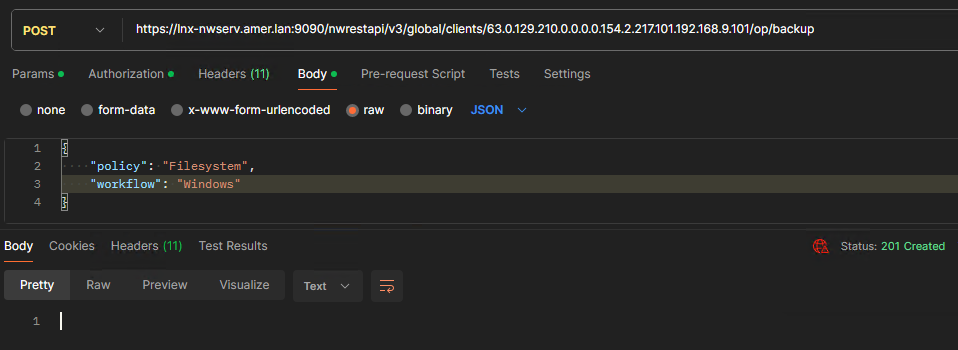
If successful status code 201 is returned.
Option 2: Starting one or more client backups using the Protection Policy:
Using the Protection Policy and Workflow names generate a POST URI for the policy and workflow containing one or more clients that you want to backup:
POST https://NETWORKER_SERVERNAME:9090/nwrestapi/v3/global/protectionpolicies/POLICY_NAME/workflows/WORKFLOW_NAME/op/backup
Because this is a POST, you must specify a JSON body in the request. In this case, we specify the client names which can be collected from the output in step 1.
{
   "clients": ["CLIENT_1","CLIENT_2"]
}
For Example:

If successful status code 201 is returned.
To start a backup for the entire policy (all clients in the workflow's group), specify the following in the JSON body:
{}
By doing this, all clients configured in the protection group assigned to the workflow are backed up.
Optionally, specify save sets with a client:
{
   "clients": ["CLIENT_1:/etc/hosts","CLIENT_2:/var/log/messages"]
}
Additional Information
NetWorker REST API: How to use a remote AUTHC server when processing RESTAPI requests?
NetWorker REST API Triage Guide
NetWorker REST API Triage Guide
Affected Products
NetWorkerProducts
NetWorker Family, NetWorker SeriesArticle Properties
Article Number: 000224014
Article Type: How To
Last Modified: 18 Apr 2025
Version: 2
Find answers to your questions from other Dell users
Support Services
Check if your device is covered by Support Services.