NVP vProxy: VM Backup Is Not Warning When VM Contains Independent Disk
Summary: NetWorker VMware Protection (NVP) is configured to backup a VM which contains Independent disks. The backup completes successfully. VMs with a mixture of independent and dependent disks are reported as successful backups, but the independent disk was not backed up. ...
This article applies to
This article does not apply to
This article is not tied to any specific product.
Not all product versions are identified in this article.
Symptoms
- A VMware VM protected by NetWorker is configured with at least one Independent Disk.
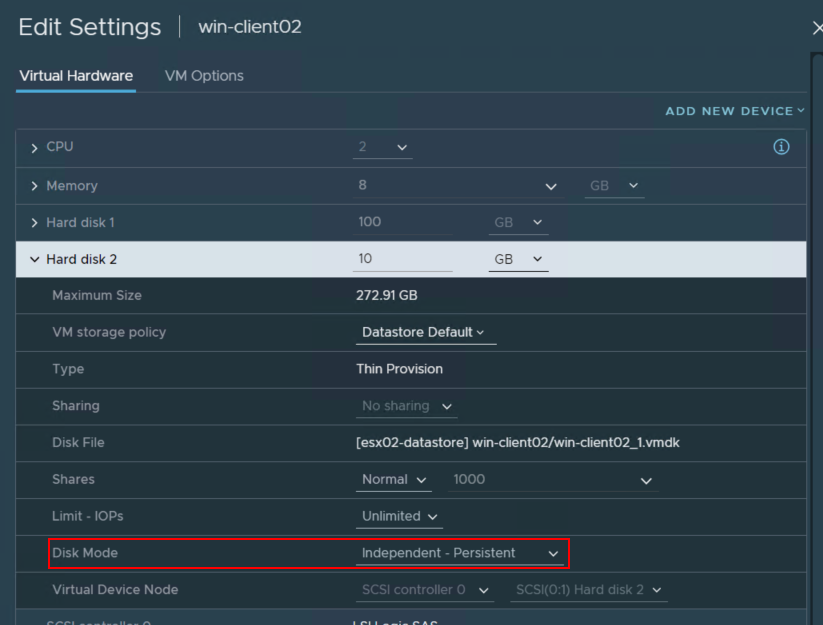
- VM backup reports a successful backup. There is no warning or alert that the VM contains unsupported disks.
- During a restore of the VM it is noticed that the VM is missing disks: NVP-vProxy: VM Restore is missing disks during recovery disk selection
Cause
This is expected behavior.
NetWorker VMware Protection (NVP) uses VMware snapshot technology when performing VM backups. An independent disk does not participate in virtual machine snapshots. That is, the disk state is independent of the snapshot state and creating, consolidating, or reverting to snapshots does not have any effect on the disks. When using independent disks, you cannot perform VMware snapshot for backup.
NetWorker VMware Protection (NVP) uses VMware snapshot technology when performing VM backups. An independent disk does not participate in virtual machine snapshots. That is, the disk state is independent of the snapshot state and creating, consolidating, or reverting to snapshots does not have any effect on the disks. When using independent disks, you cannot perform VMware snapshot for backup.
Resolution
NetWorker Request For Enhancement (RFE) NW-I-2297 was created with a request to add an alert to the NetWorker server daemon.raw when a NetWorker VMware Protection backup detects a VM with independent disks selected. If you would like to track this RFE, reach out to your Dell Site Account Manager (SAM) or sales representative with RFE number NW-I-2297.
Option 1:
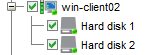
From the VM's settings in VMware, change the Disk Mode from Independent to Dependent. This will include the disk during VMware snapshot operations, and it will be protected during NVP backups of the VM. Before changing the Disk Mode, consult with the VM owner and the VMware administrator in case the VM has a specific requirement to have the disk in Independent mode. Once the Disk Mode is changed to Dependent, ensure that it is selected in a NetWorker VMware protection group:
Option 2:
If the Disk Mode cannot be changed but backups are needed for the data on the Independent disk, install the NetWorker client software on the VM and configure a NetWorker client to protect the data on the Independent disk. For information about installing the client software and configuring NetWorker clients, see the NetWorker Installation and Administration Guides: https://www.dell.com/support/home/product-support/product/networker/docs
Additional Information
- Snapshot Limitations: https://docs.vmware.com/en/VMware-vSphere/7.0/com.vmware.vsphere.vm_admin.doc/GUID-53F65726-A23B-4CF0-A7D5-48E584B88613.html
- Change Disk Mode to Exclude Virtual Disks from Snapshots: https://docs.vmware.com/en/VMware-vSphere/7.0/com.vmware.vsphere.vm_admin.doc/GUID-8B6174E6-36A8-42DA-ACF7-0DA4D8C5B084.html

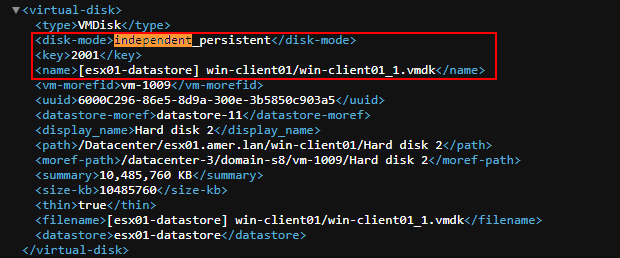
You can identify VMs with Independent disks by performing the following:
On the NetWorker server run:
nsrvim -d VCENTER_NAME
Where VCENTER_NAME is the name of the vCenter/hypervisor as its added in NetWorker.
Open the vcenter.xml file and search/filter for Independent.
Affected Products
NetWorkerProducts
NetWorker Family, NetWorker SeriesArticle Properties
Article Number: 000225541
Article Type: Solution
Last Modified: 30 May 2024
Version: 2
Find answers to your questions from other Dell users
Support Services
Check if your device is covered by Support Services.