PowerStore:当将 Unity 添加为文件的远程系统时,如果 SSL 证书中缺少 IP 地址,则导入失败
Summary: 如果 PowerStore 的自签名证书中不存在 Unity 管理 IP 地址,则 PowerStore 无法添加远程系统。
This article applies to
This article does not apply to
This article is not tied to any specific product.
Not all product versions are identified in this article.
Symptoms
尝试将 Unity 添加为远程系统时出错:
来自 PowerStore Manager 的屏幕截图:
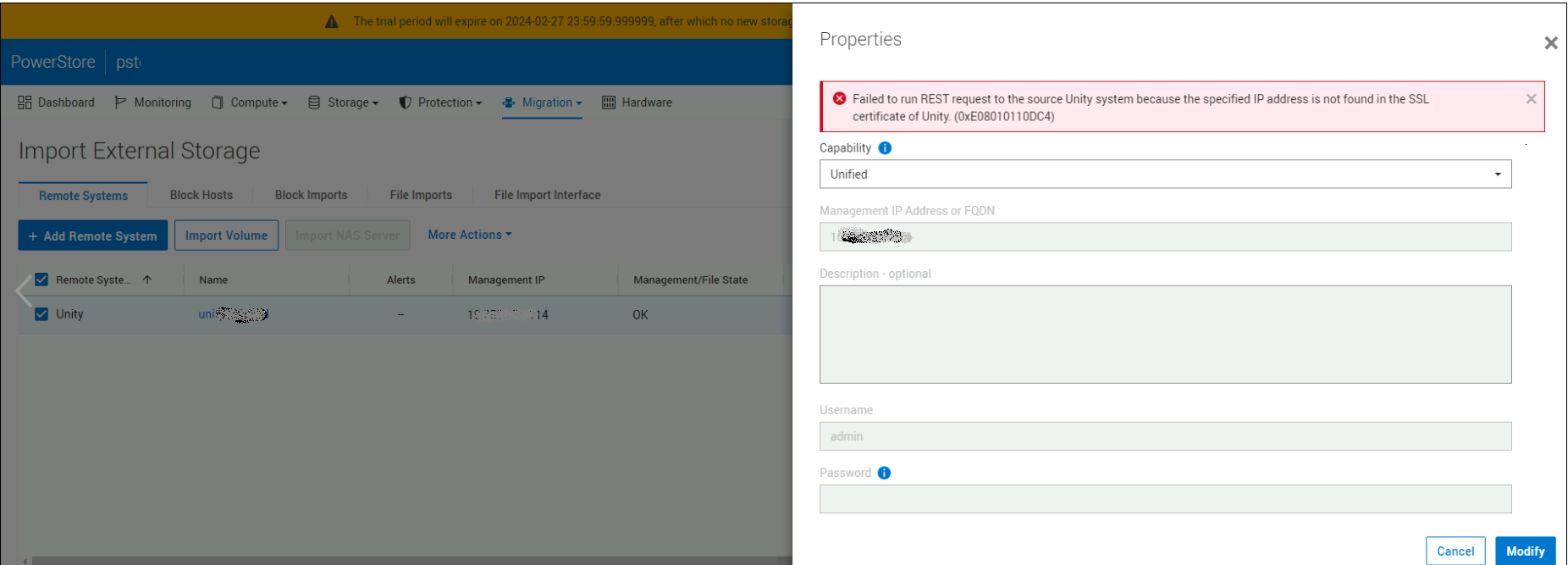
Failed to run REST request to the source Unity system because the specified IP address is not found in the SSL certificate of Unity. (0xE08010110DC4)
来自 PowerStore Manager 的屏幕截图:
Cause
Unity 证书缺少 Unity 管理 IP 地址和完全限定域名值的“subjectAltName”信息。
Resolution
在 Unity 上生成指定“subjectAltName”信息的新证书。
例:
例:
1) Using the openssl utility from a Linux host, create a Certificate Signing Request file with the following fields:
C=Country, ST=State, L=Location, O=Organization, CN=CommonName

service@Unity_LAB spb:~/user> openssl req -new -sha256 -key server.key -passin pass:emcemc -out request.csr -days 1825 -subj '/C=US/ST=MA/L=Sarasota/O=MyCust/CN=5.6.7.11/'

2) Self-sign the Certificate Signing Request file with the private key. If there is an "unable to write 'random state'" error, elevate to root user and try again.

service@Unity_LAB spb:~/user> openssl x509 -in request.csr -sha256 -out unitycer.crt -req -signkey server.key -days 1825 -extfile <(printf "subjectAltName=DNS:<MyUnity.LAB.DELL.COM>,DNS:<MyUnity>,IP:<IPV4  management IP>, IP:<IPV6 management IP>")
Affected Products
PowerStoreArticle Properties
Article Number: 000226350
Article Type: Solution
Last Modified: 05 Sept 2025
Version: 2
Find answers to your questions from other Dell users
Support Services
Check if your device is covered by Support Services.