NetWorker: How to configure a distributed file system backup using multiple windows clients using filesystem-dynamic backup method.
Summary: How to configure a distributed file system backup using multiple windows clients using filesystem-dynamic backup method.
This article applies to
This article does not apply to
This article is not tied to any specific product.
Not all product versions are identified in this article.
Instructions
Below are the steps to configure a Distributed Filesystem Backup using multiple windows clients using filesystem-dynamic backup method:
The same CIF share must be mapped to multiple windows system that must be backed up using filesystem-dynamic backup method.
Steps:
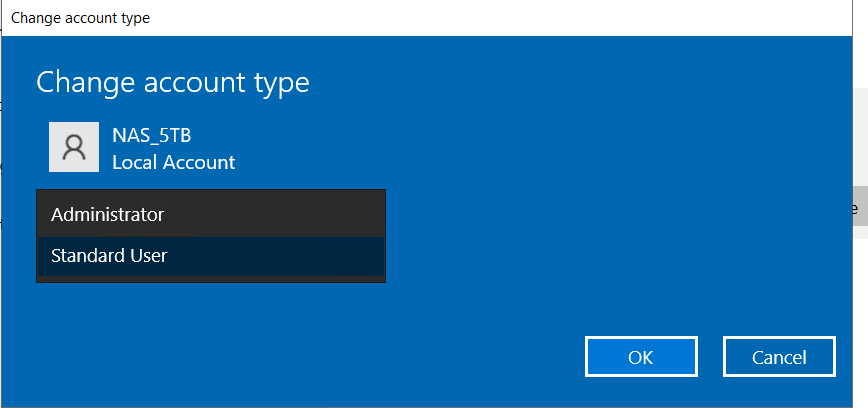
The account used for CIFS access must be added to the administrator group on the primary client and all worker clients as described below.
1. Go to "Add, edit, or remove other users" from the control panel.
2. Select the account used for CIFS access.
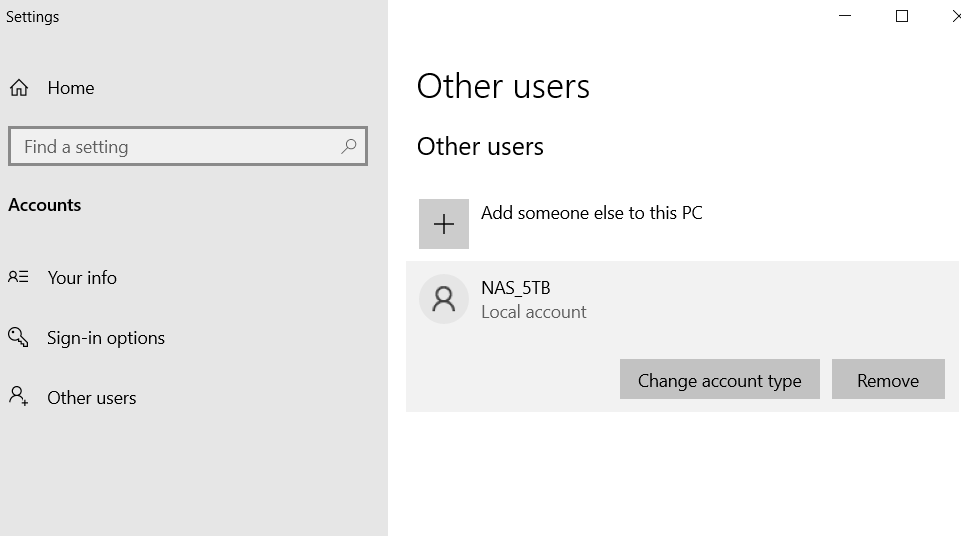
3. Go to change account type.
4. Select "administrator".
Article Properties
Article Number: 000227054
Article Type: How To
Last Modified: 21 Jan 2026
Version: 3
Find answers to your questions from other Dell users
Support Services
Check if your device is covered by Support Services.