PowerEdge: XE8640 GPU ERoT Update Failed
Summary: PowerEdge XE8640 GPU ERoT Update Failed
This article applies to
This article does not apply to
This article is not tied to any specific product.
Not all product versions are identified in this article.
Symptoms
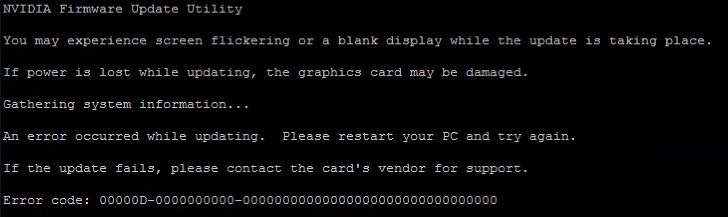
When try to update the PowerEdge XE8640 GPU Embedded root of Trust (ERoT): H100_SXM5_EROT_cec1736-ecfw-0002.0178.0000-n00-installer, by following the installation guide, the update failed with error messages as below:
Cause
Check the OS logs if there are error messages like below:
This is due to the "secure boot" is enabled.
Oct 11 22:05:32 supportlive kernel: Lockdown: H100_SXM5_EROT_: Direct PCI access is restricted; see man kernel_lockdown.7
This is due to the "secure boot" is enabled.
Resolution
Disable the "Secure boot" in BIOS setup.
After the ERoT is updated successfully, enable the "Secure boot" in BIOS setup.
After the ERoT is updated successfully, enable the "Secure boot" in BIOS setup.
Affected Products
PowerEdge XE8640Article Properties
Article Number: 000239198
Article Type: Solution
Last Modified: 07 Jul 2025
Version: 3
Find answers to your questions from other Dell users
Support Services
Check if your device is covered by Support Services.