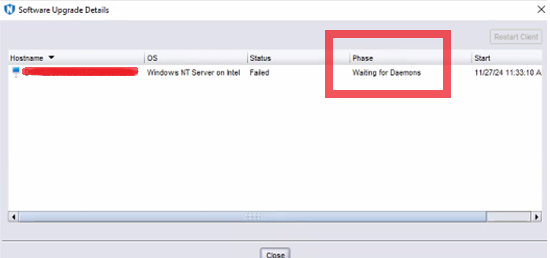
NetWorker client upgrade through package manager failed with error Waiting for Daemons
Summary: This article deals with error encountered while upgrading NetWorker Client on Windows OS through NetWorker package manager and resolution to it.
This article applies to
This article does not apply to
This article is not tied to any specific product.
Not all product versions are identified in this article.
Symptoms
Windows NetWorker client upgrade fails with error "waiting for Daemons"
Cause
After the upgrade is performed, the NetWorker client services restart and if the service is not up before the timeout, it fails with this error.
Resolution
- Log in to the NetWorker client's desktop.
- Open Control Panel, then go to Programs\Programs and Features. Verify that the Version column of the NetWorker software reflects the upgraded version.
- Open Services.msc and verify that the NetWorker Remote Exec Service is Running. If the service is not running, attempt to start the service.
If the service is failing to start, check the following for more insight about the failure:
- Render the client's daemon.raw:
- Default installation path: C:\Program Files\EMC NetWorker\nsr\logs\daemon.raw
- NetWorker: How to use nsr_render_log to render .raw log files
- Open Event Viewer on the client and review the Application event logs.
- Review NetWorker installation logs under %LOCALAPPDATA%\Temp\NetWorker_YYYYMMDDHHmmSS_#_NwClient.log
Affected Products
NetWorkerArticle Properties
Article Number: 000290990
Article Type: Solution
Last Modified: 04 Mar 2025
Version: 1
Find answers to your questions from other Dell users
Support Services
Check if your device is covered by Support Services.