Dell Networking OS9 Slik konfigurerer du en manuell DHCP-binding eller statisk DHCP-binding
Summary: Denne artikkelen forklarer hvordan du konfigurerer en manuell Dynamic Host Control Protocol-binding (DHCP) eller statisk DHCP-binding i Dell Networking OS9.
This article applies to
This article does not apply to
This article is not tied to any specific product.
Not all product versions are identified in this article.
Instructions
Index
Hva er manuell DHCP-binding
Konfigurasjon
Verifisere
Punkter å huske
Hva er manuell DHCP-binding eller statisk DHCP-binding?
DHCP-serveren tilordner klienten en tilgjengelig IP-adresse automatisk, og oppretter deretter en oppføring i bindingstabellen. Administratoren kan imidlertid opprette en oppføring manuelt for en klient. Manuelle bindinger er nyttige når du vil garantere at en nettverksenhet mottar en bestemt IP-adresse.
Konfigurasjon
Konfigurasjon av dynamisk utvalg
|
Kommando |
Forklaring |
|---|---|
DELL# configure |
Gå til konfigurasjonsmodus |
DELL(conf)# ip dhcp server |
Gå til DHCP-modus |
DELL(config-dhcp)# pool <POOL NAME> |
Opprett DHCP-utvalget |
DELL(config-dhcp-D-POOL)# network <Network/subnet mask> |
Angi IP-adressen |
DELL(config-dhcp-D-POOL)# default-router <Default Router IP> |
Angi standardruter |
DELL(config-dhcp-D-POOL)# dns-server <DNS server IP> |
Spesifiser DNS-Server |
Konfigurasjon av statisk utvalg
|
Kommando |
Forklaring |
|---|---|
DELL# configure |
Gå til konfigurasjonsmodus |
DELL(conf)# ip dhcp server |
Gå til DHCP-modus |
DELL(config-dhcp)# pool <POOL NAME> |
Opprett DHCP-utvalg |
DELL(config-dhcp-S-POOL)# host-address <IP address> |
Angi IP-adresse |
DELL(config-dhcp-S-POOL)# hardware-address <Mac address> |
Angi adressen for klientmaskinvaren |
DELLconfig-dhcp-S-POOL)# default-router <Default Router IP> |
Angi standardruter (valgfritt) |
DELL(config-dhcp-S-POOL)# dns-server <DNS server IP> |
Spesifiser DNS-Server (valgfritt) |
Aktiver DHCP SERVER
|
Kommando |
Forklaring |
|---|---|
DELL# configure |
Gå til konfigurasjonsmodus |
DELL(conf)# ip dhcp server |
Gå til DHCP-modus |
DELL(config-dhcp)# no disable |
Aktivere DHCP-server |
Eksempel på konfigurasjon
Tenk på eksemplet nedenfor der en klient med mac-adresse 11:22:33:44:55:66 må motta IP-adressen 10.0.0.100 fra DHCP-serveren.
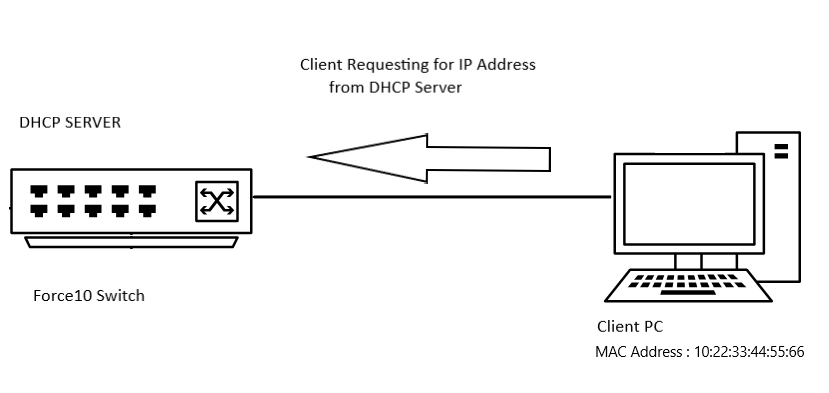
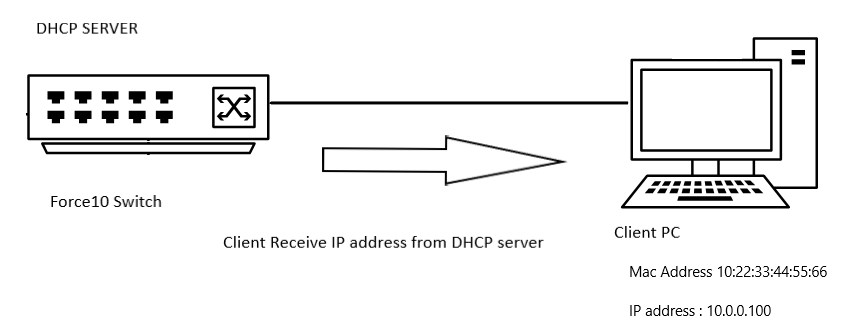
Eksempel på konfigurasjon
DELL# configure
DELL(conf)# ip dhcp server
DELL(config-dhcp)# pool DYNAMICPOOL
DELL(config-dhcp-DYNAMICPOOL)# network 10.0.0.0/24
DELL(config-dhcp-DYNAMICPOOL)# default-router 10.0.0.1
DELL(config-dhcp-DYNAMICPOOL)# dns-server 8.8.8.8
DELL(config-dhcp-DYNAMICPOOL)# exit
DELL(config-dhcp)#

DELL(config-dhcp)# pool STATICPOOL
DELL(config-dhcp-STATICPOOL)# host-address 10.0.0.100
DELL(config-dhcp-STATICPOOL)# hardware-address 10:22:33:44:55:66
DELL(config-dhcp-DYNAMICPOOL)# exit
DELL(config-dhcp)#

DELL(config-dhcp)# no disable
Bekreft
DHCP-KONFIGURASJON
Hvis du vil kontrollere DHCP-serverkonfigurasjonen og utvalgsdetaljene, bruker du kommandoen nedenfor:
DELL# show ip dhcp configuration pool
Eksempel på utdata
DELL# show ip dhcp configuration  pool

Pool Name            : DYNAMICPOOL
Pool Type            : Dynamic
Domain Name          :
Lease Time           : 1Day 0Hrs 0Mins
DNS Servers          : 8.8.8.8
Default Routers      : 10.0.0.1
Network              : 10.0.0.0 255.255.255.0

Pool Name            : STATICPOOL
Pool Type            : Manual
Domain Name          :
Lease Time           : 1Day 0Hrs 0Mins
DNS Servers          :
Default Routers      :
Hardware Address     : 10:22:33:44:55:66
Hardware Address Type: Ethernet
Host                 : 10.0.0.100 0.0.0.0
Binding
For å bekrefte IP-adressen fra DHCP-serveren, bruk kommandoen nedenfor:
DELL# show ip dhcp binding

Sample output
DELLEMC#show ip dhcp binding
 IP address      Hardware address   Lease expiration     Type
10.0.0.100      10:22:33:44:55:66    infinite             Manual
Total number of entries in the table: 1
Verdt å huske
- Du må ha et dynamisk utvalgsområde i nettverket for at det statiske utvalget skal fungere
- Manuelle bindinger kan betraktes som adresseutvalg for én vert. Det er ingen begrensning på antall manuelle bindinger,
- Vi kan bare konfigurere én manuell binding per vert.
- Forsikre deg om at vi bruker gyldig verts-IP innenfor delnettområdet som verts-IP.
Affected Products
OS9, PowerSwitch S3048-ON, PowerSwitch S4048-ON, PowerSwitch S4810P, PowerSwitch S4810-ON, PowerSwitch S4820T, PowerSwitch S5000, Dell Networking S3100 Series, PowerSwitch S4048T-ON, PowerSwitch S5048F-ONProducts
PowerSwitch S6000, PowerSwitch S6000 ON, PowerSwitch S6010-ON, PowerSwitch S6100-ON, PowerSwitch Z9100-ON, PowerSwitch Z9264F-ON, PowerSwitch Z9332F-ONArticle Properties
Article Number: 000312772
Article Type: How To
Last Modified: 25 Apr 2025
Version: 1
Find answers to your questions from other Dell users
Support Services
Check if your device is covered by Support Services.