NVP vProxy: SQL VM restore mount fails "HTTP 409 (Conflict)"
Summary: The NetWorker VMware Protection (NVP) solution is configured to backup Microsoft SQL Virtual Machines (VM) using MSVMAPPAGENT. During a restore operation, the SQL mount operation fails with HTTP 409 (Conflict) ...
This article applies to
This article does not apply to
This article is not tied to any specific product.
Not all product versions are identified in this article.
Symptoms
The SQL VM restore is performed from the Data Protection Restore Client (DPRC).
The mount process fails, reporting HTTP 409 (Conflict):
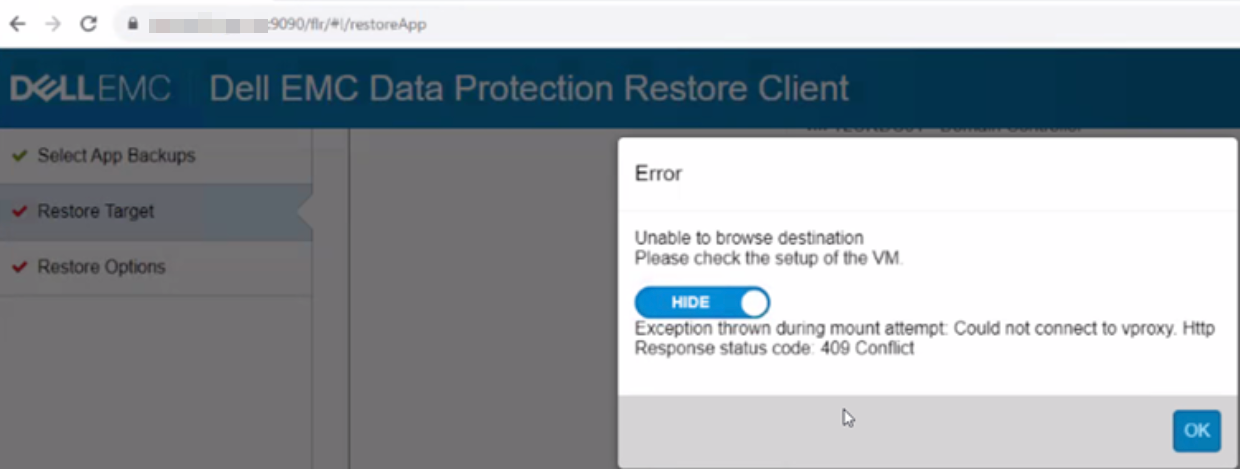
The NetWorker server's flr-server.log reports the same HTTP error:
Linx: /nsr/authc/logs/flr-server.log
Windows (Default): C:\Program Files\EMC NetWorker\nsr\authc-server\tomcat\logs\flr-server.log
YYYY-MM-DD HH:mm:SS [https-jsse-nio-9090-exec-5] INFO  c.e.n.c.v.i.VProxyRestClient.getVProxyUrl 104 - Call vProxy: POST https://NETWORKER-SERVER-ADDRESS:9090/api/v1/FlrBrowseSessions
YYYY-MM-DD HH:mm:SS [https-jsse-nio-9090-exec-5] INFO  c.e.n.c.v.i.VProxyRestClient.createVProxyHttpRequest 126 - Using already cached NW routable IP: NETWORKER-SERVER-ADDRESS/NETWORKER-SERVER-IP
YYYY-MM-DD HH:mm:SS [https-jsse-nio-9090-exec-5] INFO  c.e.n.c.v.i.VProxyRestClient._vProxyPOST 265 - Payload = {"Config":{"AcceptedLanguage":"en","acceptedLanguage":"en","SessionId":null,"LogTag":"FLR_Browse_FLR-SESSION-ID","IdleTimeout":0,"LogLevel":"DEBUG","FlrMountSessionId":"FLR-SESSION-ID","CacheRetentionSeconds":60,"CurrentWorkingDirectory":"","BrowseDestination":false,"ParentPath":null,"ApplicationData":null,"AppName":null,"Vcenter":null,"VmGuestLogin":null}}
YYYY-MM-DD HH:mm:SS [https-jsse-nio-9090-exec-5] INFO  c.e.n.c.v.i.VProxyRestClient._vProxyPOST 270 - Requesting vProxyPOST for https://NETWORKER-SERVER-ADDRESS:9090/api/v1/FlrBrowseSessions, FlrBrowseSessions...
YYYY-MM-DD HH:mm:SS [https-jsse-nio-9090-exec-5] INFO  c.e.n.c.v.i.VProxyRestClient._vProxyPOST 272 - Got vProxyPOST response.
YYYY-MM-DD HH:mm:SS [https-jsse-nio-9090-exec-5] INFO  c.e.n.c.v.i.VProxyRestClient.checkResponse 390 - Response Status Code = 409
YYYY-MM-DD HH:mm:SS [https-jsse-nio-9090-exec-5] INFO  c.e.n.c.v.i.VProxyRestClient.checkResponse 391 - Response Reason Phrase = Conflict
YYYY-MM-DD HH:mm:SS [https-jsse-nio-9090-exec-5] ERROR c.e.n.c.v.i.VProxyRestClient.checkResponse 396 - Could not connect to vproxy. Http Response status code: 409 Conflict
YYYY-MM-DD HH:mm:SS [https-jsse-nio-9090-exec-5] ERROR c.e.n.c.v.i.VProxyMount.postBrowseSession 378 - Error browsing
com.emc.nw.common.exception.BrowseException: Could not connect to vproxy. Http Response status code: 409 Conflict
    .... Removed for brevity ....
YYYY-MM-DD HH:mm:SS [https-jsse-nio-9090-exec-5] ERROR c.e.f.s.i.FsObjectServiceImpl.createVProxyBrowse 812 - Browse backup sessions were not created correctly - possibly a bad mount for sessionid: FLR-SESSION-ID
YYYY-MM-DD HH:mm:SS [https-jsse-nio-9090-exec-5] ERROR c.e.f.s.i.FsObjectServiceImpl.createVProxyBrowse 813 - mount session error message reads: Mount job failure message: Create vProxy browse requests failed.
Cause
The DPRC is not waiting long enough for the mount operation to complete. The DPRC sends an Application Programming Interface (API) call to close the mount session while vProxy is still mounting disks, causing an HTTP 409 conflict.
This issue was raised to NetWorker engineering.
Impacted: NetWorker 19.13.0.0 and prior
Resolution
This issue is fixed in NetWorker 19.13.0.1.
Upgrade the NetWorker server to this release (or later) for a fix.
Additional Information
This problem was observed in an environment where one SQL VM contained 10 disks (VMDK) and many databases. All MSVMAPPAGENT mount operations failed with this symptom, where other smaller SQL servers mounted without issue.
Affected Products
NetWorkerProducts
NetWorker FamilyArticle Properties
Article Number: 000342040
Article Type: Solution
Last Modified: 04 Sept 2025
Version: 4
Find answers to your questions from other Dell users
Support Services
Check if your device is covered by Support Services.