Alienware Command Center 定期發生存取違規錯誤
Summary: 本文提供有關 Alienware Command Center (AWCC) 5.x/6.x 產生重複0xc0000005 (存取違規) 錯誤的詳細資訊。
This article applies to
This article does not apply to
This article is not tied to any specific product.
Not all product versions are identified in this article.
Symptoms
受影響的產品:
- Alienware Command Center 5.x 和 6.x
- Alienware 7.1 遊戲專用耳機 AW510H
- Alienware 無線遊戲專用耳機 AW988
重新建立的步驟:
- 安裝 AWCC 5.x 或 6.x
- 連接 Alienware (AW) AW510H 或 AW988H 耳機
- 啟動 控制面板>應用程式與功能 ,找出所有耳機元件
- 手動將其解除安裝 (所有耳機元件)。
預期成果:應完全卸下 AW 耳機元件。
實際結果:AW 耳機元件已卸下,但 AWHeadset Service32 和 AWHeadset Service64 仍在工作管理員中執行。
Cause
舊版 Awheadsetsvc32 發現記憶體擴充有問題,最終導致因資源耗盡而導致的程序故障。
與這些 EOL 耳機相關的服務當機是在 AWHeadsetSvc32.exe 內0x00024ce0處的故障偏移。
Resolution
因應措施:
在 Windows 服務中停用耳機服務並重新啟動電腦可緩解問題(耳機服務不再執行)
如何停用耳機服務:
- 按下 Windows 鍵 + R 鍵以開啟 Windows 服務。
- 找到 AWHeadset 服務。
- 以滑鼠右鍵按一下 服務 ,然後選取 內容。
- 開啟 一般 標籤。
- 將 啟動類型 設為 停用。
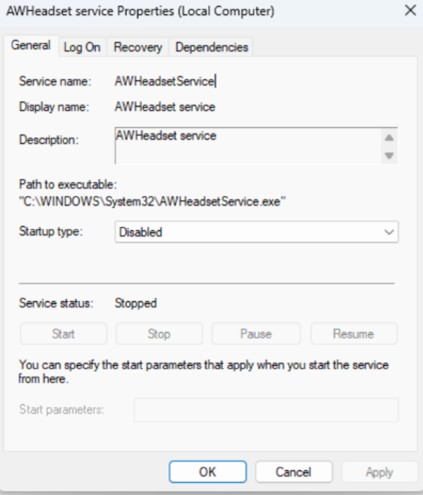
- 將電腦重新開機。
注意:插入 AW988H 或 AW510H 不會觸發自動下載或安裝 AWCC 元件。
Affected Products
Alienware Command Center, Alienware 7.1 Gaming Headset AW510H, Alienware Wireless Gaming Headset AW988Article Properties
Article Number: 000443746
Article Type: Solution
Last Modified: 24 May 2026
Version: 3
Find answers to your questions from other Dell users
Support Services
Check if your device is covered by Support Services.