NetWorker:如何在 SQL 外掛程式使用者介面中啟用除錯
Summary: 本文說明如何在 Microsoft (NMM) 的 NetWorker 模組 SQL 附掛程式中啟用偵錯。 這用於調試使用者介面問題,而不是用於調試模組備份/恢復問題。
This article applies to
This article does not apply to
This article is not tied to any specific product.
Not all product versions are identified in this article.
Instructions
本文說明如何在 Microsoft (NMM) 的 NetWorker 模組 SQL 附掛程式中啟用偵錯。
這用於調試使用者介面問題,而不是用於調試模組備份/恢復問題。
所需步驟
- 在 SQL Server Management Studio 中從工具列開啟附掛程式使用者介面,或按一下開始功能表,選取 EMC NetWorker、SQL Server 模組專用的 NetWorker 附掛程式。
- 打開外掛程式后,使用按 Control 鍵組合並按兩下 SQL 外掛程式介面的底部。這會開啟類似記事本的視窗。
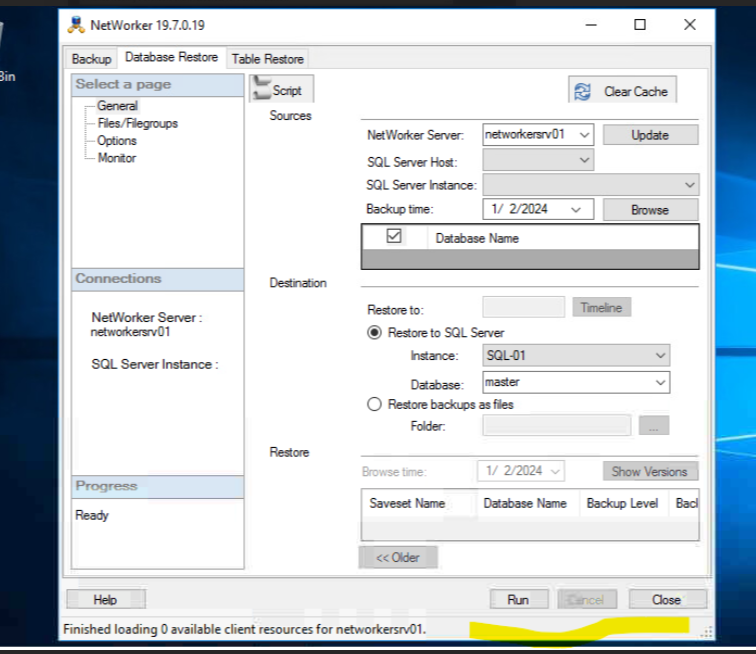
- 在新的 wIndow 中,選取視窗底部的 已啟用 核取方塊。再次按兩下底部,返回正常使用者介面。
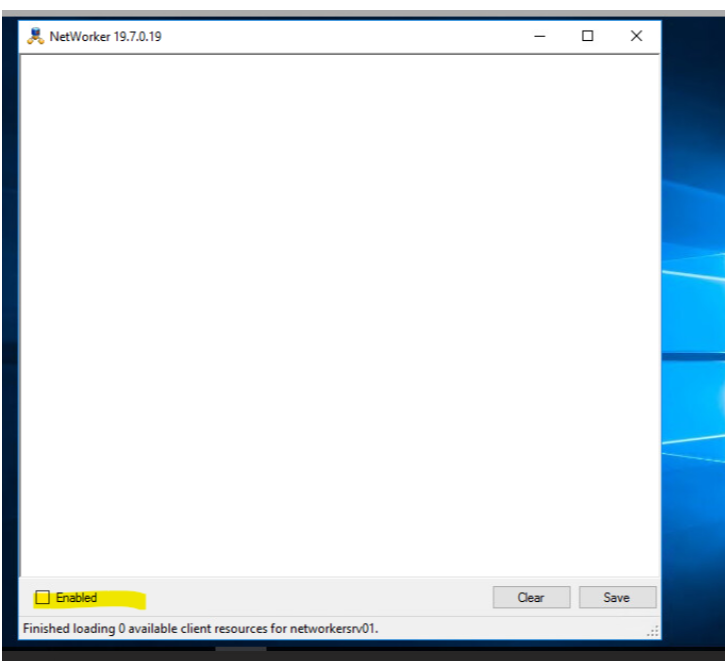
- 重現使用者介面顯示問題,並收集使用者介面中顯示的調試消息。
Affected Products
NetWorker, NetWorker Module for MicrosoftProducts
NetWorker Family, NetWorker ModuleArticle Properties
Article Number: 000223805
Article Type: How To
Last Modified: 06 Apr 2026
Version: 3
Find answers to your questions from other Dell users
Support Services
Check if your device is covered by Support Services.