Avamar: Hyper-V registration fails with "Failed to perform authenticate operation"
Summary: Knowledge Base (KB) article that provides a workaround for Hyper-V registration failure due to authentication.
This article applies to
This article does not apply to
This article is not tied to any specific product.
Not all product versions are identified in this article.
Symptoms
Hyper-V Proxy cluster registration fails with the following messages in the av_cluster_config_wizard.log file:
av_cluster_config_wizard ERROR<0000>: Failed to perform authenticate operation
av_cluster_config_wizard DEBUG<0000>: UpdateStatusAndList: Unable to validate user credentials and updated the 'WinClusterSvc' service
av_cluster_config_wizard ERROR<0000>: Unable to validate user credentials and updated the 'WinClusterSvc' service
av_cluster_config_wizard ERROR<0000>: Installation failed with the following error:
Failed in UserAuthentication.ValidateUser('EMCSERVER1', 'WinClusterSvc')
av_cluster_config_wizard DEBUG<0000>: Changing ClusterConfigWizardData.CompletionStatus from 'InProgress' to 'Failure'.
av_cluster_config_wizard DEBUG<0000>: UpdateStatus: Installation failed with the following error:
Failed in UserAuthentication.ValidateUser('EMCSERVER1', 'WinClusterSvc')
Cause
Extra login security has been implemented on the Hyper-V server or cluster node: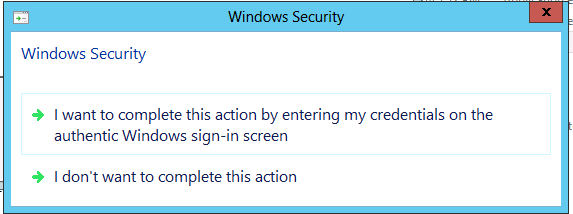
Resolution
- To work around this issue, disable the following Group policy setting:
Computer Configuration-->Administrative Templates-->Windows Components-->Credential User Interface-->Require trusted path for credential entry
Afterwards, run the following command to update the settings on the Hyper-V server:
gpupdate /forceThen rerun the Avamar Cluster Configuration Wizard.
- Configure a multiproxy client from PowerShell.
a. Open PowerShell prompt (run as administrator).
b. Change to the Avamar bin directory:
cd "C:\Program Files\avs\bin"
c. Run the following PowerShell commands to manually configure the cluster client:
Import-Module .\virtualclientconfig.dll


New-AvMultiProxyClient -NodeNames  EMCSERVER1,EMCSERVER2  -PluginName hypervvss
d. If the wizard completes successfully, there are no error messages.
e. Open the services and manually configure Avamar Windows Cluster Service to run under the same domain admin account as the logged-in user account.
Additional Information
Affected Products
AvamarProducts
AvamarArticle Properties
Article Number: 000039300
Article Type: Solution
Last Modified: 08 Jul 2025
Version: 4
Find answers to your questions from other Dell users
Support Services
Check if your device is covered by Support Services.