DPA:DPA 無法在產生警示時執行 python 指令檔。
This article applies to
This article does not apply to
This article is not tied to any specific product.
Not all product versions are identified in this article.
Symptoms
當 DPA 中的事件導向警示指向在產生警示時執行 python 指令檔時,指令檔會無法執行指令檔,並在伺服器記錄中觀察到以下錯誤訊息:
2016-12-31 08:03:24,534 ERROR [com.emc.apollo.command.util.ExecCommandsBean] (EJB default - 195) 執行命令發生錯誤。錯誤訊息為無法執行程式 「E:\monitoring\backup_fail.py」:建立行程錯誤 = 193,%1 不是有效的 Win32 應用程式
以下是來自 DPA GUI 的分析原則組態:
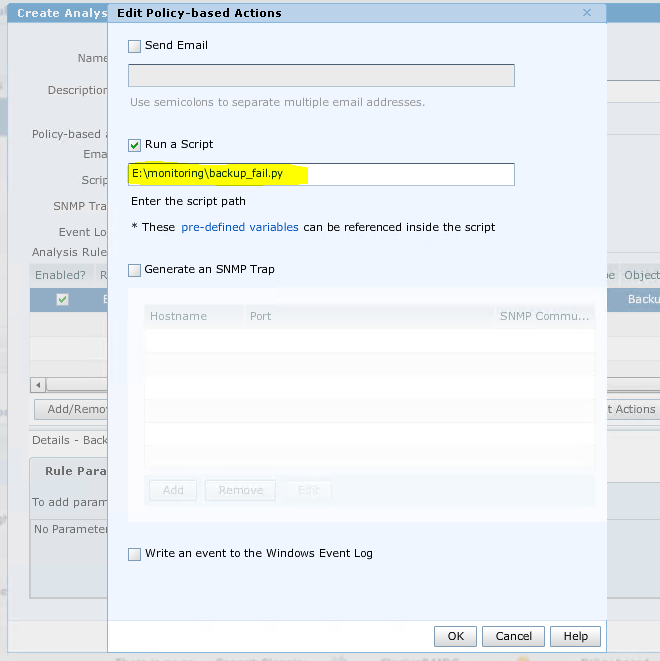
Cause
DPA 是依設計運作。DPA 無法執行 python 指令檔或 Windows 批次指令檔以外的任何其他指令檔。
Resolution
DPA 僅支援 Windows 指令檔,例如批次指令檔。
此方案中的因應措施是建立一個批次指令檔,以呼叫 python 程序來執行 python 指令檔。接著在 DPA GUI 上以編輯原則為基礎的動作中使用批次檔案。
此方案中的因應措施是建立一個批次指令檔,以呼叫 python 程序來執行 python 指令檔。接著在 DPA GUI 上以編輯原則為基礎的動作中使用批次檔案。
Affected Products
App Direct File System AgentArticle Properties
Article Number: 000055098
Article Type: Solution
Last Modified: 06 May 2025
Version: 3
Find answers to your questions from other Dell users
Support Services
Check if your device is covered by Support Services.