啟用系統資料加密後,應用程式會顯示方塊和「隨機」字元而非文字
Summary: 本文提供啟用系統資料加密 (SDE) 後,應用程式會顯示方塊和「隨機」字元而非文字的相關資訊。
This article applies to
This article does not apply to
This article is not tied to any specific product.
Not all product versions are identified in this article.
Symptoms
受影響的產品:
- Dell Data Protection | Encryption
受影響的版本:
- v8.12 和 8.13
螢幕上的文字可以顯示為正方形或其他隨機字元。當系統資料加密 (SDE) 也啟用時,使用非拉丁文字和語言 (例如阿拉伯文) 時,就會發生這種情況。
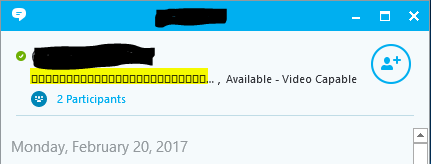
圖 1:(僅英文)螢幕上的文字顯示為正方形和其他隨機字元
Cause
不適用
Resolution
因應措施:
將電腦重新開機。
解決方案:
將用戶端升級至 v8.15 或更新版本,或將下列排除項目套用至受影響裝置的 SDE 加密規則:
-^3C:\Windows\Globalization
如要聯絡支援部門,請參閱 Dell Data Security 國際支援電話號碼。
請前往 TechDirect,以線上產生技術支援要求。
如需更多深入見解與資源,請加入 Dell 安全性社群論壇。
Affected Products
Dell EncryptionArticle Properties
Article Number: 000124728
Article Type: Solution
Last Modified: 11 Apr 2024
Version: 9
Find answers to your questions from other Dell users
Support Services
Check if your device is covered by Support Services.