VMware: Cómo migrar el puerto VMkernel vmk0 de un switch distribuido a un switch estándar
Summary: En este artículo, se muestra cómo migrar vmk0 de un vDS a un switch estándar a través de la línea de comandos.
This article applies to
This article does not apply to
This article is not tied to any specific product.
Not all product versions are identified in this article.
Instructions
Procedimiento:
Pasos para migrar el puerto vmk0 de VMkernel de un switch distribuido a un switch estándar:
- Recopile información de IP para el puerto VMkernel actual vmk0 (dirección IP, máscara de red, gateway predeterminado y VLAN).
- Eliminar un
vmnicdesde un switch distribuido actual (vDS).- Obtenga el ID de puerto de
vmnicy vDS Name mediante el siguiente comando:
- Obtenga el ID de puerto de
esxcli network vswitch dvs vmware list
A continuación, se muestra un ejemplo de la salida, el nombre es
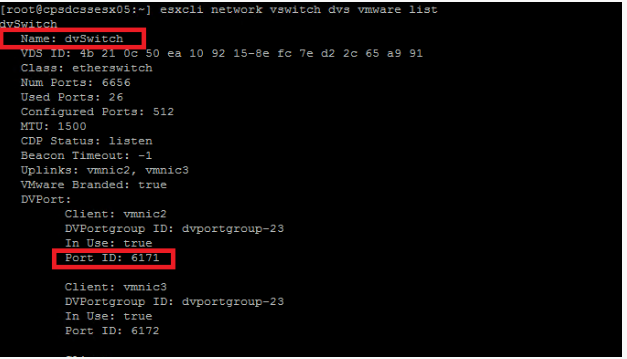
dvSwitchy el ID de puerto de vmnic2 es 6171.
Figura 1: ID de puerto y nombre de vDS de vmnic
- Ejecute el siguiente comando para eliminar un vmnic del vDS:
esxcfg-vswitch -Q vmnic -V dvPort_ID_of_vmnic dvSwitch
Ejemplo:
esxcfg-vswitch -Q vmnic2 -V 6171 dvSwitch
- Elimine el vmk0 actual con el comando:
esxcli network ip interface remove --interface-name=vmk0
Si el volcado de núcleo de red está configurado en vmk0, deshabilítelo con el siguiente comando:
esxcli system coredump network set --enable false
- Cree un switch estándar con el siguiente comando:
esxcli network vswitch standard add -v vSwitchName
Ejemplo:
esxcli network vswitch standard add -v vSwitch0(Crea un vSwitch con el nombre vSwitch0).
- Cree un grupo de puertos al que asignar vmk0 con el comando:
esxcli network vswitch standard portgroup add -p portgroup_name -v vSwitch
Ejemplo:
esxcli network vswitch standard port group add -p management -v vSwitch0
(Crea un grupo de puertos denominado management en vSwitch0).
- Asigne vmk0 al grupo de puertos con el comando:
esxcli network ip interface add -i vmk0 -p portgroup_name
Ejemplo:
esxcli network ip interface add -i vmk0 -p management(Añade
vmk0 como management grupo de puertos).
- Configure la dirección IP de vmk0 con el siguiente comando:
esxcli network ip interface ipv4 set -i vmk0 -I ipaddress -N netmask -t static
Ejemplo:
esxcli network ip interface ipv4 set -i vmk0 -I 10.1.1.10 -N 255.255.255.0 -t static(Conjunto
vmk0 como 10.1.1.10 Con máscara de red 255.255.255.0 como static IP.)
- Configure la VLAN para el grupo de puertos donde reside vmk0 con el comando:
esxcli network vswitch standard portgroup set -p portgroup -v VLAN
Ejemplo:
esxcli network vSwitch standard port group set -p management -v 10(Asigna la VLAN)
10 Al grupo de puertos management.)
- Configure el gateway predeterminado para vmk0 con el siguiente comando:
esxcfg-route -a default defaultGW
Ejemplo:
esxcfg-route -a default 10.1.1.1(Configure el gateway predeterminado en
10.1.1.1.)
- Configure vmk0 como administración con el comando:
esxcli network ip interface tag add -i vmk0 -t Management
- Habilite el volcado de núcleo de red si se habilitó en vmk0 con el comando:
esxcli system coredump network set --enabled true
Affected Products
VxBlock and Vblock Systems, VMware ESXi 7.x, VMware ESXi 8.xArticle Properties
Article Number: 000206306
Article Type: How To
Last Modified: 22 Jul 2025
Version: 3
Find answers to your questions from other Dell users
Support Services
Check if your device is covered by Support Services.