Alienware Command Center 出现反复出现的访问违规错误
Summary: 本文提供有关 Alienware Command Center (AWCC) 5.x/6.x 生成重复0xc0000005(访问冲突)错误的更多信息。
This article applies to
This article does not apply to
This article is not tied to any specific product.
Not all product versions are identified in this article.
Symptoms
受影响的产品:
- Alienware Command Center 5.x 和 6.x
- Alienware 7.1 游戏耳机 AW510H
- Alienware无线游戏头戴式耳机AW988
重新创建步骤:
- 安装 AWCC 5.x 或 6.x
- 连接 Alienware (AW) AW510H 或 AW988H 耳机
- 启动 控制面板>应用程序和功能 以查找所有耳机组件
- 手动卸载它们(所有耳机组件)。
预期成果:应完全卸下 AW 耳机组件。
实际结果:AW 头戴式耳机组件已删除,但 AWHeadset Service32 和 AWHeadset Service64 仍在任务管理器中运行。
Cause
发现较旧版本的 Awheadsetsvc32 存在内存缩放问题,最终导致资源耗尽导致进程故障。
与这些 EOL 耳机关联的服务崩溃是 AWHeadsetSvc32.exe 内 0x00024ce0 的故障偏移。
Resolution
解决办法:
在 Windows 服务中禁用耳机服务并重新启动计算机可缓解此问题(耳机服务不再运行)
如何禁用耳机服务:
- 按 Windows 键 + R 打开 Windows 服务。
- 找到 AWHeadset 服务。
- 右键单击 该服务 ,然后选择 属性。
- 打开 “常规 ”选项卡。
- 将 “启动类型 ”设置为“ 已禁用”。
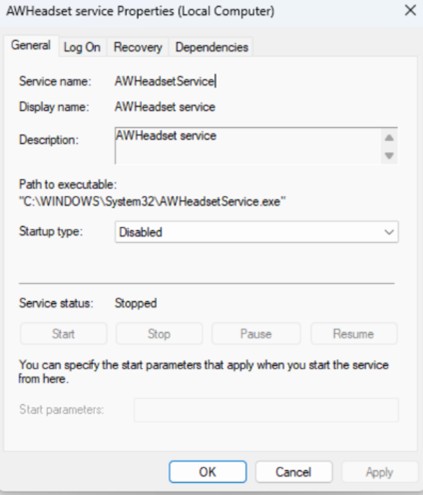
- 重新启动计算机。
提醒:插入 AW988H 或 AW510H 不会触发 AWCC 组件的自动下载或安装。
Affected Products
Alienware Command Center, Alienware 7.1 Gaming Headset AW510H, Alienware Wireless Gaming Headset AW988Article Properties
Article Number: 000443746
Article Type: Solution
Last Modified: 24 May 2026
Version: 3
Find answers to your questions from other Dell users
Support Services
Check if your device is covered by Support Services.