NetWorker: NMC non si avvia dopo l'aggiornamento "IM003: Impossibile caricare il driver specificato"
Summary: Il servizio server NetWorker Management Console (NMC) (GSTD) non si avvia correttamente con questo errore IM003: Impossibile caricare il driver specificato a causa dell'errore di sistema 126: Impossibile trovare il modulo specificato. (PostgreSQL ANSI(x64), C:\program files\emc networker\management\GST\postgres_latest\odbc\psqlodbc30a Errore interno: impossibile rilasciare l'handle del database ...
This article applies to
This article does not apply to
This article is not tied to any specific product.
Not all product versions are identified in this article.
Symptoms
- Il pacchetto NetWorker Management Console (NMC) è stato aggiornato su un sistema Windows.
- Il servizio NMC GSTD non si avvia con i seguenti errori registrati nel .. \Program Files\EMC NetWorker\Management\GST\logs\gstd.raw:
IM003: Specified driver could not be loaded due to system error 126: The specified module could not be found. (PostgreSQL ANSI(x64), C:\program files\emc networker\management\GST\postgres_latest\odbc\psqlodbc30a
Internal error: could not release database handle
Cause
Durante l'aggiornamento vengono rimosse la cartella postgres e postgres_latest link simbolico e ne vengono creati di nuovi, in questo caso postgres_latest è stato ricreato correttamente ma è stato rimosso poco dopo senza alcuna indicazione del motivo.
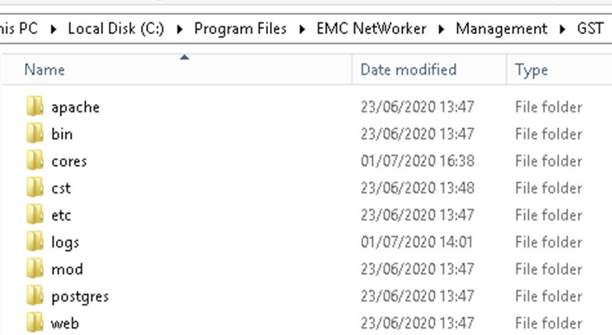
La causa è sconosciuta ma si verifica durante l'aggiornamento, il postgres_latest Il collegamento simbolico viene rimosso poco dopo la creazione. Se il software NMC viene rimosso e quindi viene installato il nuovo software, i sintomi di questo problema non sembrano essere presenti.
Resolution
Per risolvere il problema, sono stati trovati i seguenti passaggi eseguiti singolarmente.
- Disinstallare il software NMC e reinstallarlo.
- Ricreare il link simbolico più recente del postgres
- Individuare la cartella postgres più recente in (<Install_Directory>:\Program Files\EMC NetWorker\Management\GST\postgres)
- Aprire un prompt dei comandi amministrativo ed eseguire il seguente comando:
mklink /D "path_to_new_symbolic_link "path_to_latest_postgres_folder"
Esempio:
mklink /D "C:\Program Files\EMC NetWorker\Management\GST\postgres_latest" "C:\Program Files\EMC NetWorker\Management\GST\postgres\11.1"
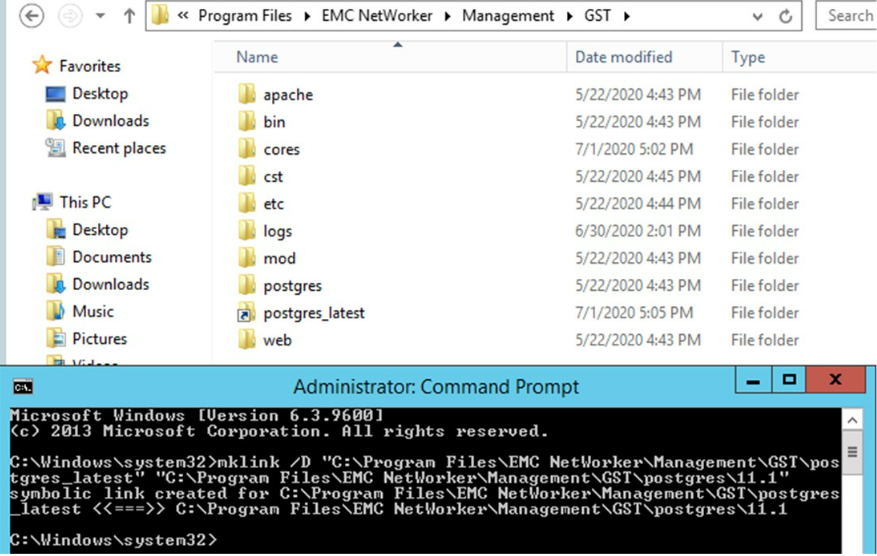
NOTA: L'esecuzione di una disinstallazione e reinstallazione di NetWorker potrebbe risolvere il problema, ma in alcuni casi non è riuscito.
- Una volta postgres_latest è in atto, assicurarsi che NMC venga avviato e, soprattutto, che il backup di nmcdb venga eseguito e abbia esito positivo.
Affected Products
NetWorkerProducts
NetWorker, NetWorker Management ConsoleArticle Properties
Article Number: 000069897
Article Type: Solution
Last Modified: 08 Aug 2025
Version: 4
Find answers to your questions from other Dell users
Support Services
Check if your device is covered by Support Services.