NetWorker: 업그레이드 후 NMC를 시작하지 못함 "IM003: 지정된 드라이버를 로드할 수 없습니다." 오류 메시지가 나타납니다.
Summary: NMC(NetWorker Management Console) 서버 서비스(GSTD)가 IM003 오류와 함께 성공적으로 시작되지 않습니다. Specified driver could not be loaded due to system error 126: The specified module could not be found. (PostgreSQL ANSI(x64), C:\program files\emc networker\management\GST\postgres_latest\odbc\psqlodbc30a 내부 오류: 데이터베이스 핸들을 해제할 수 없습니다. ...
This article applies to
This article does not apply to
This article is not tied to any specific product.
Not all product versions are identified in this article.
Symptoms
- Windows 시스템에서 NMC(NetWorker Management Console) 패키지가 업그레이드되었습니다.
- NMC GSTD 서비스가 .에 기록된 다음 오류와 함께 시작되지 않습니다. \Program Files\EMC NetWorker\Management\GST\logs\gstd.raw:
IM003: Specified driver could not be loaded due to system error 126: The specified module could not be found. (PostgreSQL ANSI(x64), C:\program files\emc networker\management\GST\postgres_latest\odbc\psqlodbc30a
Internal error: could not release database handle
Cause
업그레이드하는 동안 postgres 폴더와 postgres_latest 심볼릭 링크가 제거된 다음 새 링크가 생성됩니다(이 경우 postgres_latest 성공적으로 다시 생성되었지만 발생한 이유를 표시하지 않고 얼마 지나지 않아 제거되었습니다.
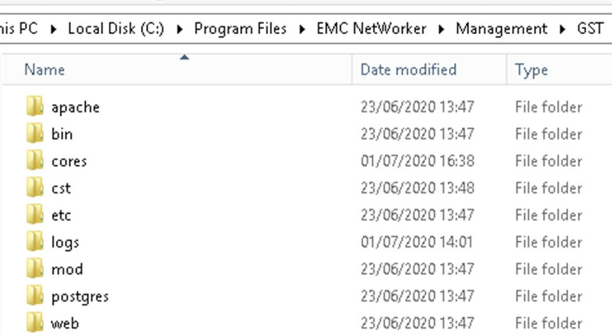
원인은 알 수 없지만 업그레이드 중에 발생합니다. postgres_latest 심볼 링크는 생성된 직후 제거됩니다. NMC 소프트웨어를 제거한 다음 새 소프트웨어를 설치하면 이 문제의 증상이 나타나지 않습니다.
Resolution
개별적으로 수행된 다음 단계는 각각 이 문제를 해결하기 위한 것으로 확인되었습니다.
- NMC 소프트웨어를 제거한 후 다시 설치합니다.
- postgres 최신 심볼릭 링크 다시 만들기
- (<Install_Directory>:\Program Files\EMC NetWorker\Management\GST\postgres)에서 최신 postgres 폴더를 찾습니다.
- 관리 명령 프롬프트를 열고 다음 명령을 실행합니다.
mklink /D "path_to_new_symbolic_link "path_to_latest_postgres_folder"
예:
mklink /D "C:\Program Files\EMC NetWorker\Management\GST\postgres_latest" "C:\Program Files\EMC NetWorker\Management\GST\postgres\11.1"
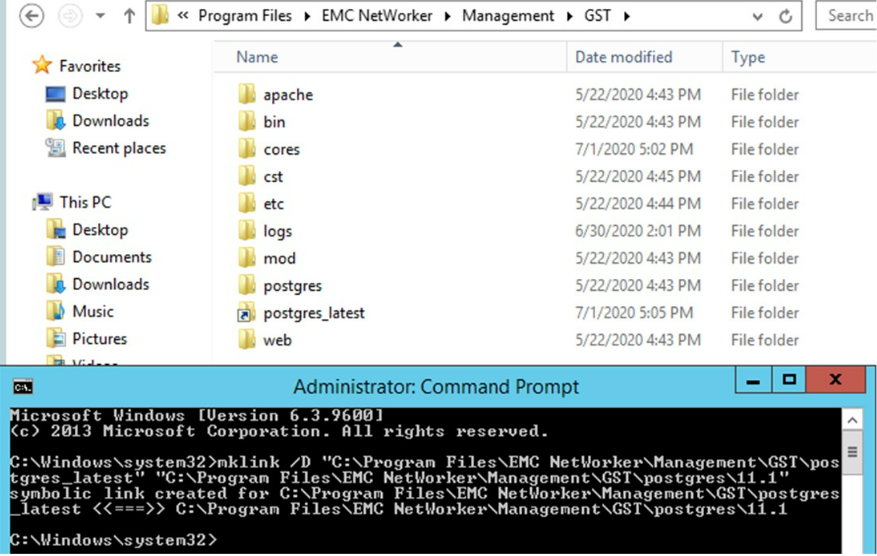
참고: NetWorker를 제거했다가 다시 설치하면 문제가 해결될 수 있지만 실패하는 경우도 있습니다.
- postgres_latest 완료되면 NMC가 시작되고 가장 중요한 것은 nmcdb 백업이 실행 및 성공하는지 확인합니다.
Affected Products
NetWorkerProducts
NetWorker, NetWorker Management ConsoleArticle Properties
Article Number: 000069897
Article Type: Solution
Last Modified: 08 Aug 2025
Version: 4
Find answers to your questions from other Dell users
Support Services
Check if your device is covered by Support Services.