PowerStore: Kopier fil med V attr til SMB-deling kan mislykkes med feil "er for stor for destinasjonsfilsystemet"
Summary: Kopier filen med V attr til SMB-deling kan mislykkes med feilen "er for stor for destinasjonsfilsystemet."
This article applies to
This article does not apply to
This article is not tied to any specific product.
Not all product versions are identified in this article.
Symptoms
Sjekk om V attr på filen:
Mislykket melding: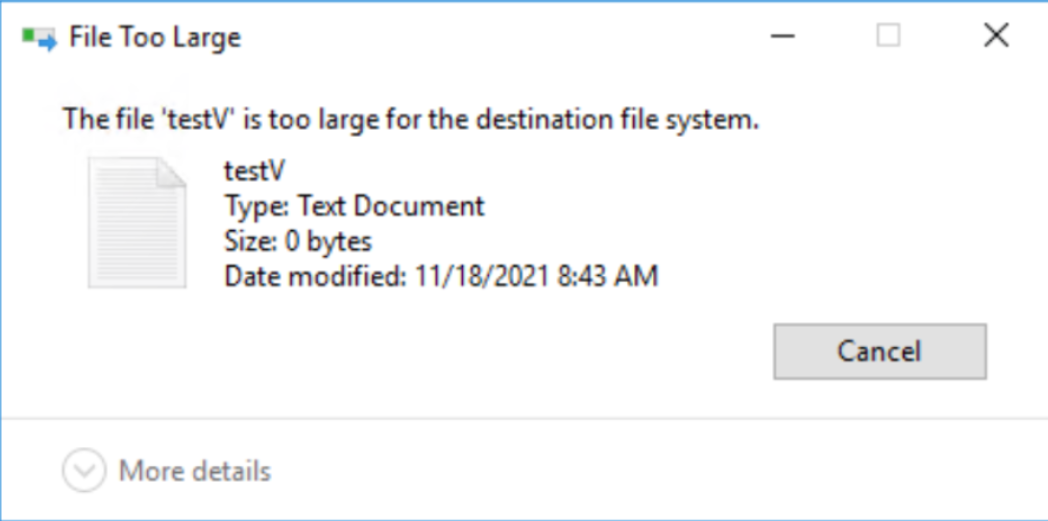
sdnas_active.log:
PS E:\> attrib .\testV.txt
A V E:\testV.txt Fail screenshot:
Mislykket melding:
sdnas_active.log:
2021/11/25-05:04:13.637761 7f4aa1df1702 SMB: 07:[SDNAS-A18] smb_convertFileAttributes: Ugyldig FileAttribute (0x8020)
2021/11/25-05:04:13.637868 7f4aa1df1702 SMB:10:[sdnas-a18] <<<< SMB2 MSG len=73, Command=0x5(Create), NTStatus=INVALID_PARAMETER
Cause
Gjeldende PowerStore-versjon støtter ikke V-attr.
Resolution
Løsning:
Fjern Vattr fra filer før du kopierer til en PowerStore SMB-ressurs.
I en fremtidig versjon vil virkemåten bli forbedret. Kopier filer med V attr til PowerStore SMB share lose V attr, og kopier til NTFS eller Windows SMB share.
Fjern Vattr fra filer før du kopierer til en PowerStore SMB-ressurs.
I en fremtidig versjon vil virkemåten bli forbedret. Kopier filer med V attr til PowerStore SMB share lose V attr, og kopier til NTFS eller Windows SMB share.
Additional Information
V attr er ReFS integritet strømmer - File Integrity.
Litt informasjon om ReFS Integration Stream - https://docs.microsoft.com/en-us/windows-server/storage/refs/integrity-streams
Litt informasjon om ReFS Integration Stream - https://docs.microsoft.com/en-us/windows-server/storage/refs/integrity-streams
Affected Products
PowerStoreArticle Properties
Article Number: 000194244
Article Type: Solution
Last Modified: 10 Dec 2021
Version: 1
Find answers to your questions from other Dell users
Support Services
Check if your device is covered by Support Services.