PowerProtectのバックアップとレプリケーションのジョギングが完了するまでに長い時間がかかる
Summary: PowerProtect Data Managerアプライアンスは、Transparent Snapshot Data Mover (TSDM)ソリューションを使用してvSphere環境を保護するために使用されます。特定のWindows仮想マシン(VM)のバックアップとレプリケーションを実行するたびに、かなりの時間がかかっています。
This article applies to
This article does not apply to
This article is not tied to any specific product.
Not all product versions are identified in this article.
Symptoms
バックアップ ワークフロー ログには、 UsedBtyes と ChangedBytes VMの場合:
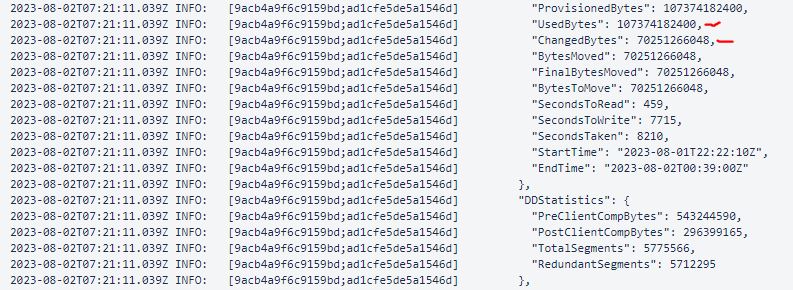
この例では、 ChangedBytes 70251266048バイト(70.3 GB)の値。VMの評価では、VMが毎日あまりアクティブではないことが示されており、それほど高くないはずです UsedBtyes と ChangedBytes 価値。
Cause
原因は、VMのゲストOSの 割り当て解除 設定にあります。スクリプト「 Unmap 設定は、アプリケーションまたはオペレーティング システムがストレージ アレイ上のスペースを再利用できるようにする機能です。これは、ディスク ブロックに削除されたデータが含まれていることをアレイに通知することによって行われ、アレイはそれらのブロックの割り当てを解除できます。
Resolution
無効にする Unmap 設定するか、File System Agentを使用してファイル システムを保護します。
- 現在の
Unmap設定:fsutil behavior query DisableDeleteNotify
DisableDeleteNotify=0 - indicates the Trim and Unmap feature is on (enabled)
DisableDeleteNotify=1 - indicates the Trim and Unmap feature is off (disabled)- 無効にするには
Unmap設定:fsutil behavior set DisableDeleteNotify 1
Additional Information

Affected Products
Data Protection, PowerProtect Data ManagerArticle Properties
Article Number: 000217326
Article Type: Solution
Last Modified: 05 Feb 2025
Version: 1
Find answers to your questions from other Dell users
Support Services
Check if your device is covered by Support Services.