완료하는 데 시간이 오래 걸리는 PowerProtect 백업 및 복제 조그
Summary: PowerProtect Data Manager 어플라이언스는 TSDM(Transparent Snapshot Data Mover) 솔루션으로 vSphere 환경을 보호하는 데 사용됩니다. 특정 Windows VM(Virtual Machine)에 대한 백업 및 복제는 실행할 때마다 상당한 시간이 소요됩니다.
This article applies to
This article does not apply to
This article is not tied to any specific product.
Not all product versions are identified in this article.
Symptoms
백업 워크플로 로그에 UsedBtyes 및 ChangedBytes VM의 경우:
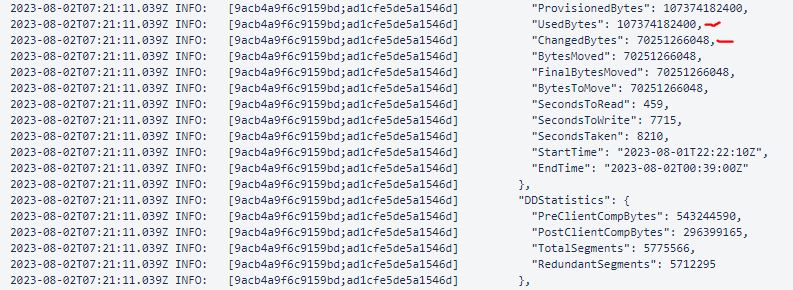
이 예에서는 ChangedBytes 70251266048바이트(70.3GB)의 값입니다. VM 평가에 따르면 VM은 매일 매우 활동적이지 않으며 그렇게 높지 않아야 합니다. UsedBtyes 및 ChangedBytes 값.
Cause
원인은 VM의 게스트 OS 매핑 해제 설정에 있습니다. 이 Unmap 설정은 애플리케이션 또는 운영 체제가 스토리지 어레이의 공간을 재확보할 수 있는 기능입니다. 디스크 블록에 삭제된 데이터가 포함되어 있음을 어레이에 알리고 어레이가 해당 블록의 할당을 취소할 수 있습니다.
Resolution
비활성화 Unmap 를 설정하거나 File System Agent를 사용하여 파일 시스템을 보호합니다.
- 현재
Unmap설정:fsutil behavior query DisableDeleteNotify
DisableDeleteNotify=0 - indicates the Trim and Unmap feature is on (enabled)
DisableDeleteNotify=1 - indicates the Trim and Unmap feature is off (disabled)- 비활성화하려면
Unmap설정:fsutil behavior set DisableDeleteNotify 1
Additional Information

Affected Products
Data Protection, PowerProtect Data ManagerArticle Properties
Article Number: 000217326
Article Type: Solution
Last Modified: 05 Feb 2025
Version: 1
Find answers to your questions from other Dell users
Support Services
Check if your device is covered by Support Services.