PowerProtect back-up- en replicatiejogs nemen veel tijd in beslag
Summary: De PowerProtect Data Manager appliance wordt gebruikt om de vSphere-omgeving te beschermen met de Transparent Snapshot Data Mover (TSDM)-oplossing. De back-up en replicatie voor een specifieke virtuele Windows-machine (VM) neemt tijdens elke uitvoering een aanzienlijke hoeveelheid tijd in beslag. ...
Symptoms
In het back-upworkflowlogboek wordt een hoge waarde weergegeven voor de UsedBtyes als ChangedBytes voor de VM:
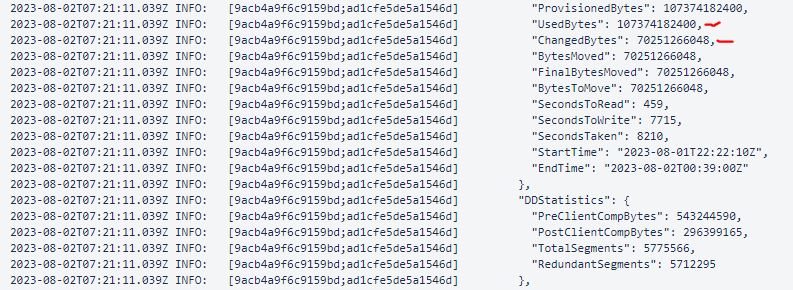
Het voorbeeld toont de ChangedBytes waarde van 70251266048 bytes (70,3 GB). Uit de VM-evaluatie blijkt dat de VM niet elke dag erg actief is en niet zo'n hoge UsedBtyes als ChangedBytes waarde.
Cause
De oorzaak is de instelling Unmap voor gastbesturingssysteem op de VM. De Unmap Een instelling is een functie waarmee een applicatie of besturingssysteem ruimte kan vrijmaken op een storage-array. Dit wordt gedaan door de array te informeren dat schijfblokken verwijderde data bevatten, waardoor de array deze blokken kan toewijzen.
Resolution
Schakel de Unmap instelling op het gastbesturingssysteem of gebruik de bestandssysteemagent om het bestandssysteem te beschermen.
- Om de huidige
Unmapmontuur:fsutil behavior query DisableDeleteNotify
DisableDeleteNotify=0 - indicates the Trim and Unmap feature is on (enabled)
DisableDeleteNotify=1 - indicates the Trim and Unmap feature is off (disabled)- Als u de
Unmapmontuur:fsutil behavior set DisableDeleteNotify 1
