PowerProtect 備份和複寫角動花費很長的時間才能完成
Summary: PowerProtect Data Manager 應用裝置是用來透過 Transparent Snapshot Data Mover (TSDM) 解決方案保護 vSphere 環境。在每次執行期間,特定 Windows 虛擬機器 (VM) 的備份和複製都會花費大量時間。
This article applies to
This article does not apply to
This article is not tied to any specific product.
Not all product versions are identified in this article.
Symptoms
備份工作流程記錄顯示 UsedBtyes 和 ChangedBytes 針對虛擬機器:
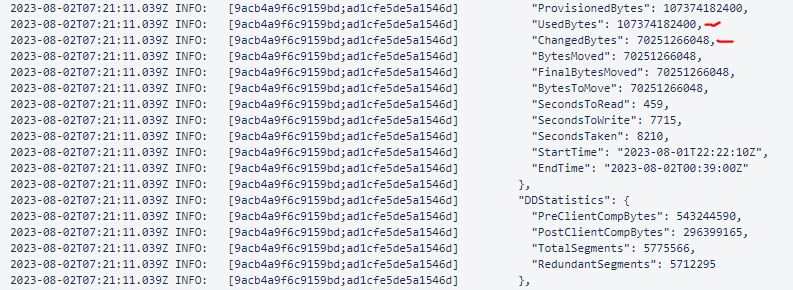
該範例顯示 ChangedBytes 值為 70251266048 位元組 (70.3 GB)。VM 評估顯示 VM 並非每天都很活躍,不應有這麼高的 UsedBtyes 和 ChangedBytes 價。
Cause
原因是 VM 上的客體作業系統 取消對應 設定。可使用 Unmap 設定是一種功能,可讓應用程式或作業系統回收儲存陣列上的空間。通知陣列磁碟區塊包含已刪除的資料,讓陣列能夠解除分配這些區塊來完成此作業。
Resolution
停用 Unmap 在客戶機作業系統上進行設置,或使用檔案系統代理來保護檔案系統。
- 若要確認目前的
Unmap設定:fsutil behavior query DisableDeleteNotify
DisableDeleteNotify=0 - indicates the Trim and Unmap feature is on (enabled)
DisableDeleteNotify=1 - indicates the Trim and Unmap feature is off (disabled)- 若要停用
Unmap設定:fsutil behavior set DisableDeleteNotify 1
Additional Information

Affected Products
Data Protection, PowerProtect Data ManagerArticle Properties
Article Number: 000217326
Article Type: Solution
Last Modified: 05 Feb 2025
Version: 1
Find answers to your questions from other Dell users
Support Services
Check if your device is covered by Support Services.