PowerProtect 备份和复制需要很长时间才能完成
Summary: PowerProtect Data Manager 一体机用于通过 Transparent Snapshot Data Mover (TSDM) 解决方案保护 vSphere 环境。在每次执行期间,特定 Windows 虚拟机 (VM) 的备份和复制会占用大量时间。
This article applies to
This article does not apply to
This article is not tied to any specific product.
Not all product versions are identified in this article.
Symptoms
备份工作流日志显示 UsedBtyes 和 ChangedBytes 对于虚拟机:
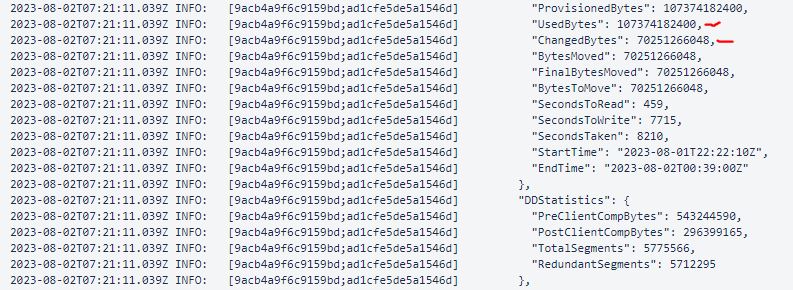
此示例显示 ChangedBytes 70251266048 字节的值 (70.3 GB)。VM 评估表明,VM 每天不是很活跃,不应有这么高的 UsedBtyes 和 ChangedBytes 价值。
Cause
原因是虚拟机上的来宾作系统 取消映射 设置。该 Unmap 设置是一项功能,允许应用程序或作系统回收存储阵列上的空间。这是通过通知阵列磁盘块包含已删除的数据来实现的,这允许阵列解除分配这些块。
Resolution
禁用 Unmap 设置或使用文件系统代理来保护文件系统。
- 要验证当前
Unmap设置:fsutil behavior query DisableDeleteNotify
DisableDeleteNotify=0 - indicates the Trim and Unmap feature is on (enabled)
DisableDeleteNotify=1 - indicates the Trim and Unmap feature is off (disabled)- 要禁用
Unmap设置:fsutil behavior set DisableDeleteNotify 1
Additional Information

Affected Products
Data Protection, PowerProtect Data ManagerArticle Properties
Article Number: 000217326
Article Type: Solution
Last Modified: 05 Feb 2025
Version: 1
Find answers to your questions from other Dell users
Support Services
Check if your device is covered by Support Services.