Dell Networking OS9:手動DHCPバインディングまたは静的DHCPバインディングを設定する方法
Summary: この記事では、Dell Networking OS9で手動動的ホスト制御プロトコル(DHCP)バインディングまたは静的DHCPバインディングを設定する方法について説明します。
This article applies to
This article does not apply to
This article is not tied to any specific product.
Not all product versions are identified in this article.
Instructions
索引
手動DHCPバインディングとは何ですか
構成
確認します
覚えておくべきポイント
手動DHCPバインディングまたはスタティックDHCPバインディングとは何ですか?
DHCP サーバーは、クライアントに使用可能な IP アドレスを自動的に割り当て、バインディング テーブルにエントリを作成します。ただし、管理者はクライアントのエントリーを手動で作成できます。手動バインドは、ネットワーク デバイスが特定の IP アドレスを受け取ることを保証する場合に便利です。
Configuration
Dynamic Poolの構成
|
コマンド |
説明 |
|---|---|
DELL# configure |
設定モードを起動します |
DELL(conf)# ip dhcp server |
DHCPモードの開始 |
DELL(config-dhcp)# pool <POOL NAME> |
DHCPプールの作成 |
DELL(config-dhcp-D-POOL)# network <Network/subnet mask> |
IPアドレスを指定します |
DELL(config-dhcp-D-POOL)# default-router <Default Router IP> |
default-routerを指定します |
DELL(config-dhcp-D-POOL)# dns-server <DNS server IP> |
DNSサーバーの指定 |
静的プール構成
|
コマンド |
説明 |
|---|---|
DELL# configure |
設定モードを起動します |
DELL(conf)# ip dhcp server |
DHCPモードの開始 |
DELL(config-dhcp)# pool <POOL NAME> |
DHCPプールの作成 |
DELL(config-dhcp-S-POOL)# host-address <IP address> |
IPアドレスの指定 |
DELL(config-dhcp-S-POOL)# hardware-address <Mac address> |
クライアント ハードウェア アドレスの指定 |
DELLconfig-dhcp-S-POOL)# default-router <Default Router IP> |
default-routerの指定(オプション) |
DELL(config-dhcp-S-POOL)# dns-server <DNS server IP> |
DNSサーバーの指定(オプション) |
DHCPサーバーのアクティブ化
|
コマンド |
説明 |
|---|---|
DELL# configure |
設定モードを起動します |
DELL(conf)# ip dhcp server |
DHCPモードの開始 |
DELL(config-dhcp)# no disable |
DHCP サーバのアクティブ化 |
サンプル設定
MACアドレス11:22:33:44:55:66のクライアントがDHCPサーバーからIPアドレス10.0.0.100を受信する必要がある次の例について考えてみます。
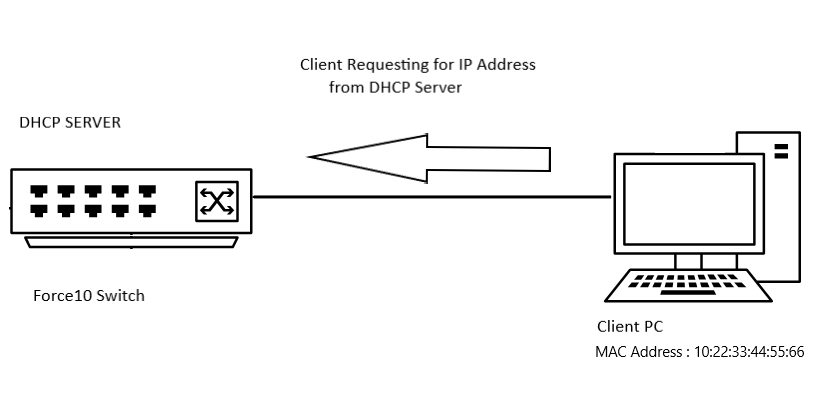
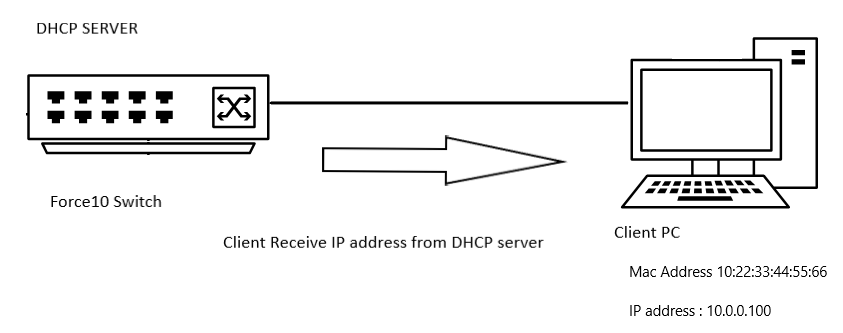
サンプル設定
DELL# configure
DELL(conf)# ip dhcp server
DELL(config-dhcp)# pool DYNAMICPOOL
DELL(config-dhcp-DYNAMICPOOL)# network 10.0.0.0/24
DELL(config-dhcp-DYNAMICPOOL)# default-router 10.0.0.1
DELL(config-dhcp-DYNAMICPOOL)# dns-server 8.8.8.8
DELL(config-dhcp-DYNAMICPOOL)# exit
DELL(config-dhcp)#

DELL(config-dhcp)# pool STATICPOOL
DELL(config-dhcp-STATICPOOL)# host-address 10.0.0.100
DELL(config-dhcp-STATICPOOL)# hardware-address 10:22:33:44:55:66
DELL(config-dhcp-DYNAMICPOOL)# exit
DELL(config-dhcp)#

DELL(config-dhcp)# no disable
検証
DHCP構成
DHCPサーバーの構成とプールの詳細を確認するには、次のコマンドを使用します。
DELL# show ip dhcp configuration pool
出力例
DELL# show ip dhcp configuration  pool

Pool Name            : DYNAMICPOOL
Pool Type            : Dynamic
Domain Name          :
Lease Time           : 1Day 0Hrs 0Mins
DNS Servers          : 8.8.8.8
Default Routers      : 10.0.0.1
Network              : 10.0.0.0 255.255.255.0

Pool Name            : STATICPOOL
Pool Type            : Manual
Domain Name          :
Lease Time           : 1Day 0Hrs 0Mins
DNS Servers          :
Default Routers      :
Hardware Address     : 10:22:33:44:55:66
Hardware Address Type: Ethernet
Host                 : 10.0.0.100 0.0.0.0
拘束力
DHCPサーバーから提供されたIPアドレスを確認するには、次のコマンドを使用します。
DELL# show ip dhcp binding

Sample output
DELLEMC#show ip dhcp binding
 IP address      Hardware address   Lease expiration     Type
10.0.0.100      10:22:33:44:55:66    infinite             Manual
Total number of entries in the table: 1
覚えておくべきポイント
- 静的プールを機能させるには、そのネットワークに動的プール範囲が必要です
- 手動バインドは、単一ホストのアドレス プールと見なすことができます。手綴じの数に制限はなく、
- ホストごとに構成できる手動バインドは1つだけです。
- サブネット範囲内の有効なホストIPをホストIPとして使用していることを確認します。
Affected Products
OS9, PowerSwitch S3048-ON, PowerSwitch S4048-ON, PowerSwitch S4810P, PowerSwitch S4810-ON, PowerSwitch S4820T, PowerSwitch S5000, Dell Networking S3100 Series, PowerSwitch S4048T-ON, PowerSwitch S5048F-ONProducts
PowerSwitch S6000, PowerSwitch S6000 ON, PowerSwitch S6010-ON, PowerSwitch S6100-ON, PowerSwitch Z9100-ON, PowerSwitch Z9264F-ON, PowerSwitch Z9332F-ONArticle Properties
Article Number: 000312772
Article Type: How To
Last Modified: 25 Apr 2025
Version: 1
Find answers to your questions from other Dell users
Support Services
Check if your device is covered by Support Services.