Dell Networking OS9 Een handmatige DHCP-binding of statische DHCP-binding configureren
Summary: In dit artikel wordt uitgelegd hoe u een handmatige DHCP-binding (Dynamic Host Control Protocol) of statische DHCP-binding configureert in Dell Networking OS9.
Instructions
Index
Wat is handmatige DHCP-binding
?Configuratie
Verifiëren
Punten om te onthouden
Wat is handmatige DHCP-binding of statische DHCP-binding?
De DHCP-server wijst de client automatisch een beschikbaar IP-adres toe en maakt vervolgens een vermelding in de bindingstabel. De beheerder kan echter handmatig een vermelding voor een klant maken. Handmatige bindingen zijn handig wanneer u wilt garanderen dat een netwerkapparaat een specifiek IP-adres ontvangt.
Configuratie
Dynamische poolconfiguratie
|
Opdracht |
Toelichting |
|---|---|
DELL# configure |
Activeer de configuratiemodus |
DELL(conf)# ip dhcp server |
Ga naar de DHCP-modus |
DELL(config-dhcp)# pool <POOL NAME> |
De DHCP-groep maken |
DELL(config-dhcp-D-POOL)# network <Network/subnet mask> |
Geef het IP-adres op |
DELL(config-dhcp-D-POOL)# default-router <Default Router IP> |
Standaardrouter opgeven |
DELL(config-dhcp-D-POOL)# dns-server <DNS server IP> |
DNS-server opgeven |
Statische groepsconfiguratie
|
Opdracht |
Toelichting |
|---|---|
DELL# configure |
Activeer de configuratiemodus |
DELL(conf)# ip dhcp server |
Ga naar de DHCP-modus |
DELL(config-dhcp)# pool <POOL NAME> |
DHCP-groep maken |
DELL(config-dhcp-S-POOL)# host-address <IP address> |
IP-adres opgeven |
DELL(config-dhcp-S-POOL)# hardware-address <Mac address> |
Specificeer het adres van de clienthardware |
DELLconfig-dhcp-S-POOL)# default-router <Default Router IP> |
Standaardrouter opgeven (optioneel) |
DELL(config-dhcp-S-POOL)# dns-server <DNS server IP> |
DNS-server opgeven (optioneel) |
Activate DHCP SERVER
|
Opdracht |
Toelichting |
|---|---|
DELL# configure |
Activeer de configuratiemodus |
DELL(conf)# ip dhcp server |
Ga naar de DHCP-modus |
DELL(config-dhcp)# no disable |
Activate DHCP Server |
Voorbeeldconfiguratie
Beschouw het onderstaande voorbeeld waarbij een client met mac-adres 11:22:33:44:55:66 IP-adres 10.0.0.100 van de DHCP-server moet ontvangen.
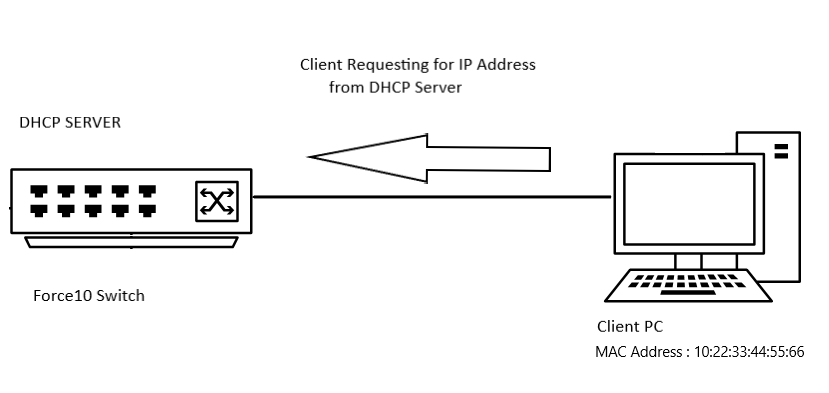
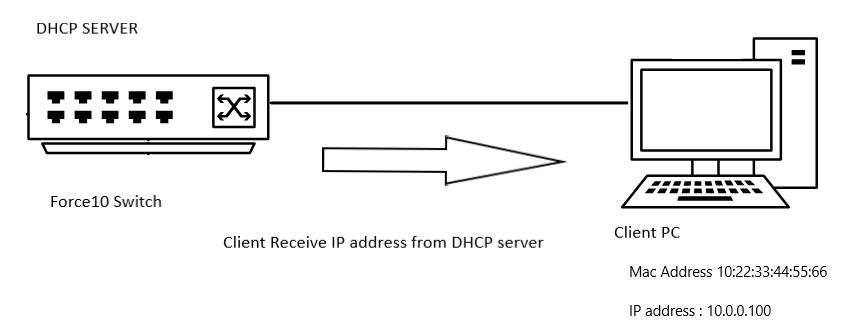
Voorbeeldconfiguratie
DELL# configure
DELL(conf)# ip dhcp server
DELL(config-dhcp)# pool DYNAMICPOOL
DELL(config-dhcp-DYNAMICPOOL)# network 10.0.0.0/24
DELL(config-dhcp-DYNAMICPOOL)# default-router 10.0.0.1
DELL(config-dhcp-DYNAMICPOOL)# dns-server 8.8.8.8
DELL(config-dhcp-DYNAMICPOOL)# exit
DELL(config-dhcp)#

DELL(config-dhcp)# pool STATICPOOL
DELL(config-dhcp-STATICPOOL)# host-address 10.0.0.100
DELL(config-dhcp-STATICPOOL)# hardware-address 10:22:33:44:55:66
DELL(config-dhcp-DYNAMICPOOL)# exit
DELL(config-dhcp)#

DELL(config-dhcp)# no disable
Verifiëren
DHCP-CONFIGURATIE
Als u de DHCP-serverconfiguratie en groepsdetails wilt controleren, gebruikt u de onderstaande opdracht:
DELL# show ip dhcp configuration pool
Voorbeeldresultaat
DELL# show ip dhcp configuration  pool

Pool Name            : DYNAMICPOOL
Pool Type            : Dynamic
Domain Name          :
Lease Time           : 1Day 0Hrs 0Mins
DNS Servers          : 8.8.8.8
Default Routers      : 10.0.0.1
Network              : 10.0.0.0 255.255.255.0

Pool Name            : STATICPOOL
Pool Type            : Manual
Domain Name          :
Lease Time           : 1Day 0Hrs 0Mins
DNS Servers          :
Default Routers      :
Hardware Address     : 10:22:33:44:55:66
Hardware Address Type: Ethernet
Host                 : 10.0.0.100 0.0.0.0
Bindend
Gebruik de onderstaande opdracht om het IP-adres te controleren dat door de DHCP-server wordt verstrekt:
DELL# show ip dhcp binding

Sample output
DELLEMC#show ip dhcp binding
 IP address      Hardware address   Lease expiration     Type
10.0.0.100      10:22:33:44:55:66    infinite             Manual
Total number of entries in the table: 1
Punten om te onthouden
- U moet een dynamisch poolbereik in dat netwerk hebben om de statische pool te laten werken
- Handmatige bindingen kunnen worden beschouwd als adresgroepen met één host. Er is geen limiet op het aantal handmatige bindingen,
- We kunnen slechts één handmatige binding per host configureren.
- Controleer of we een geldig host-IP-adres binnen het subnetbereik gebruiken als het host-IP-adres.