满足支持安全核心个人计算的 BIOS 和作系统要求
Summary: 本文提供了有关您的个人计算机上的 BIOS 选项设置的信息。 系统 BIOS 中的设置必须配置为支持安全核心 PC,在具有 Microsoft Windows 10 版本 19H1 及更高版本的英特尔 Whiskey Lake 系统上,对于具有 Windows 10 版本 20H1 及更高版本的英特尔 Comet Lake 系统,请在作系统中执行以下步骤。
This article applies to
This article does not apply to
This article is not tied to any specific product.
Not all product versions are identified in this article.
Instructions
目录:
Bios 是什么?
请参阅什么是 BIOS 以及如何更新您的戴尔系统上的 BIOS
如何设置
必须将系统 BIOS 中的以下设置配置为支持安全核心个人计算机。
- Secure Boot - Secure Boot Enable设置必须为 ON,并且 Microsoft UEFI CA 选项必须为 OFF(图 1)。
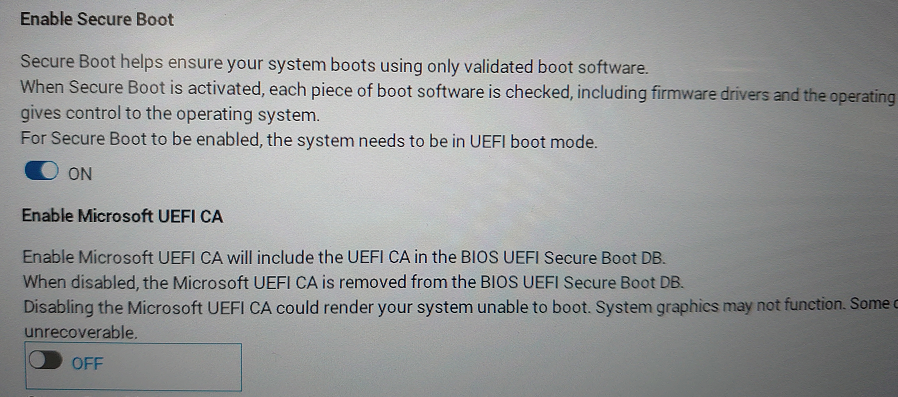
图 1.— BIOS 中的 Secure Boot Enable - 必须在“Security”、“SMM Security Mitigation”设置中选择“System Management Mode (SMM) SMM Security Mitigation”选项。(图2.)
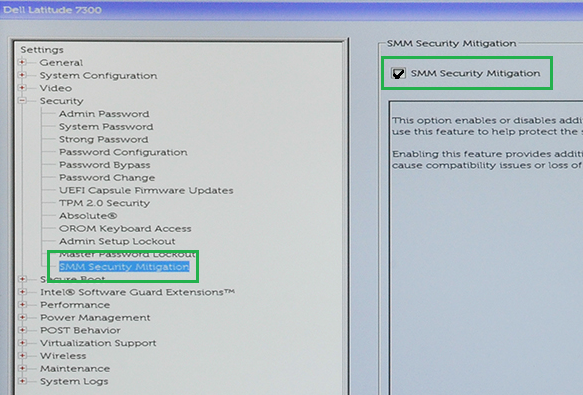
图2.— BIOS 中的 SMM Security Mitigation Enable - 必须在“Virtualization Support”、“VT for Direct I/O”设置中选择 VT for Direct I/O 选项。(图 3.)
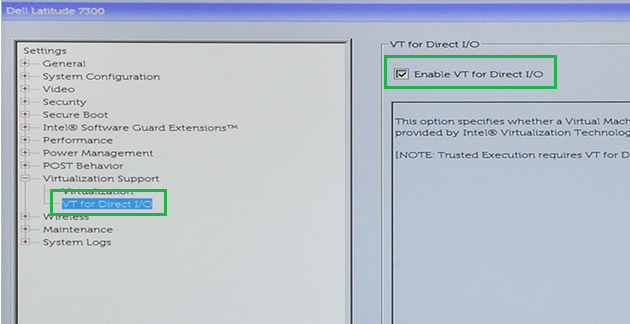
图3.— BIOS 中的 VT for Direct I/O Enable - 必须在 Virtualization Support, Trusted Execution 设置中启用 Trusted Execution 选项。(图 4.)
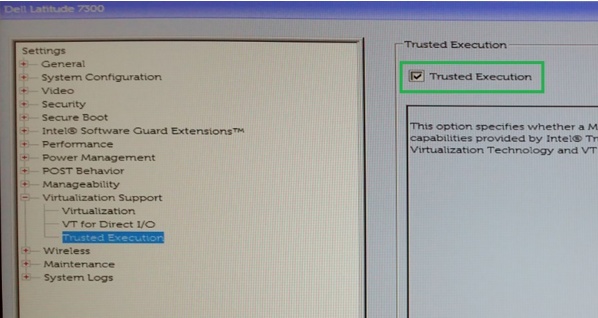
图4.— BIOS 中的 Trusted Execution Enable
对于具有 Microsoft Windows 10 版本 19H1 及更高版本的 Intel Whiskey Lake 计算机,或者具有 Windows 10 版本 20H1 及更高版本的 Intel Comet Lake 计算机,请在操作系统中执行以下步骤。
- 在设置下,更新和安全、Windows 安全、设备安全、核心隔离、核心隔离详细信息。(图 5.)
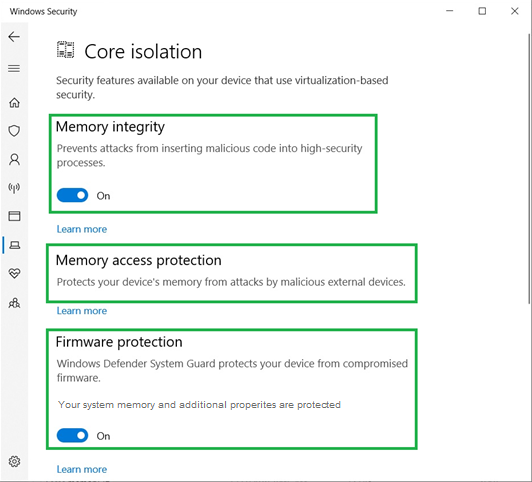
图5.— Windows 核心隔离设置- 设置内存完整性 - 开启
- 内存访问保护应为 - 开启
- 设置固件保护 - 开启
- 完成后,设备安全指示:“您的设备超出增强的硬件安全的要求。”(图 6.)
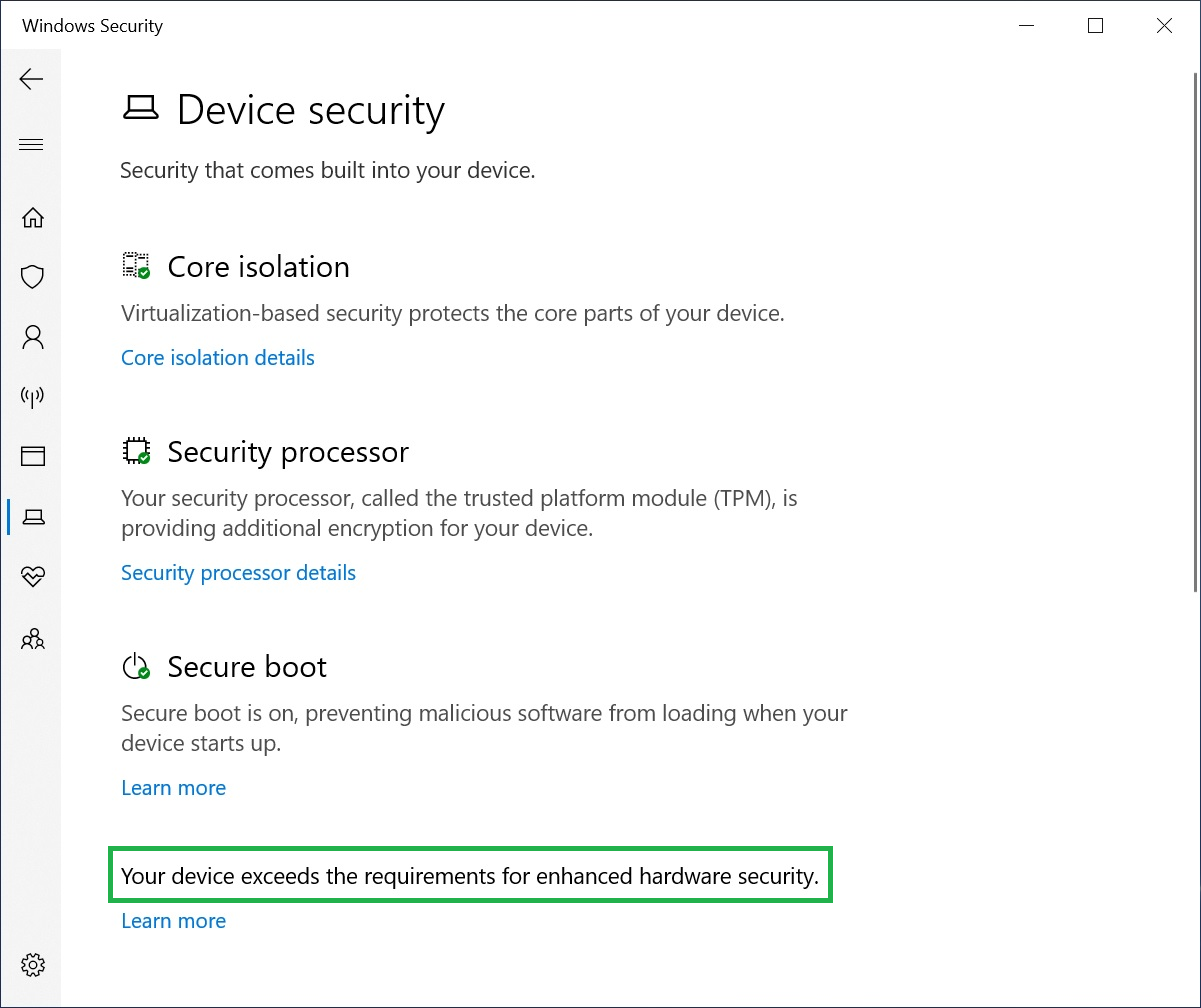
图6.- 您的设备超出增强的硬件安全的要求。
Affected Products
Workstations, Fixed Workstations, Mobile WorkstationsArticle Properties
Article Number: 000124038
Article Type: How To
Last Modified: 27 Oct 2025
Version: 7
Find answers to your questions from other Dell users
Support Services
Check if your device is covered by Support Services.