Kan BitLocker niet inschakelen na vervanging van de harde schijf
Summary: BitLocker wordt mogelijk niet ingeschakeld na vervanging van de harde schijf.
This article applies to
This article does not apply to
This article is not tied to any specific product.
Not all product versions are identified in this article.
Symptoms
Als u een probleem met de harde schijf tegenkomt op een schijf met BitLocker, nadat de schijf is vervangen, kunt u BitLocker zonder problemen inschakelen tijdens een nieuw besturingssysteem.
Cause
Als u om welke reden dan ook een fout tegenkomt waardoor de computer niet kan communiceren met de Trusted Platform Module (TPM), moet u de TPM-chip wissen en vervolgens BitLocker configureren.
Resolution
- Als u de TPM wilt wissen, start u op in het BIOS en zoekt u het gebied met de TPM-regeling. (Bevindt zich op dezelfde locatie voor TPM maar heeft mogelijk verschillende opties onder TPM)

- Kies ervoor om de TPM te wissen en klik vervolgens op ja om alle sleutels uit de TPM te verwijderen. (TPM moet actief blijven)
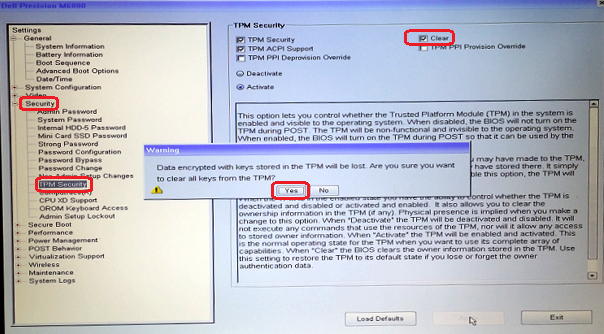
- Sluit vervolgens het BIOS af en start het BIOS opnieuw op en controleer of de TPM nog steeds als actief wordt gezien.
- Sluit het besturingssysteem af en start het besturingssysteem opnieuw op en configureer BitLocker vervolgens volgens het normale proces.
Affected Products
Desktops & All-in-Ones, Alienware, Dell All-in-One, Dell Pro All-in-One, Dell Pro Max Micro, Dell Pro Max Slim, Dell Pro Max Tower, Dell Pro Micro, Dell Pro Slim, Dell Pro Tower, Dell Slim, Dell Tower, Inspiron, Legacy Desktop Models, OptiPlex
, Vostro, XPS, G Series, G Series, Alienware, Dell Plus, Dell Pro, Dell Pro Max, Dell Pro Plus, Dell Pro Premium, Inspiron, Latitude, Dell Pro Rugged, Vostro, XPS, Legacy Laptop Models, Fixed Workstations, Mobile Workstations, Dell Pro Max Micro XE FCM2250, Dell Pro Max Slim XE FCS1250, Dell Pro Max Tower T2 XE FCT2250, Dell Pro Max 16 XE MC16250, Dell Pro Micro Plus XE QBM1250, Dell Pro Slim Plus XE5 QBS1250, Dell Pro Tower Plus XE5 QBT1250
...
Article Properties
Article Number: 000137422
Article Type: Solution
Last Modified: 13 May 2025
Version: 5
Find answers to your questions from other Dell users
Support Services
Check if your device is covered by Support Services.