Intel Graphics Command Center Total Color Correction Settings Do Not Affect Blu-Ray Discs Viewed in CyberLink PowerDVD 21
Summary: Learn about Blu-ray video color in CyberLink PowerDVD 21 being unchanged by using Intel Graphics Command Center total color correction settings.
This article applies to
This article does not apply to
This article is not tied to any specific product.
Not all product versions are identified in this article.
Symptoms
You may find that the Intel Graphics Command Center total color correction settings do not affect watching a Blu-ray in CyberLink PowerDVD 21.
To re-create the issue:
- Play a Blu-ray video using CyberLink PowerDVD 21.
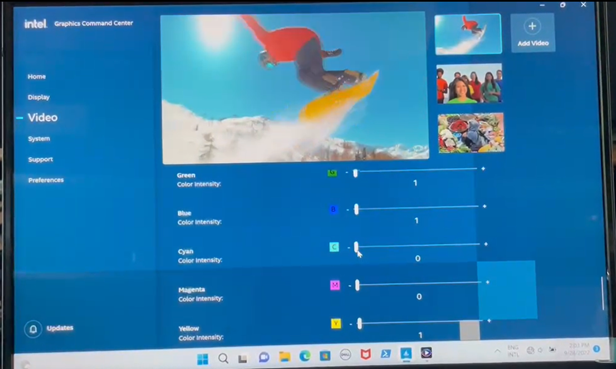
- Open Intel Graphics Command Center (IGCC).
- Go to the Video tab.
- Enable Total Color Correction and move all the sliders to random values.
- Test the Blu-ray video again in PowerDVD 21. The Blu-ray video has no color change.
Affected Products:
- CyberLink PowerDVD 21
Cause
CyberLink has commented that this is expected behavior. Color adjustment software should not affect Blu-ray video due to the current protection mechanism of Blu-ray video.
Resolution
This is expected behavior because Blu-ray video has its own high-definition digital content protection (HDCP) mechanism.
Affected Products
Inspiron 13 5330, Inspiron 14 5430, Inspiron 16 5630, Inspiron 16 7630 2-in-1, Vostro 16 5630Article Properties
Article Number: 000207750
Article Type: Solution
Last Modified: 24 Apr 2025
Version: 5
Find answers to your questions from other Dell users
Support Services
Check if your device is covered by Support Services.