Avamar VM 映像備份失敗,並顯示「No Proxy」,因為 Proxy 在 vCenter 中已關閉電源
Summary: Avamar VM 映像備份失敗,並顯示「No Proxy」,因為 Proxy 在 vCenter 中已關閉電源。
This article applies to
This article does not apply to
This article is not tied to any specific product.
Not all product versions are identified in this article.
Symptoms
Avamar UI 中的活動監視器顯示「No Proxy」。

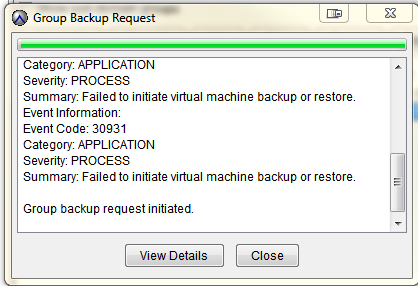
隨選 VMware 映射備份失敗,並顯示下列專案:
類別:應用程式
嚴重性:程式
摘要:無法啟動虛擬機備份或還原。
活動資訊:
事件代碼:30931
類別:應用程式
嚴重性:程式
摘要:無法啟動虛擬機備份或還原。
如果群組備份要求已啟動。
Cause
在 vCenter 中,Proxy 已關閉電源。
Resolution
- 開啟 vCenter 並檢查 Proxy 是否已關閉電源。
- 如果 Proxy 已關閉電源,請開啟 Proxy 電源。
Additional Information
下列文章討論具有相同一般「無 Proxy」錯誤的問題。
Affected Products
AvamarProducts
AvamarArticle Properties
Article Number: 000033569
Article Type: Solution
Last Modified: 05 Feb 2025
Version: 4
Find answers to your questions from other Dell users
Support Services
Check if your device is covered by Support Services.