VNXe: Secure Shell (SSH) op het systeem in- of uitschakelen. (Op te lossen door gebruiker)
Summary: Hiermee kunt u Secure Shell op het systeem in- of uitschakelen
This article applies to
This article does not apply to
This article is not tied to any specific product.
Not all product versions are identified in this article.
Instructions
Om verbinding te maken met het systeem en geavanceerd systeemonderhoud uit te voeren, moet u het Secure Shell-protocol (SSH) op beide storageprocessors (SP's) inschakelen. Met deze serviceactie kunt u servicetools, zoals serviceacties of servicescripts, uitvoeren op het VNXe-systeem. Zodra SSH is ingeschakeld, kunt u of uw serviceprovider de tools uitvoeren via een serviceportal. Wanneer de servicetools zijn uitgevoerd, schakelt u het SSH-protocol uit om ervoor te zorgen dat het systeem veilig is.
Ga voor meer informatie over het gebruik van servicescripts naar de EMC Online Support website. Zoek op de VNXe-productpagina naar VNXe-serviceopdrachten.
Notitie
Als SSH is ingeschakeld voordat het systeem opnieuw wordt opgestart, failover of het systeem in de servicemodus gaat, blijft SSH ingeschakeld.
SSH in- of uitschakelen:
Procedure
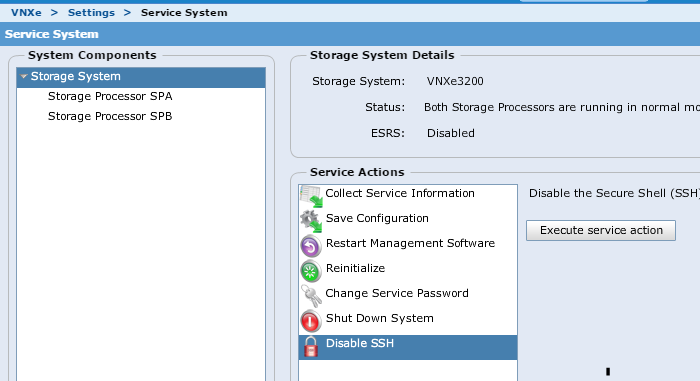

Ga voor meer informatie over het gebruik van servicescripts naar de EMC Online Support website. Zoek op de VNXe-productpagina naar VNXe-serviceopdrachten.
Notitie
Als SSH is ingeschakeld voordat het systeem opnieuw wordt opgestart, failover of het systeem in de servicemodus gaat, blijft SSH ingeschakeld.
SSH in- of uitschakelen:
Procedure
1. Klik op Instellingen > Servicesysteem.
2. Voer het servicewachtwoord in om toegang te krijgen tot de pagina Servicesysteem.
3. Selecteer Opslagsysteem onder Systeemcomponenten.
4. Selecteer onder ServiceactiesSSH inschakelen of SSH uitschakelen.
5. Klik op Serviceactie uitvoeren.
6.In het bevestigingsvenster op OK om SSH in of uit te schakelen.
2. Voer het servicewachtwoord in om toegang te krijgen tot de pagina Servicesysteem.
3. Selecteer Opslagsysteem onder Systeemcomponenten.
4. Selecteer onder ServiceactiesSSH inschakelen of SSH uitschakelen.
5. Klik op Serviceactie uitvoeren.
6.In het bevestigingsvenster op OK om SSH in of uit te schakelen.
Om in te loggen op SSH na het inschakelen van SSH in Unishpere
gebruikersnaam: service
password: het service wachtwoord dat je hebt toegewezen of het admin wachtwoord
gebruikersnaam: service
password: het service wachtwoord dat je hebt toegewezen of het admin wachtwoord
Affected Products
VNXe3200Products
VNX1 Series, VNX2 Series, VNXe1600, VNXe2 Series, VNXe3200Article Properties
Article Number: 000022454
Article Type: How To
Last Modified: 07 Nov 2025
Version: 5
Find answers to your questions from other Dell users
Support Services
Check if your device is covered by Support Services.