VNXe:在系統上啟用或停用安全殼層 (SSH)。(使用者可修正)
Summary: 啟用或停用系統上的安全殼層
This article applies to
This article does not apply to
This article is not tied to any specific product.
Not all product versions are identified in this article.
Instructions
若要連線至系統並執行進階系統維護,您必須在兩個儲存處理器 (SP) 上啟用 Secure Shell (SSH) 通訊協定。此服務操作允許您在 VNXe 系統上運行服務工具,例如服務操作或服務腳本。啟用 SSH 後,您或您的服務提供者可以通過服務門戶運行工具。服務工具執行完成後,請停用 SSH 通訊協定,以確保系統安全無虞。
若要深入瞭解如何使用服務指令檔,請前往 EMC 線上支援網站。從 VNXe 產品頁面搜尋 VNXe 服務命令。
便條
如果在系統重新開機、容錯移轉或系統進入維修模式之前啟用 SSH,SSH 會保持啟用狀態。
若要啟用或停用 SSH:
手續

若要深入瞭解如何使用服務指令檔,請前往 EMC 線上支援網站。從 VNXe 產品頁面搜尋 VNXe 服務命令。
便條
如果在系統重新開機、容錯移轉或系統進入維修模式之前啟用 SSH,SSH 會保持啟用狀態。
若要啟用或停用 SSH:
手續
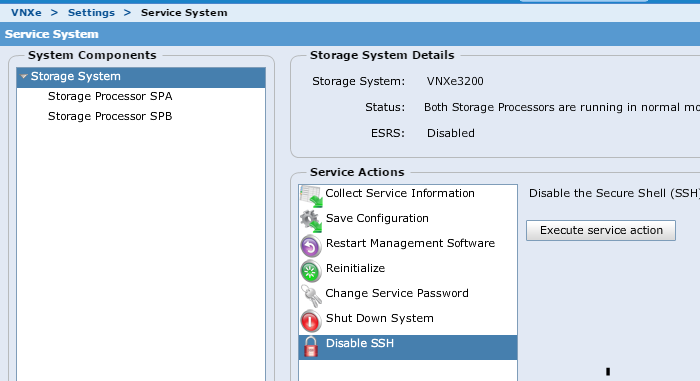
1. 按一下 設定 > 服務系統。
2. 輸入服務密碼以進入「服務系統」頁面。
3. 在 系統元件下方,選取 儲存系統。
4. 在 「維修動作」下方,選取 啟用 SSH 或 停用 SSH。
5. 按一下 「執行維修動作」。
6.In 確認對話方塊中,按一下 確定 以啟用或停用 SSH。
2. 輸入服務密碼以進入「服務系統」頁面。
3. 在 系統元件下方,選取 儲存系統。
4. 在 「維修動作」下方,選取 啟用 SSH 或 停用 SSH。
5. 按一下 「執行維修動作」。
6.In 確認對話方塊中,按一下 確定 以啟用或停用 SSH。
若要在以 Unishpere
使用者名稱中插入 SSH 後登入 SSH:service
password:您指定的服務密碼或管理員密碼
使用者名稱中插入 SSH 後登入 SSH:service
password:您指定的服務密碼或管理員密碼
Affected Products
VNXe3200Products
VNX1 Series, VNX2 Series, VNXe1600, VNXe2 Series, VNXe3200Article Properties
Article Number: 000022454
Article Type: How To
Last Modified: 07 Nov 2025
Version: 5
Find answers to your questions from other Dell users
Support Services
Check if your device is covered by Support Services.