NVP:FLR 或即时访问还原失败并显示“无法登录到 Data Domain 服务”
Summary: 虚拟机 (VM) FLR 或即时访问还原,并且无法通过 SSH 连接到 DD 并创建网络文件系统 (NFS) 导出。报告身份验证错误。
This article applies to
This article does not apply to
This article is not tied to any specific product.
Not all product versions are identified in this article.
Symptoms
NetWorker VMware Protection (NVP) 集成已通过 vProxy 设备进行配置。虚拟机的文件级恢复 (FLR) 或即时访问 (IA) 恢复失败,表明它无法向 Data Domain 进行身份验证。NetWorker Management Console (NMC) 中的恢复配置窗口和恢复日志中显示:
Virtual machine recovery failed: vProxy recovery failed with error message: Session "efc196c5-263c-446a-94bc-72f1a62687e1" failed. Error: Unable to create NFS export at '[DATA_DOMAIN]:/data/col1/[NETWORKER_SERVER]/Recover-[VPROXY]-efc196c5-263c-446a-94bc-72f1a62687e1': Unable to run SSH command, error Unable to make ssh connection to '[DATA_DOMAIN]', error ssh: handshake failed: ssh: unable to authenticate, attempted methods [none password], no supported methods remain.
错误也可能表现为:
Unable to create NFS export at 'DD_NAME:/data/col1/NSR_NAME/FLR-VPRXY_NAME-SESSION-ID': Unable to create NFS export. A 'POST' method to DataDomain at 'https://DD_NAME:3009/rest/v2.0/dd-systems/0/protocols/nfs/exports' responded with code 403: Error from DataDomain: 'User not authorized to execute this command: Possible reasons are user doesn't have enough permissions, user permissions have changed or session has expired. Please relogin!, code 5321'
Unable to create NFS export at 'DD_NAME:/data/col1/NSR_NAME/FLR-VPRXY_NAME-SESSION-ID': Unable to login while creating NFS export at 'DD_NAME:/data/col1/NSR_NAME/FLR-VPRXY_NAME-SESSION-ID': Failed to login to DataDomain service at 'https://DD_NAME:3009/rest/v1.0/auth'. A 'POST' method to DataDomain at 'https://DD_NAME:3009/rest/v1.0/auth' responded with code 400: Error from DataDomain: '**** Value of "password" is empty or invalid., code 5437'
提醒:错误可能会有所不同,具体取决于所涉及的 Data Domain作系统版本。该错误表示当 vProxy 尝试在 FLR 期间创建 NFS 导出时存在授权问题。
Cause
FLR(和即时访问还原)需要 NetWorker“Data Domain 系统”资源中的 DD 管理凭据。输入的凭据不正确、缺失,或者指定的帐户没有正确的角色。
Resolution
更新管理用户密码:
- 连接到 Data Domain Web 管理界面:
https://DD_HOSTNAME/ddem - 使用
sysadmin用户或其他管理用户帐户。 - 转至 管理 ->访问权限 ->本地用户。
- 确保 NetWorker 用于“管理用户”的帐户在 Data Domain 上具有“管理员”权限:
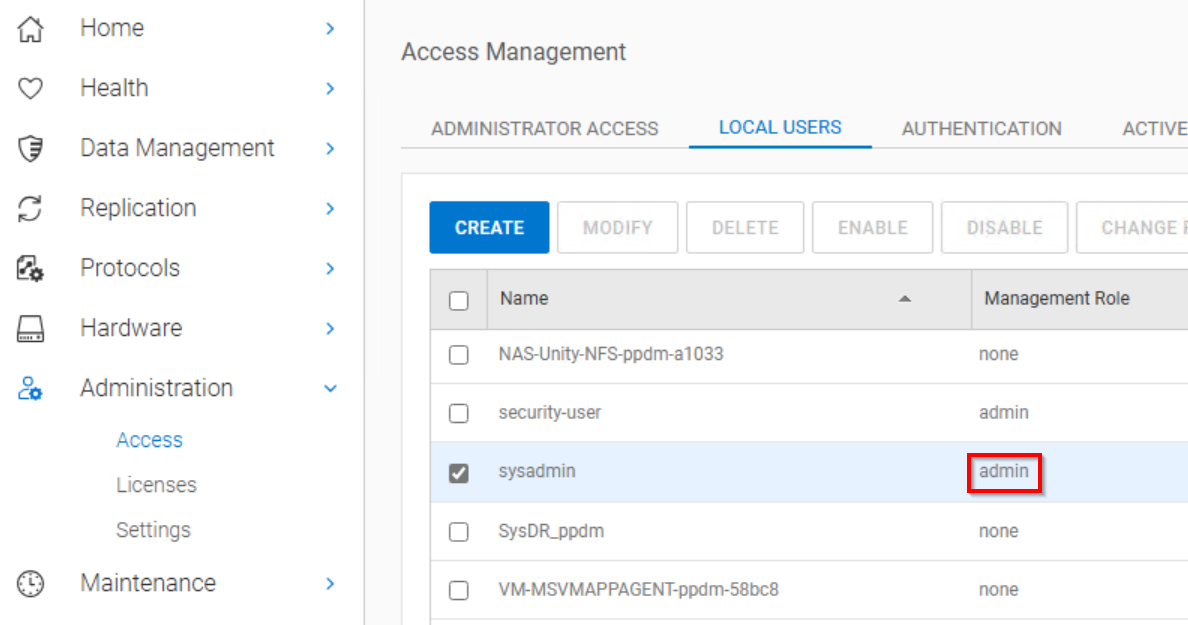
提醒:sysadmin 的默认角色是“admin”。如果您已创建另一个用户帐户供 NetWorker 用作管理用户,请确保将其设置为“admin”。
- 以 NetWorker 管理员身份从 NMC 或 NetWorker Web 用户界面 (NWUI) 连接到 NetWorker 服务器。
- 访问 Data Domain 系统。
-
- NMC:设备 —> Data Domain 系统
- NWUI:设备和介质 —> Data Domain 系统
- 打开 Data Domain 属性。
- 输入管理用户和密码:

- 单击 Save。
- 设置 DD 管理凭据后,再次执行 FLR(或即时访问还原)作。
Additional Information
在 FLR(或 IA 还原)期间,vProxy 使用 SSH 连接到 DD。指定的“管理用户”会在 Data Domain 上创建 NFS 导出。NFS 导出项作为 NFS 数据存储区装载到 VMware 中。NFS 导出项用于恢复虚拟机数据。虚拟机备份和其他还原方法的运行方式不同,因此此问题仅在 FLR 或 IA 还原作期间出现。
Affected Products
NetWorkerArticle Properties
Article Number: 000065426
Article Type: Solution
Last Modified: 11 Jun 2025
Version: 5
Find answers to your questions from other Dell users
Support Services
Check if your device is covered by Support Services.