Dell Latitude 3410: Funktionstastvejledning til tastatur
Summary: Følgende vejledning viser de tilgængelige tastaturgenveje og de funktioner, de udfører på den bærbare Dell Latitude 3410-pc.
This article applies to
This article does not apply to
This article is not tied to any specific product.
Not all product versions are identified in this article.
Symptoms
Tastaturgenvejsfunktioner
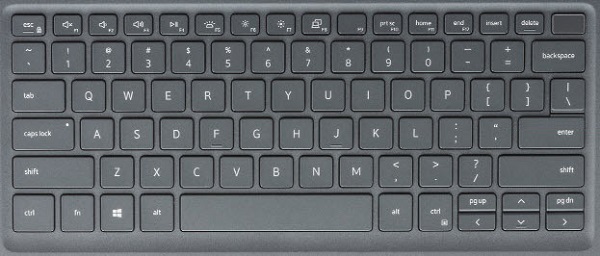
Nedenstående figur viser tastaturet med nøglefunktioner på den bærbare Latitude 3410-pc.
Cause
Nedenstående tabel viser en liste over kombinationstastfunktioner til genveje, der findes på den bærbare Latitude 3410-pc.
| Taster | Primær funktion | Sekundær funktionsmåde (fn + tast) |
|---|---|---|
| Fn + Esc | Esc |
Skift fn-tastlås |
| Fn + F1 |
Slå lyd fra |
F1 |
| Fn + F2 |
Lydstyrke ned |
F2 |
| Fn + F3 |
Lydstyrke op |
F3 |
| Fn + F4 |
Slå mikrofon fra |
F4 |
| Fn + F5 |
Tænd og sluk tastaturets baggrundslys. |
F5 |
| Fn + F6 |
Reducer lysstyrke |
F6 |
| Fn + F7 |
Øg lysstyrke |
F7 |
| Fn + F8 |
Skift til ekstern skærm |
F8 |
| Fn + F10 |
Print Screen |
F10 |
| Fn + F11 |
Start |
F11 |
| Fn + 12 |
End |
F12 |
| Fn + CTRL |
Åbn programmenuen |
-- |
Resolution
 Gå til vores vidensbase for tastatur for at få flere ressourcer og oplysninger.
 Du kan finde flere artikler og oplysninger på vores supportside for pegefeltet.
 Du kan også finde flere artikler og oplysninger på vores supportside for mus.
Affected Products
Latitude 3410Article Properties
Article Number: 000129898
Article Type: Solution
Last Modified: 19 Apr 2026
Version: 7
Find answers to your questions from other Dell users
Support Services
Check if your device is covered by Support Services.