PowerEdge: TPM shows version 'Not Available' and 'Date & time' incorrect information at Lifecycle controller
Summary: This article discusses PowerEdge models T150, T350, R250, and R350 where TPM shows version 'Not Available' and 'Date & time' incorrect information at Lifecycle controller.
This article applies to
This article does not apply to
This article is not tied to any specific product.
Not all product versions are identified in this article.
Symptoms
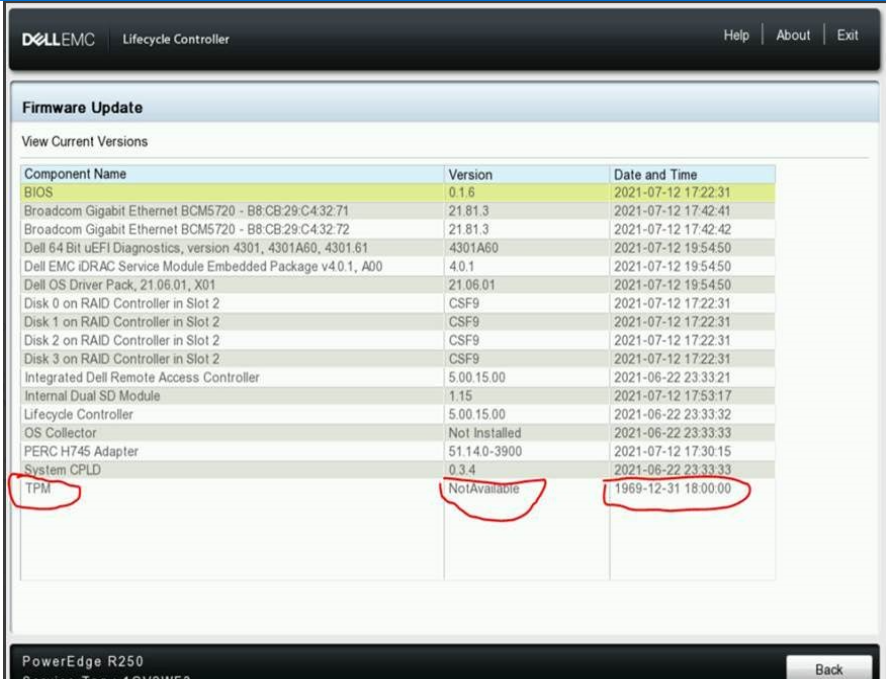
TPM platform T150, T350, R250, and R350 report the TPM's 'version' and 'Date & time' information is wrong at the Lifecycle controller.
Cause
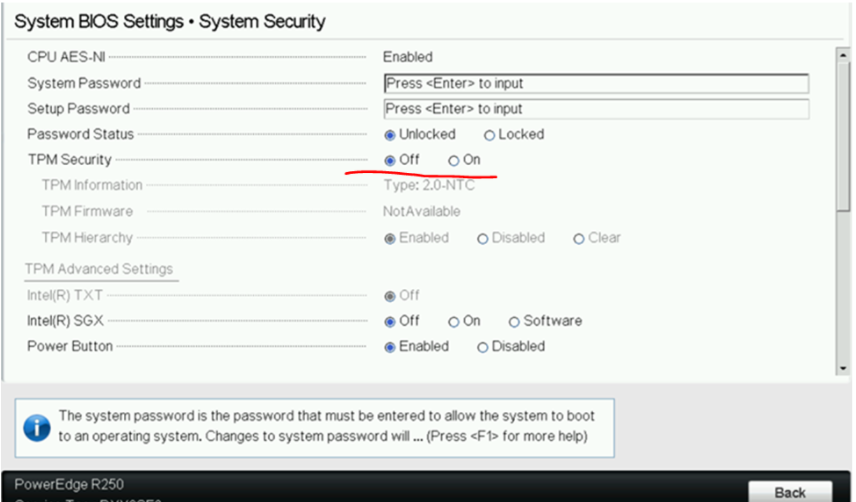
Because TPM is disabled at BIOS by default, TPM data cannot be read and LCUI loads the default date and time as TPM 'date and time'. It is an expected behavior.

Resolution
To enable TPM, select ON in BIOS Settings > System Security:
Affected Products
OEMR R250, OEMR R350, OEMR T350, PowerEdge R250, PowerEdge R350, PowerEdge T150, PowerEdge T350, Dell EMC vSAN T350 Ready NodeArticle Properties
Article Number: 000189798
Article Type: Solution
Last Modified: 23 May 2025
Version: 3
Find answers to your questions from other Dell users
Support Services
Check if your device is covered by Support Services.