AppSync:无法在日语 Windows Server 2019 上打开带有 ERR_SSL_VERSION_OR_CIPHER_MISMATCH 的 AppSync 4.5 控制台
Summary: 在日语版本的 Windows Server 2019 上安装 AppSync 4.5 时,无法访问 AppSync 4.5 控制台。如果 AppSync 服务器在日语 Windows Server 2019 上从 4.4.1.0 升级,则 AppSync 4.5 控制台不会发生此问题。
This article applies to
This article does not apply to
This article is not tied to any specific product.
Not all product versions are identified in this article.
Symptoms
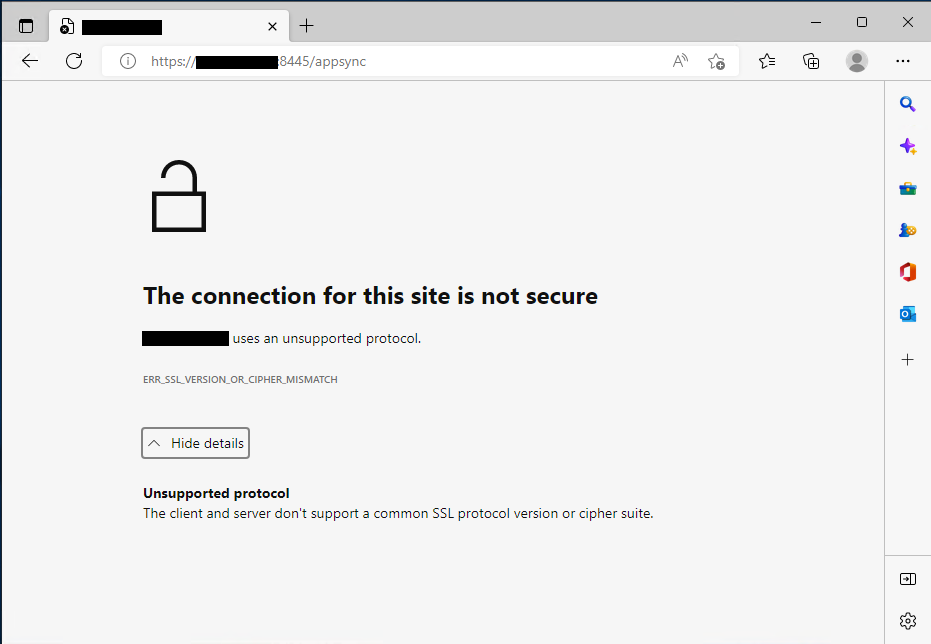
在日本 Windows Server 2019 上安装 AppSync 4.5 后,无法使用 ERR_SSL_VERSION_OR_CIPHER_MISMATCH 打开 AppSync 4.5 控制台。
从安装了 AppSync 4.5 的日语 Windows Server 2019 访问 AppSync 控制台。
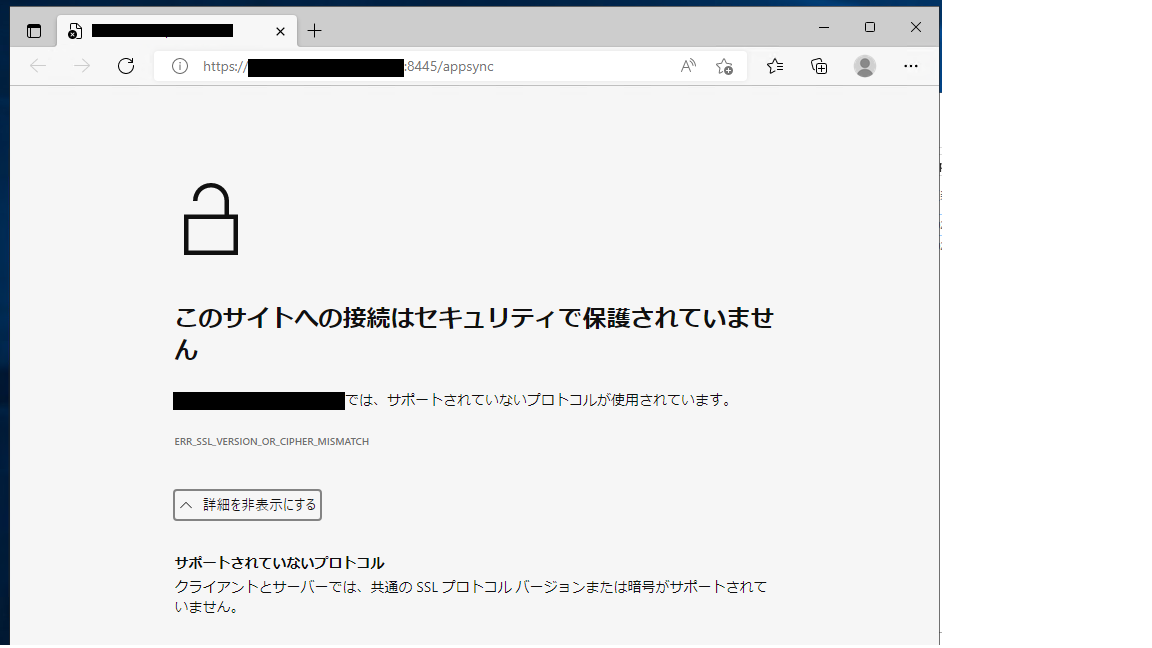
AppSync 控制台通过网络从英语 Windows Server 2019 访问日语版 Windows Server 2019 上的 AppSync 4.5 服务器。
症状详细信息:
名为“Dell_AppSync_Install_xx_xx_xxxx_xx_xx_xx.log”的安装日志指出未获取 IP。
从安装了 AppSync 4.5 的日语 Windows Server 2019 访问 AppSync 控制台。
AppSync 控制台通过网络从英语 Windows Server 2019 访问日语版 Windows Server 2019 上的 AppSync 4.5 服务器。
提醒:如果 AppSync 服务器在日本 Windows Server 2019 上从 4.4.1.0 升级到 4.5,则 AppSync 控制台访问权限正常。
症状详细信息:
名为“Dell_AppSync_Install_xx_xx_xxxx_xx_xx_xx.log”的安装日志指出未获取 IP。
命令.run():C:\Users\Administrator\AppData\Local\Temp\2\492110.tmp\executeScriptTmp0.bat:stdout [C:\Users\Administrator\AppData\Local\Temp\2\I1662800479\Windows>set IP= ]Cause
由于 IP 未在上面获取,我们在创建证书和 Keycloak 领域时发现问题。
Command.run(): C:\Users\Administrator\AppData\Local\Temp\2\492110.tmp\executeScriptTmp0.bat:stdout [C:\Users\Administrator\AppData\Local\Temp\2\I1662800479\Windows>"C:\EMC\AppSync"\jboss\_jre\bin\keytool.exe -genkey -alias appsync -keyalg RSA -validity 365 -keystore "C:\EMC\AppSync"\jboss\standalone\configuration\cas.jks -storetype JKS -ext SAN=DNS:win2019-117.ps-hes.local,,DNS:localhost -dname "cn=win2019-117.ps-hes.local, ou=AppSync, o=EMC, c=US" -keypass changeit -storepass changeit ]
Command.run(): C:\Users\Administrator\AppData\Local\Temp\2\492110.tmp\executeScriptTmp0.bat:stdout [keytoolƒGƒ‰�[: java.lang.Exception: Illegal item  in SAN=DNS:win2019-117.ps-hes.local,,DNS:localhost]

Command.run(): C:\Users\Administrator\AppData\Local\Temp\2\492110.tmp\executeScriptTmp0.bat:stdout [AppSync-INFO Keycloak Realm Creation]
Command.run(): C:\Users\Administrator\AppData\Local\Temp\2\492110.tmp\executeScriptTmp0.bat:stderr [Not a valid JSON document - Unexpected character (',' (code 44)): expected a valid value (JSON String, Number, Array, Object or token 'null', 'true' or 'false']
Command.run(): C:\Users\Administrator\AppData\Local\Temp\2\492110.tmp\executeScriptTmp0.bat:stderr [ at [Source: (StringReader); line: 888, column: 10]]
Command.complete(): process completed with exit code: 1
Resolution
解决方案:
AppSync 使用受支持的英文版 Windows。
根据 2022 年 9 月 15 日的 AppSync 支持矩阵,不支持非英语操作系统版本。
安装指南中对非英语操作系统版本的引用错误地指出了支持。
如有其他疑虑,请联系您当地的戴尔团队或致电提出服务请求,并留意本文。
AppSync 使用受支持的英文版 Windows。
根据 2022 年 9 月 15 日的 AppSync 支持矩阵,不支持非英语操作系统版本。
安装指南中对非英语操作系统版本的引用错误地指出了支持。
如有其他疑虑,请联系您当地的戴尔团队或致电提出服务请求,并留意本文。
Products
AppSyncArticle Properties
Article Number: 000203449
Article Type: Solution
Last Modified: 23 Feb 2023
Version: 6
Find answers to your questions from other Dell users
Support Services
Check if your device is covered by Support Services.