AppSync: Nie można otworzyć konsoli AppSync 4.5 przy użyciu ERR_SSL_VERSION_OR_CIPHER_MISMATCH w japońskim systemie Windows Server 2019
Summary: Nie można uzyskać dostępu do konsoli AppSync 4.5 po zainstalowaniu AppSync 4.5 w japońskim systemie Windows Server 2019. Problem nie dotyczy konsoli AppSync 4.5, jeśli serwer AppSync został uaktualniony z wersji 4.4.1.0 w japońskim systemie Windows Server 2019. ...
This article applies to
This article does not apply to
This article is not tied to any specific product.
Not all product versions are identified in this article.
Symptoms
Nie można otworzyć konsoli AppSync 4.5 przy użyciu ERR_SSL_VERSION_OR_CIPHER_MISMATCH po zainstalowaniu AppSync 4.5 w japońskim systemie Windows Server 2019.
Dostęp do konsoli AppSync z japońskiego systemu Windows Server 2019, na którym zainstalowano AppSync 4.5.
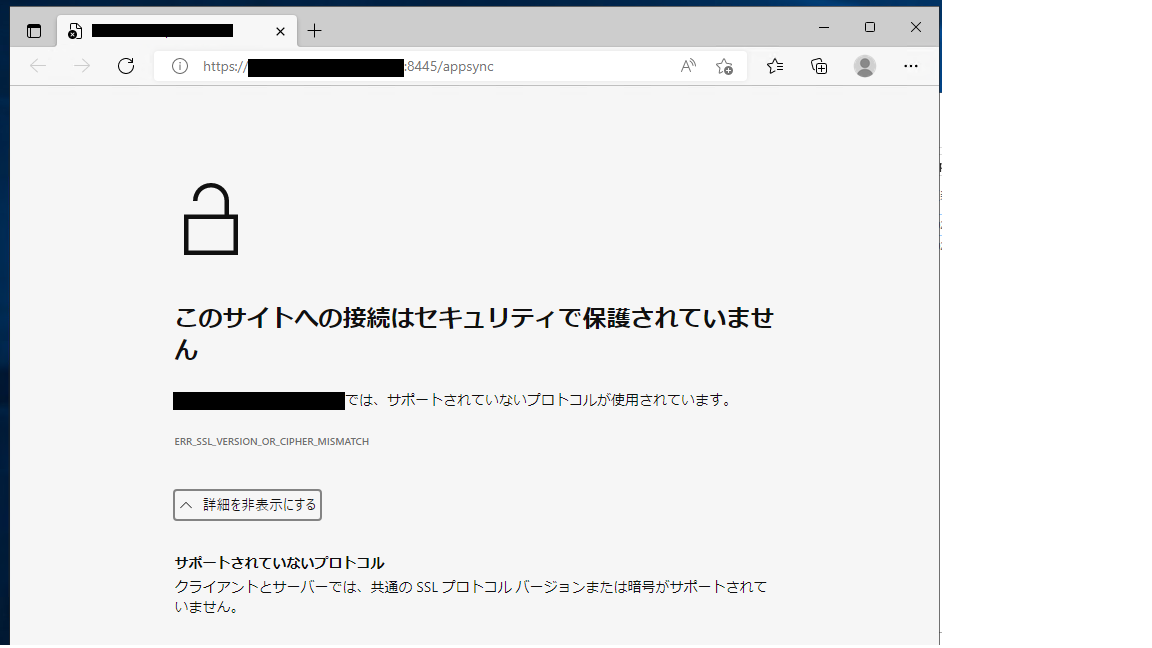
Dostęp do konsoli AppSync 4.5 serwera w japońskim systemie Windows Server 2019 z angielskiego systemu Windows Server 2019 za pośrednictwem sieci.
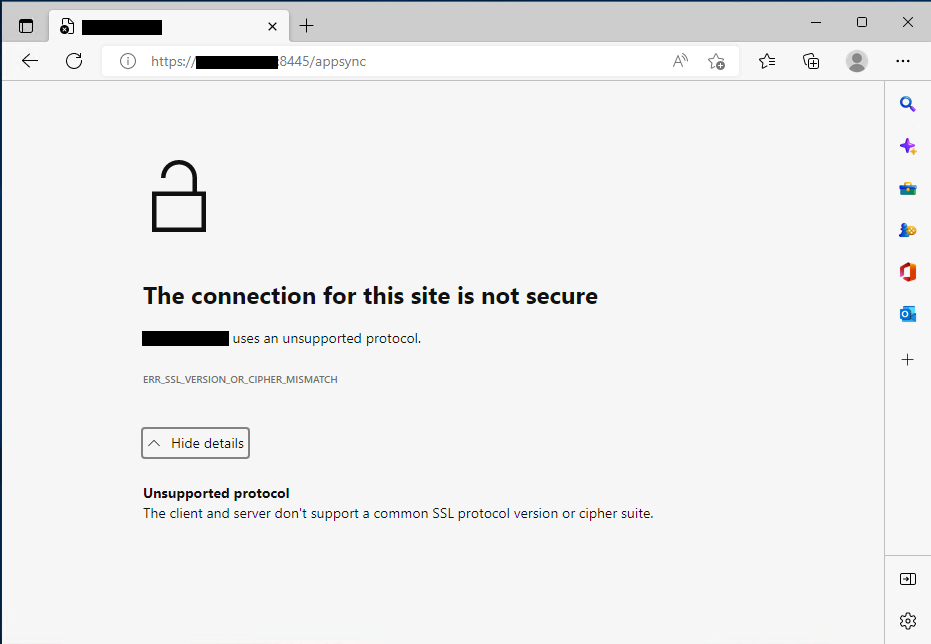
Szczegółowe informacje o objawach:
Dziennik instalacji o nazwie "Dell_AppSync_Install_xx_xx_xxxx_xx_xx_xx.log" stwierdza, że nie pobrano adresu IP.
Dostęp do konsoli AppSync z japońskiego systemu Windows Server 2019, na którym zainstalowano AppSync 4.5.
Dostęp do konsoli AppSync 4.5 serwera w japońskim systemie Windows Server 2019 z angielskiego systemu Windows Server 2019 za pośrednictwem sieci.
UWAGA: Dostęp do konsoli AppSync jest prawidłowy, jeśli serwer AppSync został uaktualniony do wersji 4.5 z 4.4.1.0 w japońskim systemie Windows Server 2019.
Szczegółowe informacje o objawach:
Dziennik instalacji o nazwie "Dell_AppSync_Install_xx_xx_xxxx_xx_xx_xx.log" stwierdza, że nie pobrano adresu IP.
Polecenie.run(): C:\Users\Administrator\AppData\Local\Temp\2\492110.tmp\executeScriptTmp0.bat:stdout [C:\Users\Administrator\AppData\Local\Temp\2\I1662800479\Windows>set IP= ]Cause
Ponieważ adres IP nie jest pobierany powyżej, widzimy problemy podczas tworzenia certyfikatów i obszaru Keycloak.
Command.run(): C:\Users\Administrator\AppData\Local\Temp\2\492110.tmp\executeScriptTmp0.bat:stdout [C:\Users\Administrator\AppData\Local\Temp\2\I1662800479\Windows>"C:\EMC\AppSync"\jboss\_jre\bin\keytool.exe -genkey -alias appsync -keyalg RSA -validity 365 -keystore "C:\EMC\AppSync"\jboss\standalone\configuration\cas.jks -storetype JKS -ext SAN=DNS:win2019-117.ps-hes.local,,DNS:localhost -dname "cn=win2019-117.ps-hes.local, ou=AppSync, o=EMC, c=US" -keypass changeit -storepass changeit ]
Command.run(): C:\Users\Administrator\AppData\Local\Temp\2\492110.tmp\executeScriptTmp0.bat:stdout [keytoolƒGƒ‰�[: java.lang.Exception: Illegal item  in SAN=DNS:win2019-117.ps-hes.local,,DNS:localhost]

Command.run(): C:\Users\Administrator\AppData\Local\Temp\2\492110.tmp\executeScriptTmp0.bat:stdout [AppSync-INFO Keycloak Realm Creation]
Command.run(): C:\Users\Administrator\AppData\Local\Temp\2\492110.tmp\executeScriptTmp0.bat:stderr [Not a valid JSON document - Unexpected character (',' (code 44)): expected a valid value (JSON String, Number, Array, Object or token 'null', 'true' or 'false']
Command.run(): C:\Users\Administrator\AppData\Local\Temp\2\492110.tmp\executeScriptTmp0.bat:stderr [ at [Source: (StringReader); line: 888, column: 10]]
Command.complete(): process completed with exit code: 1
Resolution
Rozwiązanie:
użyj obsługiwanej angielskiej wersji systemu Windows dla AppSync.
Wersje systemu operacyjnego w językach innych niż angielskie nie są obsługiwane zgodnie z matrycą zgodności AppSync z 15 września 2022 r.
Odniesienia do wersji systemu operacyjnego w wersji innej niż angielska w Podręczniku instalacji mają nieprawidłowy odczyt dotyczący obsługi.
W razie dodatkowych wątpliwości skontaktuj się z lokalnym zespołem firmy Dell lub zadzwoń w zgłoszeniu serwisowym i zapoznaj się z treścią tego artykułu.
użyj obsługiwanej angielskiej wersji systemu Windows dla AppSync.
Wersje systemu operacyjnego w językach innych niż angielskie nie są obsługiwane zgodnie z matrycą zgodności AppSync z 15 września 2022 r.
Odniesienia do wersji systemu operacyjnego w wersji innej niż angielska w Podręczniku instalacji mają nieprawidłowy odczyt dotyczący obsługi.
W razie dodatkowych wątpliwości skontaktuj się z lokalnym zespołem firmy Dell lub zadzwoń w zgłoszeniu serwisowym i zapoznaj się z treścią tego artykułu.
Products
AppSyncArticle Properties
Article Number: 000203449
Article Type: Solution
Last Modified: 23 Feb 2023
Version: 6
Find answers to your questions from other Dell users
Support Services
Check if your device is covered by Support Services.