Avamar - 由于 Tomcat 内存问题,PDM 和 SnapshotManager 无法正常工作
Summary: Avamar - 由于 Tomcat 内存问题,PDM 和 SnapshotManager 无法正常工作。
This article applies to
This article does not apply to
This article is not tied to any specific product.
Not all product versions are identified in this article.
Symptoms
Avamar 19.7+ 已实施用于检查代理状态的新功能。此功能连接到每个代理上的 CIM 服务(默认轮询周期为 30 分钟),以检查 Jetty、CIM、avagent、FLR 和 vmtools 等服务的状态。
在某些环境中,此默认代理状态轮询周期可能会导致 Tomcat 内存耗尽,从而造成 Snapshot Manager、Deploy Manager (PDM)、Client Manager (AAM) 和 Avamar DTLT 主页等服务中断。这些中断将持续存在,直至 Tomcat 服务重新启动为止。
Snapshot Manager 影响:
尝试使用 Snapshot Manager 时,Snapshot Manager 会在 60 分钟后报告超时错误 (curl 28)。
08:49:00 avvcbimage Info : Creating snapshot 'Avamar-1668329340b6216cd5819bac4f61bece141dc1f5035c2c07c6', quiesceFS=1 08:49:00 avvcbimage Info : SnapshotManager: createSnapshot for vmMoref = vm-161785 08:49:00 avvcbimage Info : SnapshotManager: POST to /snapshotmanager/vm/vm-161785/action/createSnapshot 09:49:00 avvcbimage Info : POST: curl_easy_perform failed. Path:/snapshotmanager/vm/vm-161785/action/createSnapshot Curl Error: 28 09:49:00 avvcbimage Info : SnapshotManager: failed to create snapshot 09:49:00 avvcbimage FATAL : [IMG0009] failed to create snapshot, possible timeout然后,标记虚拟机注释将再花费 60 分钟时间。
09:49:00 avvcbimage Info : backup Failed, only set annotation to LastBackupStatus
09:49:00 avvcbimage Info : AvSnapMgr::addSetAnnotation, vm-161785
09:49:00 avvcbimage Info : SnapshotManager: POST to /snapshotmanager/vm/vm-161785/action/markAnnotations
09:49:00 avvcbimage Info : Login by loginWS test is OK.
09:49:00 avvcbimage Info : Entering the 'final' phase of termination, timer trigger
10:49:00 avvcbimage Info : POST: curl_easy_perform failed. Path:/snapshotmanager/vm/vm-161785/action/markAnnotations Curl Error: 28
Tomcat:
出现该问题时,用户可在 Avamar Server 上位于“/usr/local/avamar/var/dtlt/webapp_log”的 Tomcat 日志中找到以下错误消息“java.lang.OutOfMemoryError”:root@ave198:/usr/local/avamar/var/log/vcs/#: grep 'java.lang.OutOfMemoryError' /usr/local/avamar-tomcat/logs/* /usr/local/avamar-tomcat/logs/catalina.2022-12-31.log: java.lang.OutOfMemoryError: Java heap space /usr/local/avamar-tomcat/logs/catalina.2022-12-31.log: java.lang.OutOfMemoryError: Java heap space /usr/local/avamar-tomcat/logs/catalina.2022-12-31.log: java.lang.OutOfMemoryError: Java heap spaceProxy Deployment Manager:
在此问题期间,用户将无法创建代理建议。在尝试使用 Proxy Deployment Manager (PDM) 时,他们可能会遇到 HTTP 404 或 HTTP 500 等错误,也可能不会收到任何错误。
Cause
Avamar 主要错误 337410:在某些环境中,默认代理状态轮询周期为 30 分钟,可能会导致 Tomcat 内存耗尽。
Resolution
解决方案:
Avamar 19.7:此问题已在累积热修复程序 337464 中得到解决
Avamar 19.8:此问题已在累积热修复程序 337920 中得到解决
手动安装说明:
为防止再次发生此内存耗尽问题,您可以禁用自动轮询代理状态检查功能。
1.编辑 Avamar Server 上位于 /etc/vcs/dm.properties 的 dm.properties 文件。
2.找到“enable_status_check_schedule”选项,并将其值更改为“false”。
之前
3.使用以下命令以 root 用户身份重新启动 Tomcat:emwebapp.sh --restart
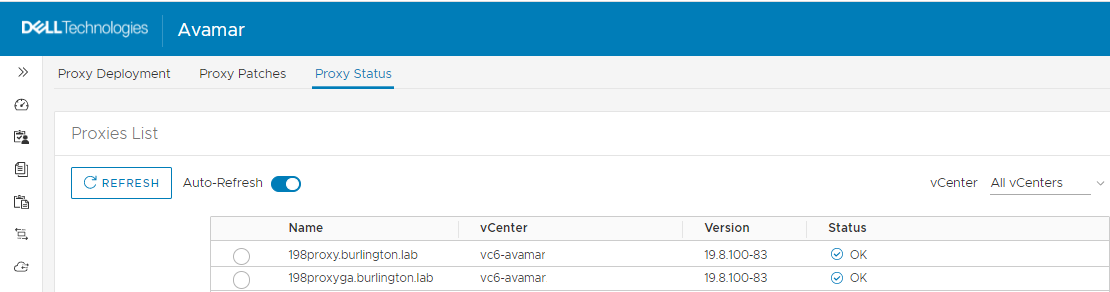
对代理管理状态功能的影响:不会影响此功能。当用户在 Avamar Web UI (AUI) 中进入“Proxy Management > Proxy Status”菜单时,仍将获取代理状态。
Avamar 19.7:此问题已在累积热修复程序 337464 中得到解决
Avamar 19.8:此问题已在累积热修复程序 337920 中得到解决
手动安装说明:
为防止再次发生此内存耗尽问题,您可以禁用自动轮询代理状态检查功能。
1.编辑 Avamar Server 上位于 /etc/vcs/dm.properties 的 dm.properties 文件。
2.找到“enable_status_check_schedule”选项,并将其值更改为“false”。
之前
# Is enable status check schedule, default value is true
enable_status_check_schedule=true
之后
# Is enable status check schedule, default value is true
enable_status_check_schedule=false
3.使用以下命令以 root 用户身份重新启动 Tomcat:emwebapp.sh --restart
对代理管理状态功能的影响:不会影响此功能。当用户在 Avamar Web UI (AUI) 中进入“Proxy Management > Proxy Status”菜单时,仍将获取代理状态。
Additional Information
备份失败的短期解决方法:
要在不重新启动 Tomcat 或更改 dm.properties 服务器文件的情况下解决备份失败,您可以在 Avamar 代理上禁用 Snapshot Manager。
有关进一步的指导,请参阅以下知识库文章:知识库文章 000181611“如何在 Avamar 代理上禁用 Snapshot Manager”。
Article Properties
Article Number: 000208326
Article Type: Solution
Last Modified: 26 Jun 2023
Version: 7
Find answers to your questions from other Dell users
Support Services
Check if your device is covered by Support Services.