Impostazioni audio non disponibili in Dell Display and Peripheral Manager 2.0 sui monitor Dell
Summary: Questo articolo fornisce informazioni su Dell Display and Peripheral Manager (DDPM) 2.0 per Windows che non supporta le impostazioni audio per i monitor serie S.
This article applies to
This article does not apply to
This article is not tied to any specific product.
Not all product versions are identified in this article.
Symptoms
Prodotti interessati:
- Dell S2425H
- Dell S2425HS
- Dell S2725H
- Dell S2725HS
- Dell S2725DS
Cause
DDPM v2.0 non supporta le impostazioni audio per i monitor serie S (S2425H, S2425HS, S2725H, S2725HS, S2725DS).
Resolution
Le impostazioni audio non sono più disponibili in DDPM v2.0 e Dell Technologies consiglia di utilizzare il menu OSD (On-Screen Display) sul monitor per regolare le impostazioni audio. Per le impostazioni OSD, fare riferimento alla guida utente del monitor.
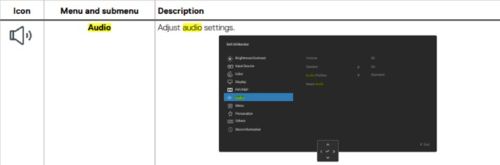
Per informazioni dettagliate su come spostarsi nel menu OSD (On-Screen Display) sul monitor, consultare la Guida dell'utente per il monitor in uso.
Consultare l'articolo della Knowledge Base Dell Manuali e documentazione del prodotto Dell per informazioni su come ottenere la guida per l'utente del monitor.
Affected Products
Dell Display and Peripheral Manager, Dell S2425H, Dell S2425HS, Dell S2725DS, Dell S2725H, Dell S2725HSArticle Properties
Article Number: 000247272
Article Type: Solution
Last Modified: 17 Sept 2025
Version: 4
Find answers to your questions from other Dell users
Support Services
Check if your device is covered by Support Services.