Powerflex 4.x - Cannot Save New Destination Protocol
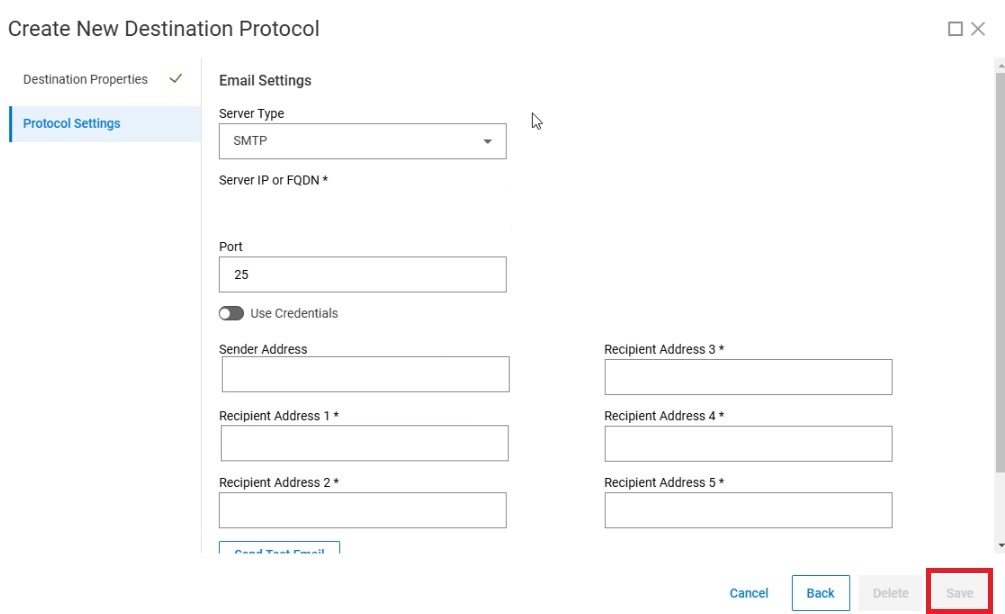
Summary: When attempting to create and save a new Destination Protocol, the Save button is grayed out.
This article applies to
This article does not apply to
This article is not tied to any specific product.
Not all product versions are identified in this article.
Symptoms
When attempting to save a new Destination Protocol in Settings > Events and Alerts, the Save button is grayed out.
Cause
All fields needed to create the new Destination Protocol have not been completed.
Resolution
All required fields in the Destination Properties pane and Protocol Settings pane must be entered before the Save button will become available.
Affected Products
PowerFlex appliance R650, PowerFlex appliance R640Products
PowerFlex rack, VxFlex Ready Nodes, PowerFlex custom node, PowerFlex appliance R6525, PowerFlex appliance R660, PowerFlex appliance R6625, Powerflex appliance R750, PowerFlex appliance R760, PowerFlex appliance R7625, PowerFlex appliance R740XD
, PowerFlex appliance R7525, PowerFlex appliance R840
...
Article Properties
Article Number: 000248546
Article Type: Solution
Last Modified: 30 Jan 2025
Version: 1
Find answers to your questions from other Dell users
Support Services
Check if your device is covered by Support Services.