OMEVV: 1.6.X - VMware vLCM Image Compliance Pre-Check May Fail for Standalone Hosts in vCenter Folder
Summary: The vSphere Lifecycle Management (vLCM) image mapped to a standalone host may fail to complete the pre-check of compliance when OpenManage Enterprise Integration for VMware vCenter (OMEVV) Hardware Security Module (HSM) is part of the image. ...
This article applies to
This article does not apply to
This article is not tied to any specific product.
Not all product versions are identified in this article.
Symptoms
OMEVV can be used as an HSM provider for vCenter vLCM to perform firmware updates on hosts along with ESXi and vendor add-ons. However, a vLCM image with OMEVV HSM (Baseline profile in OMEVV) mapped to a standalone host in a subfolder of vCenter may fail to complete the pre-check.
Errors observed in VLCM:
- "Host is not compatible with firmware included in the Firmware and Drivers Addon Baseline name"
- "Cluster Baselined with different baseline profile (baseline profile name)"

The issue is observed only for managed standalone hosts added to a folder and not for clusters added to a folder. This issue does not occur for managed hosts outside of a folder.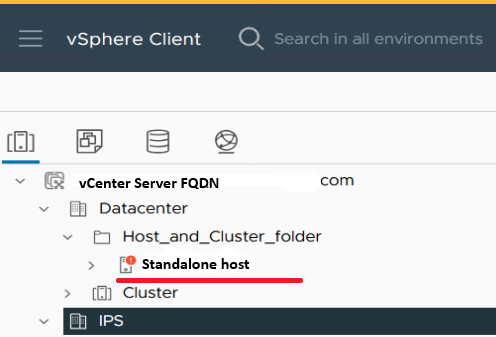
Cause
The system ID is not accurately identified when the host is present in the folder.
Resolution
Workaround:
- Move hosts out of the folder and refresh the vLCM image to resolve the issue.
- If the host must remain in the folder, remove the Firmware and Driver Add-on from the image and update the firmware using OMEVV firmware update wizards.
SOLUTION
This issue is expected to be fixed in the OMEVV release tentatively scheduled for March 2025.
Affected Products
OpenManage Enterprise Integration for VMware vCenterArticle Properties
Article Number: 000284562
Article Type: Solution
Last Modified: 19 May 2025
Version: 2
Find answers to your questions from other Dell users
Support Services
Check if your device is covered by Support Services.