Windows 11 Incorrect Operating System Version Reported
Summary: Learn about the specific applications and computer settings on Windows 11 detects the Operating System as Windows 10.
This article applies to
This article does not apply to
This article is not tied to any specific product.
Not all product versions are identified in this article.
Symptoms
In multiple applications and computer settings, Windows 11 identifies as Windows 10 to prevent application incompatibilities.
System settings that identify as Windows 10.
- Microsoft Edge and other Chromium-based browsers such as Google Chrome Browser, Brave, and so on show Windows 10 in the user agent string.
- Mozilla/5.0 (Windows NT 10.0; Win64; x64) AppleWebKit/537.36 (KHTML, like Gecko) Chrome/95.0.4638.69 Safari/537.36
- Websites that use the user agent string to identify the actual Windows version for digital content such as driver downloads and self-help may direct to incorrect content.
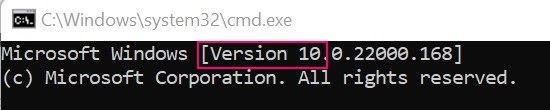
- Windows Command Prompt identifies as Version 10.
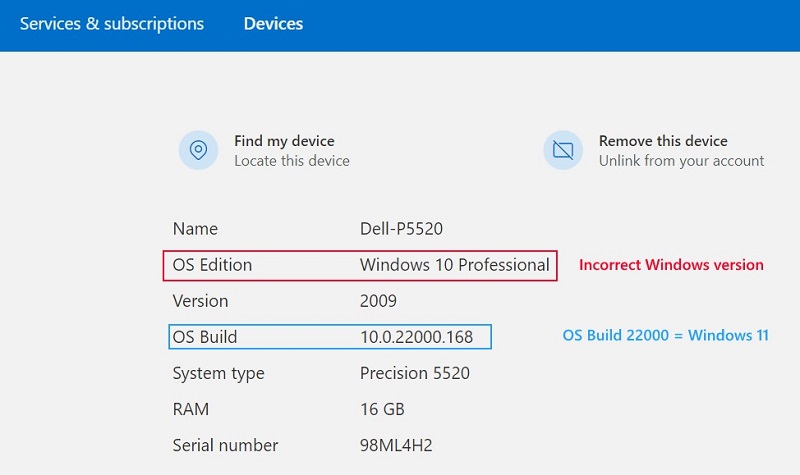
- Microsoft Account Device properties
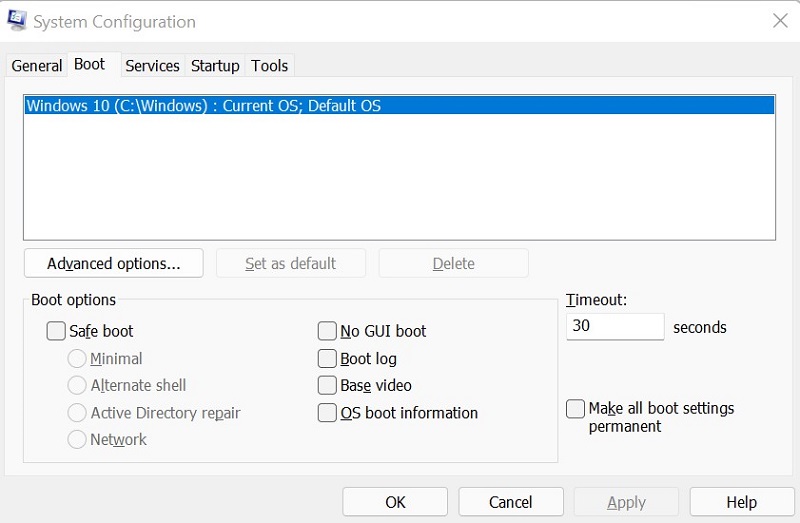
- System Configuration (MSCONFIG)
Cause
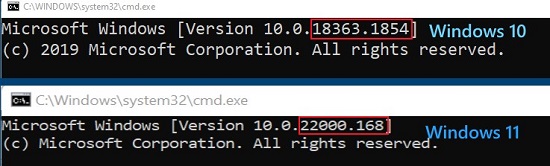
Windows uses the internal build number to differentiate between Windows 11 (Build 22000 and higher) and Windows 10 (Build below 22000).
Resolution
To correctly identify Windows version on your computer, use Winver. For instructions, see Microsoft knowledge-base article: Which version of Windows operating system am I running
Affected Products
Alienware, Inspiron, OptiPlex, Vostro, XPS, G Series, G Series, Alienware, Inspiron, Latitude, Vostro, XPS, Fixed Workstations, Mobile WorkstationsArticle Properties
Article Number: 000193571
Article Type: Solution
Last Modified: 12 May 2026
Version: 8
Find answers to your questions from other Dell users
Support Services
Check if your device is covered by Support Services.