NVP vProxy: FLR epäonnistuu Windows VM:ssä "Tiedostonimen, hakemiston nimen tai aseman otsikon syntaksi on virheellinen"
Summary: Windowsin virtuaalikoneen (VM) NetWorker VMware Protection (NVP) -tiedostotason palautus (FLR) epäonnistuu. Näyttöön tulee virhe "Joitakin objekteja tai suojausominaisuuksia ei voitu palauttaa" ...
Symptoms
NetWorker VMware Protection (NVP) vProxy File Level Restore (FLR) suoritetaan Windowsin virtuaalikoneessa (VM).
FLR-toiminto epäonnistuu ja ilmoittaa yleisestä virheestä "Joitakin esineitä tai suojausominaisuuksia ei voitu palauttaa"
Täydellinen palautusloki sisältää seuraavan virheen joillekin tiedostopoluille: "Tiedostonimen, hakemiston nimen tai taltion nimen syntaksi on virheellinen."
152791:nsrvproxy_flr_recover: vProxy Log Begins ===============================================
159373:nsrvproxy_flr_recover: vProxy Log: 2020-03-05T21:11:58Z NOTICE: [89] Logging to '/opt/emc/vproxy/runtime/logs/vflrd/recover-xxxxxxxxxxxxxxxxxxxxxxxxx.log' on host xxxx'.
159373:nsrvproxy_flr_recover: vProxy Log: 2020-03-05T21:11:58Z NOTICE: [89] Release: '4.0.0-11_1', Build number: '1', Build date: '2019-09-06T12:54:06Z'
- - - - - - - - - - - - - - -
- - - - - - - - - - - - - - -
159373:nsrvproxy_flr_recover: vProxy Log: 2020-03-05T15:11:59-06:00 ERROR:  [89] Discovery: Cannot get security data for 'C:\Program Files (x86)\EMC\vProxy FLR Agent\flr\mountpoints\FLRXXXXXXXXX\00-E$\SOME_LONG_PATH\FILE_NAME': The filename, directory name, or volume label syntax is incorrect.
159373:nsrvproxy_flr_recover: vProxy Log: 2020-03-05T15:11:59-06:00 WARN:   [89] Discovery: Cannot get attributes for 'C:\Program Files (x86)\EMC\vProxy FLR Agent\flr\mountpoints\FLRXXXXXXXXX\00-E$\SOME_LONG_PATH\FILE_NAME': Cannot get security data for 'C:\Program Files (x86)\EMC\vProxy FLR Agent\flr\mountpoints\FLRXXXXXXXXX\00-E$\SOME_LONG_PATH
159373:nsrvproxy_flr_recover: vProxy Log:  SOME_LONG_PATH\FILE_NAME': The filename, directory name, or volume label syntax is incorrect.
159373:nsrvproxy_flr_recover: vProxy Log: 2020-03-05T15:11:59-06:00 INFO:   [89] Recovery: XXXX - FILE_NAME
159373:nsrvproxy_flr_recover: vProxy Log: 2020-03-05T15:11:59-06:00 ERROR:  [89] Recovery: Cannot create handle for 'C:\Program Files (x86)\EMC\vProxy FLR Agent\flr\mountpoints\FLRXXXXXXXXX\00-E$\SOME_LONG_PATH\FILE_NAME': The system cannot find the path specified.
159373:nsrvproxy_flr_recover: vProxy Log: 2020-03-05T15:11:59-06:00 INFO:   [89] File copying completed.
159373:nsrvproxy_flr_recover: vProxy Log: 2020-03-05T15:11:59-06:00 ERROR:  [89] C:\Program Files (x86)\EMC\vProxy FLR Agent\bin\vflrcopy.exe: Some objects or security properties could not be recovered.
159373:nsrvproxy_flr_recover: vProxy Log: 2020-03-05T15:11:59-06:00 TRACE:  [89] C:\Program Files (x86)\EMC\vProxy FLR Agent\bin\vflrcopy.exe exiting with status code 0
152793:nsrvproxy_flr_recover: vProxy Log Ends =================================================
163541:nsrvproxy_flr_recover: FLR recovery failed: error code: 0, error message: Some objects or security properties could not be recovered.
162216:nsrvproxy_flr_recover: FLR recover job completed with errors.
164970:nsrvproxy_flr_recover: Requested termination of the FLR mount session 3098161.
FLR-lokit löytyvät seuraavista sijainneista:
- vProxy: /opt/emc/vproxy/runtime/logs/recycle/vflrd/DATE
- Windows-virtuaalikone: C:\Program Files (x86)\EMC\vProxy FLR Agent\logs\vflragentd\vflragentd-agent.log
Cause
Windowsin ohjelmointirajapinnat (erityisesti Win32) rajoittavat tiedostopolut 260 merkkiin (MAX_PATH). Tästä virheestä ilmoittavat tiedostopolut ovat yli 260 merkkiä pitkiä. Tämä rajoitus sisältää asemakirjaimen, kaksoispisteen, kenoviivat, kansioiden nimet, tiedostonimen ja tiedostotunnisteen.
Resolution
Windows 10:n versiosta 1607, Server 2016:sta ja uudemmista alkaen voit ottaa käyttöön pitkän polun tuen käyttöjärjestelmässä.
Tämä voidaan tehdä ryhmäkäytännön tai rekisterin muutoksella Windows-kohdevirtuaalikoneessa:
Siirry paikalliselle Group Policy Editor → Computer Configuration → Administrative Templates → System → Filesystem. Ota käyttöön "Ota käyttöön Win32 pitkät polut".
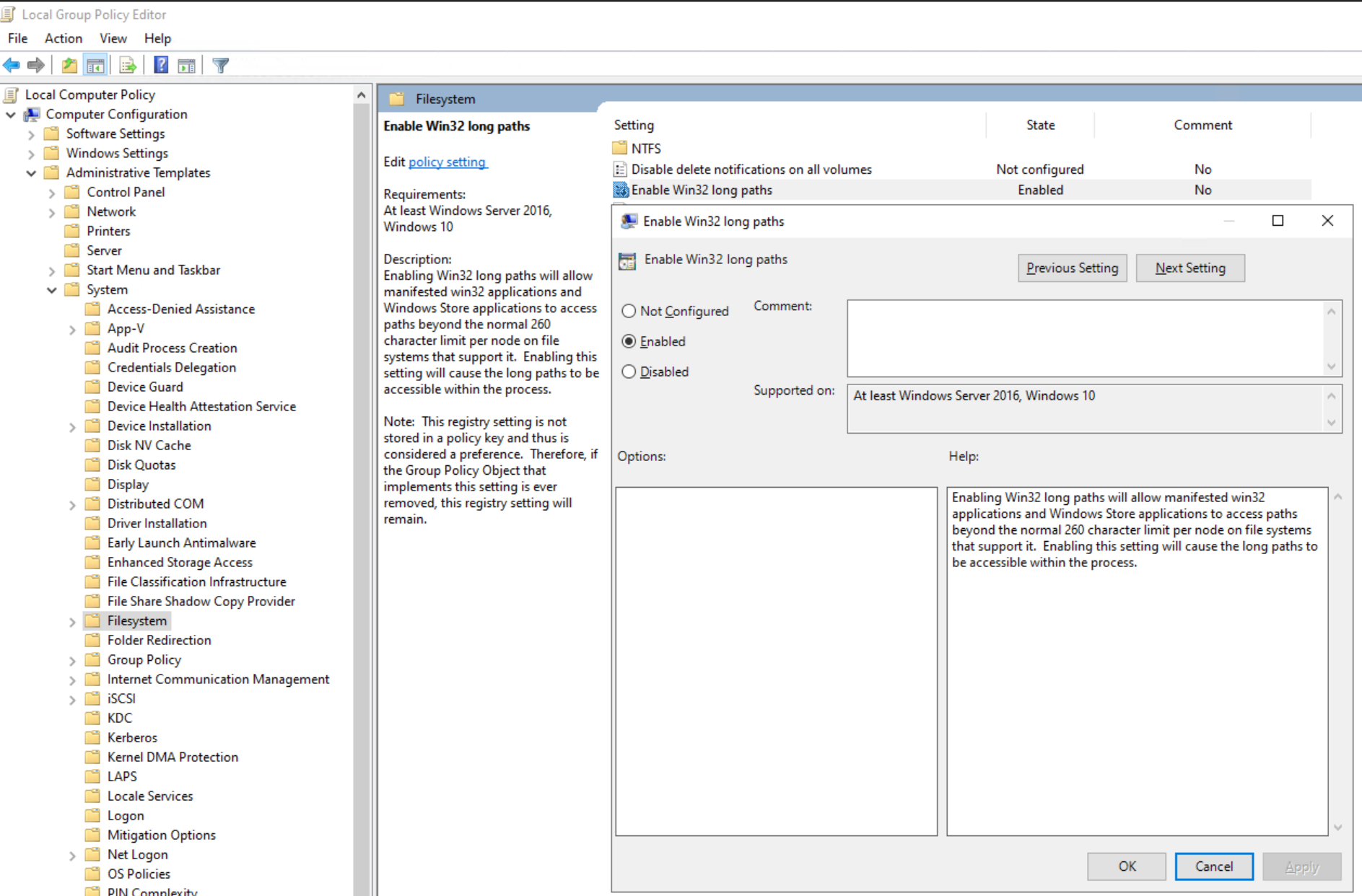
Voit myös määrittää rekisteriavaimen:
[HKEY_LOCAL_MACHINE\SYSTEM\CurrentControlSet\Control\FileSystem]
"LongPathsEnabled"=dword:00000001
Additional Information
Samanlaisia virheitä saattaa ilmetä, jos Windowsin deduplikointiominaisuus on käytössä: NVP vProxy: Windowsin virtuaalikoneen tiedostotason palautus epäonnistuu joissakin tiedostoissa ja antaa viestin "Joitakin objekteja tai suojausominaisuuksia ei voitu palauttaa".