NVP vProxy : FLR échoue sur une machine virtuelle Windows « La syntaxe du nom de fichier, du nom de répertoire ou du libellé du volume est incorrecte »
Summary: La restauration en mode fichier (FLR) de NetWorker VMware Protection (NVP) d’une machine virtuelle (VM) Windows échoue. L’erreur renvoyée est « Impossible de récupérer certains objets ou propriétés de sécurité » ...
Symptoms
La restauration en mode fichier (FLR) vProxy de NetWorker VMware Protection (NVP) est exécutée sur une machine virtuelle (VM) Windows.
L’opération FLR échoue, signalant l’erreur générique « Certains objets ou propriétés de sécurité n’ont pas pu être restaurés ».
Le journal de restauration complète détaille l’erreur suivante pour certains chemins d’accès aux fichiers : « Le nom de fichier, le nom de répertoire ou la syntaxe du libellé du volume est incorrect. »
152791:nsrvproxy_flr_recover: vProxy Log Begins ===============================================
159373:nsrvproxy_flr_recover: vProxy Log: 2020-03-05T21:11:58Z NOTICE: [89] Logging to '/opt/emc/vproxy/runtime/logs/vflrd/recover-xxxxxxxxxxxxxxxxxxxxxxxxx.log' on host xxxx'.
159373:nsrvproxy_flr_recover: vProxy Log: 2020-03-05T21:11:58Z NOTICE: [89] Release: '4.0.0-11_1', Build number: '1', Build date: '2019-09-06T12:54:06Z'
- - - - - - - - - - - - - - -
- - - - - - - - - - - - - - -
159373:nsrvproxy_flr_recover: vProxy Log: 2020-03-05T15:11:59-06:00 ERROR:  [89] Discovery: Cannot get security data for 'C:\Program Files (x86)\EMC\vProxy FLR Agent\flr\mountpoints\FLRXXXXXXXXX\00-E$\SOME_LONG_PATH\FILE_NAME': The filename, directory name, or volume label syntax is incorrect.
159373:nsrvproxy_flr_recover: vProxy Log: 2020-03-05T15:11:59-06:00 WARN:   [89] Discovery: Cannot get attributes for 'C:\Program Files (x86)\EMC\vProxy FLR Agent\flr\mountpoints\FLRXXXXXXXXX\00-E$\SOME_LONG_PATH\FILE_NAME': Cannot get security data for 'C:\Program Files (x86)\EMC\vProxy FLR Agent\flr\mountpoints\FLRXXXXXXXXX\00-E$\SOME_LONG_PATH
159373:nsrvproxy_flr_recover: vProxy Log:  SOME_LONG_PATH\FILE_NAME': The filename, directory name, or volume label syntax is incorrect.
159373:nsrvproxy_flr_recover: vProxy Log: 2020-03-05T15:11:59-06:00 INFO:   [89] Recovery: XXXX - FILE_NAME
159373:nsrvproxy_flr_recover: vProxy Log: 2020-03-05T15:11:59-06:00 ERROR:  [89] Recovery: Cannot create handle for 'C:\Program Files (x86)\EMC\vProxy FLR Agent\flr\mountpoints\FLRXXXXXXXXX\00-E$\SOME_LONG_PATH\FILE_NAME': The system cannot find the path specified.
159373:nsrvproxy_flr_recover: vProxy Log: 2020-03-05T15:11:59-06:00 INFO:   [89] File copying completed.
159373:nsrvproxy_flr_recover: vProxy Log: 2020-03-05T15:11:59-06:00 ERROR:  [89] C:\Program Files (x86)\EMC\vProxy FLR Agent\bin\vflrcopy.exe: Some objects or security properties could not be recovered.
159373:nsrvproxy_flr_recover: vProxy Log: 2020-03-05T15:11:59-06:00 TRACE:  [89] C:\Program Files (x86)\EMC\vProxy FLR Agent\bin\vflrcopy.exe exiting with status code 0
152793:nsrvproxy_flr_recover: vProxy Log Ends =================================================
163541:nsrvproxy_flr_recover: FLR recovery failed: error code: 0, error message: Some objects or security properties could not be recovered.
162216:nsrvproxy_flr_recover: FLR recover job completed with errors.
164970:nsrvproxy_flr_recover: Requested termination of the FLR mount session 3098161.
Les journaux FLR se trouvent aux emplacements suivants :
- vProxy : /opt/emc/vproxy/runtime/logs/recycle/vflrd/DATE
- Machine virtuelle Windows : C :\Program Files (x86)\EMC\vProxy FLR Agent\logs\vflragentd\vflragentd-agent.log
Cause
Les API Windows (en particulier Win32) limitent les chemins d’accès aux fichiers à 260 caractères (MAX_PATH). Les chemins d’accès au fichier signalant cette erreur dépassent 260 caractères. Cette limite inclut la lettre de lecteur, les deux-points, les barres obliques inverses, les noms de dossiers, le nom de fichier et l’extension de fichier.
Resolution
À partir de Windows 10 version 1607, Server 2016 et versions ultérieures, vous pouvez activer la prise en charge du chemin long sur le système d’exploitation.
Cela peut être fait à l’aide d’une stratégie de groupe ou d’une modification du registre sur la machine virtuelle Windows cible :
Aller à Local Group Policy Editor → Computer Configuration → Administrative Templates → System → Filesystem. Activez « Enable Win32 long paths ».
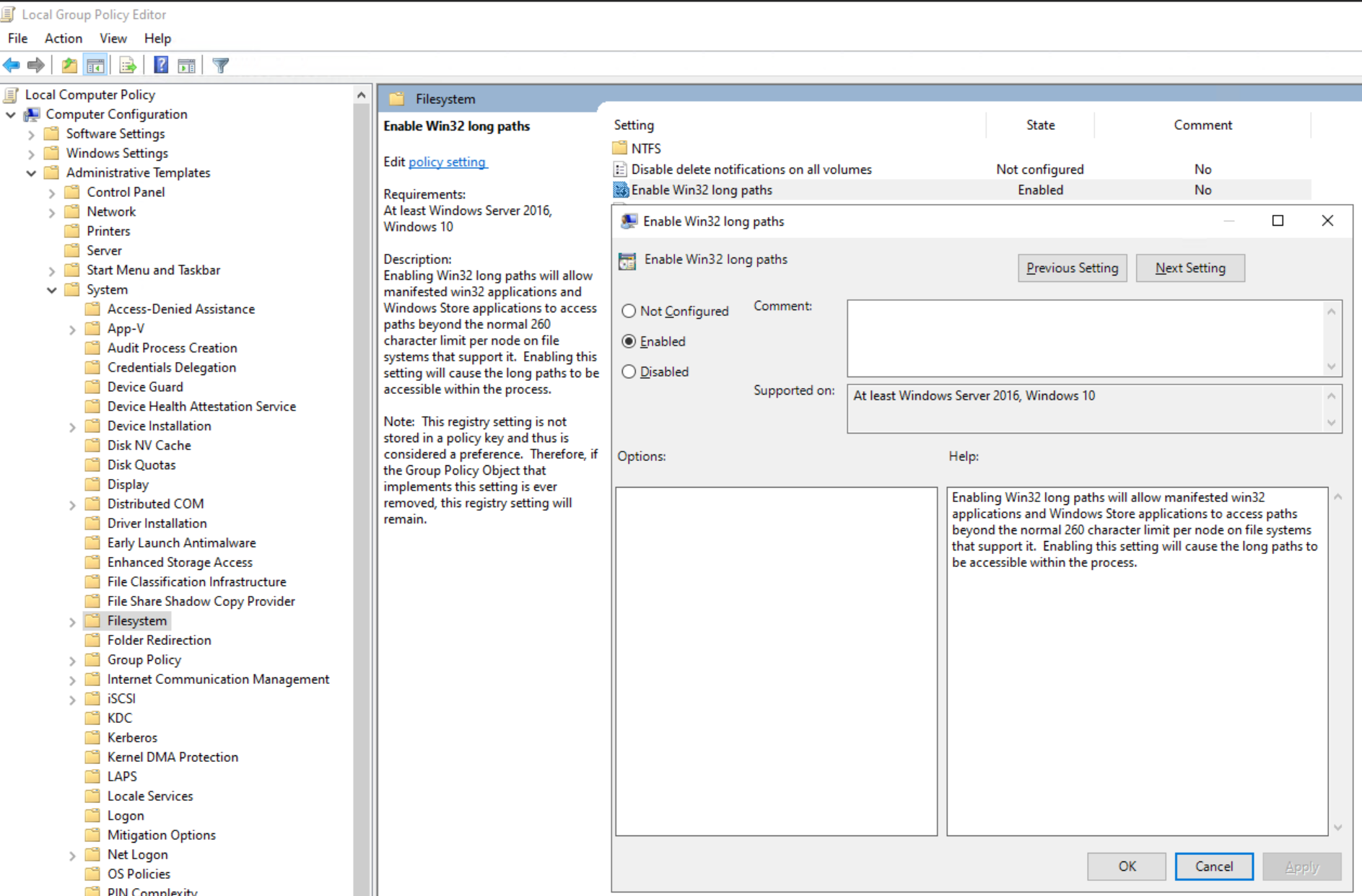
Ou définissez la clé de registre :
[HKEY_LOCAL_MACHINE\SYSTEM\CurrentControlSet\Control\FileSystem]
"LongPathsEnabled"=dword:00000001
Additional Information
Des erreurs similaires peuvent s’afficher si la fonction de déduplication Windows est activée : NVP vProxy : La restauration en mode fichier de la machine virtuelle Windows échoue pour certains fichiers avec le message « Certains objets ou propriétés de sécurité n’ont pas pu être restaurés ».