NVP vProxy:Windows VMでFLRが失敗し、「ファイル名、ディレクトリー名、またはボリューム ラベルの構文が正しくありません」
Summary: Windows仮想マシン(VM)のNetWorker VMware Protection (NVP)ファイル レベル リストア(FLR)が失敗します。返されるエラーは、「一部のオブジェクト、またはセキュリティ プロパティを回復できませんでした」です。
Symptoms
NetWorker VMware Protection (NVP) vProxy FLR(ファイル レベル リストア)は、Windows仮想マシン(VM)上で実行されます。
FLR操作が失敗し、「一部のオブジェクトまたはセキュリティ プロパティをリカバリーできませんでした」という一般的なエラーが報告されます
フル リカバリー ログには、一部のファイル パスに関する次のエラーの詳細が表示されます。「ファイル名、ディレクトリー名、またはボリューム ラベルの構文が正しくありません。」
152791:nsrvproxy_flr_recover: vProxy Log Begins ===============================================
159373:nsrvproxy_flr_recover: vProxy Log: 2020-03-05T21:11:58Z NOTICE: [89] Logging to '/opt/emc/vproxy/runtime/logs/vflrd/recover-xxxxxxxxxxxxxxxxxxxxxxxxx.log' on host xxxx'.
159373:nsrvproxy_flr_recover: vProxy Log: 2020-03-05T21:11:58Z NOTICE: [89] Release: '4.0.0-11_1', Build number: '1', Build date: '2019-09-06T12:54:06Z'
- - - - - - - - - - - - - - -
- - - - - - - - - - - - - - -
159373:nsrvproxy_flr_recover: vProxy Log: 2020-03-05T15:11:59-06:00 ERROR:  [89] Discovery: Cannot get security data for 'C:\Program Files (x86)\EMC\vProxy FLR Agent\flr\mountpoints\FLRXXXXXXXXX\00-E$\SOME_LONG_PATH\FILE_NAME': The filename, directory name, or volume label syntax is incorrect.
159373:nsrvproxy_flr_recover: vProxy Log: 2020-03-05T15:11:59-06:00 WARN:   [89] Discovery: Cannot get attributes for 'C:\Program Files (x86)\EMC\vProxy FLR Agent\flr\mountpoints\FLRXXXXXXXXX\00-E$\SOME_LONG_PATH\FILE_NAME': Cannot get security data for 'C:\Program Files (x86)\EMC\vProxy FLR Agent\flr\mountpoints\FLRXXXXXXXXX\00-E$\SOME_LONG_PATH
159373:nsrvproxy_flr_recover: vProxy Log:  SOME_LONG_PATH\FILE_NAME': The filename, directory name, or volume label syntax is incorrect.
159373:nsrvproxy_flr_recover: vProxy Log: 2020-03-05T15:11:59-06:00 INFO:   [89] Recovery: XXXX - FILE_NAME
159373:nsrvproxy_flr_recover: vProxy Log: 2020-03-05T15:11:59-06:00 ERROR:  [89] Recovery: Cannot create handle for 'C:\Program Files (x86)\EMC\vProxy FLR Agent\flr\mountpoints\FLRXXXXXXXXX\00-E$\SOME_LONG_PATH\FILE_NAME': The system cannot find the path specified.
159373:nsrvproxy_flr_recover: vProxy Log: 2020-03-05T15:11:59-06:00 INFO:   [89] File copying completed.
159373:nsrvproxy_flr_recover: vProxy Log: 2020-03-05T15:11:59-06:00 ERROR:  [89] C:\Program Files (x86)\EMC\vProxy FLR Agent\bin\vflrcopy.exe: Some objects or security properties could not be recovered.
159373:nsrvproxy_flr_recover: vProxy Log: 2020-03-05T15:11:59-06:00 TRACE:  [89] C:\Program Files (x86)\EMC\vProxy FLR Agent\bin\vflrcopy.exe exiting with status code 0
152793:nsrvproxy_flr_recover: vProxy Log Ends =================================================
163541:nsrvproxy_flr_recover: FLR recovery failed: error code: 0, error message: Some objects or security properties could not be recovered.
162216:nsrvproxy_flr_recover: FLR recover job completed with errors.
164970:nsrvproxy_flr_recover: Requested termination of the FLR mount session 3098161.
FLRログは、次の場所にあります。
- vProxy:/opt/emc/vproxy/runtime/logs/recycle/vflrd/DATE
- Windows VM: C:\Program Files (x86)\EMC\vProxy FLR Agent\logs\vflragentd\vflragentd-agent.log
Cause
Windows API(特にWin32)では、ファイル パスが260文字(MAX_PATH)に制限されています。このエラーを報告するファイル パスは260文字を超えています。この制限には、ドライブ名、コロン、バックスラッシュ、フォルダー名、ファイル名、ファイル拡張子が含まれます。
Resolution
Windows 10バージョン1607、Server 2016以降では、オペレーティング システムでロング パス サポートを有効にすることができます。
これは、ターゲットのWindows VMでグループ ポリシーまたはレジストリーを変更することで実行できます。
ローカルに移動 Group Policy Editor → Computer Configuration → Administrative Templates → System → Filesystemの詳細を確認してください。[Enable Win32 long paths]を有効にします。
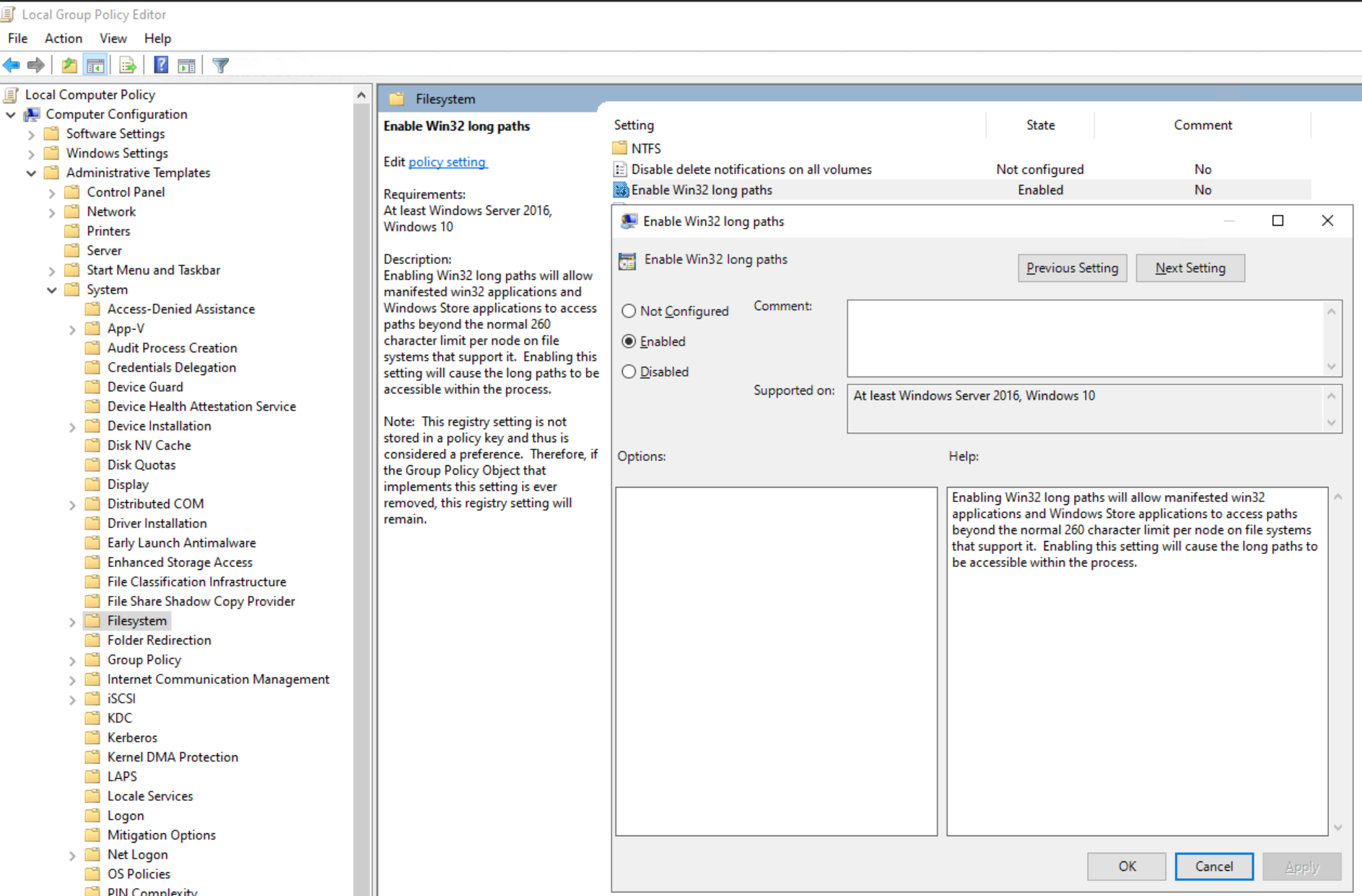
または、レジストリキーを設定します。
[HKEY_LOCAL_MACHINE\SYSTEM\CurrentControlSet\Control\FileSystem]
"LongPathsEnabled"=dword:00000001
Additional Information
Windows重複排除機能が有効になっている場合も、同様のエラーが表示されることがあります。NVP vProxy:一部のファイルに対して「一部のオブジェクトまたはセキュリティ プロパティをリカバリーできませんでした」というメッセージが表示され、Windows VMファイル レベルのリカバリーが失敗する